hamradiotools

Nexus 1.21.0 What's new in 1.21.0

One program
instead of six.

Nexus is free amateur radio software for Windows, macOS, Linux and the Raspberry Pi. It decodes, logs, maps, raises alerts and shows the panadapter in one window, with one log, for one radio or up to three.

Download Nexus 1.21.0 Getting started Source code

Free software under the GPL-3.0: nothing to buy and no account to make. Hamlib is inside every download, so rig control needs nothing else installed.

FT8 and FT4 follow WSJT-X's behavior, and JTAlert, GridTracker and your logger see Nexus as WSJT-X. CW, phone, RTTY, PSK31, SSTV, APRS, JS8, satellites and contests run in the same program and log to the same place.

Version
1.21.0
Platforms
Windows, macOS, Linux, Raspberry Pi
License
GPL-3.0
Source
On GitHub ↗
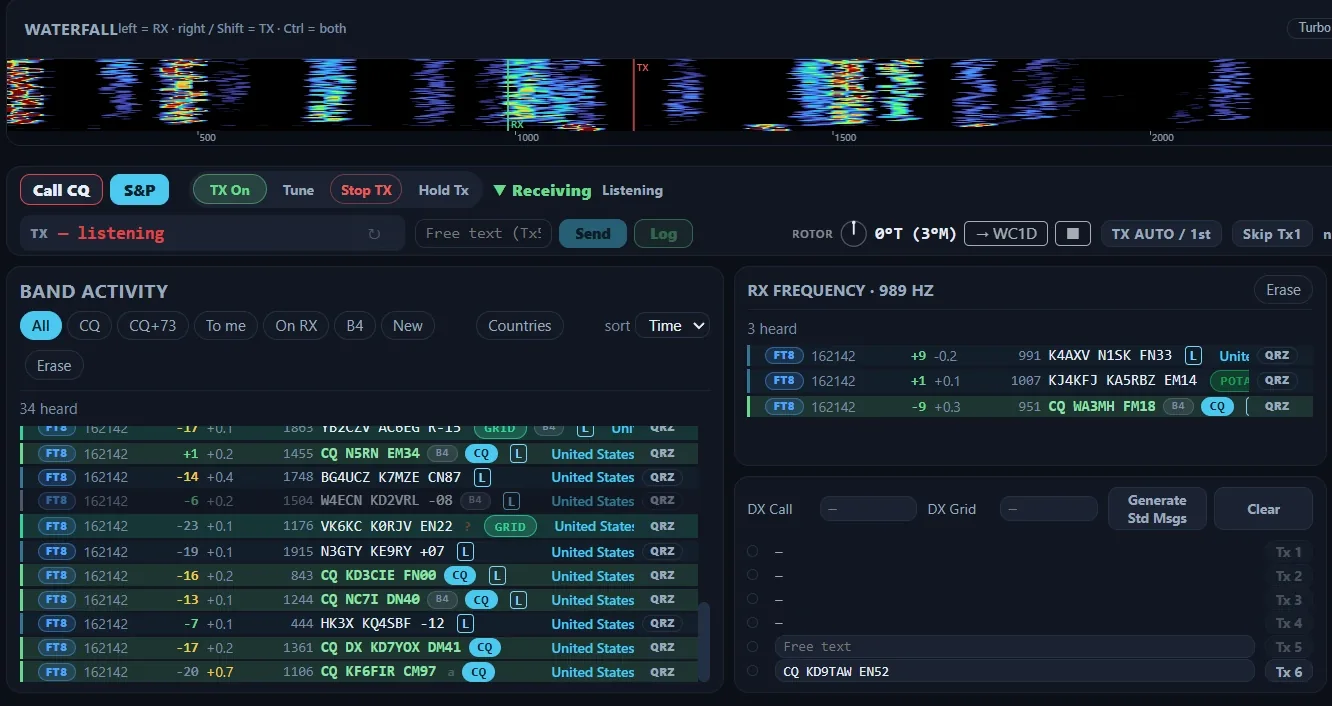
The Nexus FT8 cockpit receiving on 20 m. A waterfall runs across the top with the green RX and red TX markers. Under it are the Call CQ, S&P, TX On, Tune and Stop TX buttons. Band Activity fills the left, listing decodes such as CQ N5RN EM34 and CQ KD3CIE FN00 with CQ, B4 and L marks and the country of each station; the RX Frequency pane and the Tx1 to Tx6 messages are at the right.
The FT8 cockpit at its own size. Band Activity marks stations calling CQ, the ones you have worked before (B4) and the ones that upload to LoTW (L), and names each station's country.

Where to start

Coming from WSJT-X or another program

Your habits carry over. Double-click a CQ to answer it, Esc stops TX, F4 clears the DX call and F6 decodes the last period again. Nexus sends the WSJT-X UDP messages, so JTAlert and GridTracker keep working, and companion mode can work from the decodes of a WSJT-X, JTDX or MSHV that keeps the radio. Import your log as an ADIF file and every station you have worked before shows a B4 mark.

The short path from WSJT-X Programs Nexus works with

New to the hobby, or to digital modes

The setup wizard asks for four things: your callsign and grid, the radio, your log and your license class. Detect my radio finds a USB rig or a FlexRadio on your network and fills in the port and the sound card. Your license class becomes a transmit lockout, so Nexus will not key outside your privileges.

A Technician license goes a long way here: satellites with rotor tracking, APRS, FM repeaters and the memory packs all work from the first launch.

Getting started Quick start in the manual

Contests, Field Day and clubs

Contest mode runs ARRL Field Day and Winter Field Day, Sweepstakes, the ARRL VHF contests, CQ World Wide, CQ WPX and six state QSO parties. The CW, RTTY and phone log strips have Enter Sends Message, Super Check Partial and the standard contest F-key layout. Club sync puts every laptop on the club's log, with a scoreboard made for a TV across the room.

Contesting in Nexus The contesting chapter

What runs in it

Each of these is usually its own program. In Nexus they share one connection to the radio and one log.

JobIn Nexus
Operate the modesFT8, FT4 and the other WSJT-X modes, JS8, CW, SSB and FM, RTTY, PSK31, SSTV, APRS and our own TempoFast and TempoDeep. Every mode transmits as well as receives.
See who is onBand Activity with each station's country and bearing, a call roster you can sort, the DX cluster and skimmer spots, and a 3-D globe with the greyline and live spots.
Hear about the ones you needThe Needed board ranks every station on the air by what it would add to your log, and each row shows who near you heard it and how long ago. A new one sounds an alert and can raise a desktop notification.
Log it and count itOne logbook for every mode. DXCC, WAS, WAZ, VUCC and IOTA are worked out from your own log on your own computer, with no account. Once you set up the connectors, contacts go to LoTW, QRZ, ClubLog and eQSL as you log them.
Run a contestContest mode with Enter Sends Message, Super Check Partial, dupe checking, a running score and Cabrillo export, and club sync for a multi-operator station.
See the bandThe radio's own spectrum as a panadapter on Icom radios over CI-V and on FlexRadios, and a live audio scope on every other rig.
Find out why it is quietWhen nothing decodes, the readout says why: the radio on the wrong frequency, a closed squelch or a sound card that hears nothing. A wrong frequency comes with a Tune button that fixes it.
Program the radioRepeater search, curated memory packs and a CHIRP CSV round trip.

Everything Nexus does

How Nexus treats your station

RuleWhat it means
It opens read-onlyConnecting to the radio changes nothing on it until you act. A rig parked on 40 m LSB for a net stays there.
It transmits when you say soNexus never keys up on its own: TX is a switch you turn on. A watchdog stops a transmission left unattended for six minutes.
It holds you to your licenseYour license class locks transmit out of the segments you are not licensed for, the 60 m channels included.
Your log stays on your computerThe logbook is a database on your own disk, with a plain ADIF copy kept up to date beside it and dated backups taken automatically. Awards are worked out locally.
Passwords stay in the keychainCredentials for LoTW, QRZ, ClubLog and the other services live in your operating system's keychain and are never written to settings or logs.

Where each part stands

Help, and supporting the project

Nexus 1.21.0

Windows · macOS · Linux · Raspberry Pi · GPL-3.0

Who writes it

KD9TAW, licensed in 2021, who has operated DXpeditions to KP2 and VP2V and designed the TempoFast and TempoDeep modes. Nexus is the software on the air at the station it came from.

More about KD9TAW KD9TAW on QRZ ↗