What Nexus does
The full list, grouped the way you operate. Everything here ships in Nexus 1.21.0, and anything the app marks Beta is marked Beta here too.
Modes
Every mode Nexus decodes, it also transmits. Each of the WSJT-X modes was checked by transmitting from Nexus and decoding the result in stock WSJT-X, rather than against Nexus's own decoder, which shares its source and could share a mistake.
| Mode | Notes |
|---|---|
| FT8 | The core of Nexus. The QSO sequencer follows WSJT-X and is tested against a 207-row behavior matrix. |
| FT4 | The 7.5-second mode, on the same sequencer. |
| FT2 | Compatible with Decodium: FT4 with half the symbol time, on 3.75-second periods. |
| Q65 | Matched sample for sample against WSJT-X's own generator, at 0.9985 correlation. |
| FST4 · FST4W | For LF and MF. FST4W beacons on a percentage schedule and never touches the QSO sequencer. |
| MSK144 | Meteor scatter. It waits twelve transmit periods before giving up on a contact, where FT8 waits three. |
| JT65 | Transmit and receive, on JT65's own frequencies. |
| WSPR | Beacons on a percentage schedule, on the WSPR frequencies (14.0956 MHz on 20 m). |
| JS8 | Keyboard messaging compatible with JS8Call on the air: all four speeds decoded at once, directed messages, relay and store-and-forward. On from the first launch. |
| TempoFast · TempoDeep | Our own weak-signal modes, described further down. |
| RTTY | Sound card AFSK or a true FSK keyline, with a hands-free auto-sequencer. |
| PSK31 · QPSK31 | Keyboard chat at 31.25 baud. A click on a trace nets the decoder without moving the rig, and you can type straight into a transmission while it is on the air. |
| SSTV | Any picture that arrives decodes on its own and appears where the waterfall was, then goes to a gallery with its mode, frequency and time. Sending is one press of Send. |
| APRS | Position reports, Mic-E, messages and status packets, on a map drawn with real APRS symbols, and a receive-only iGate. |
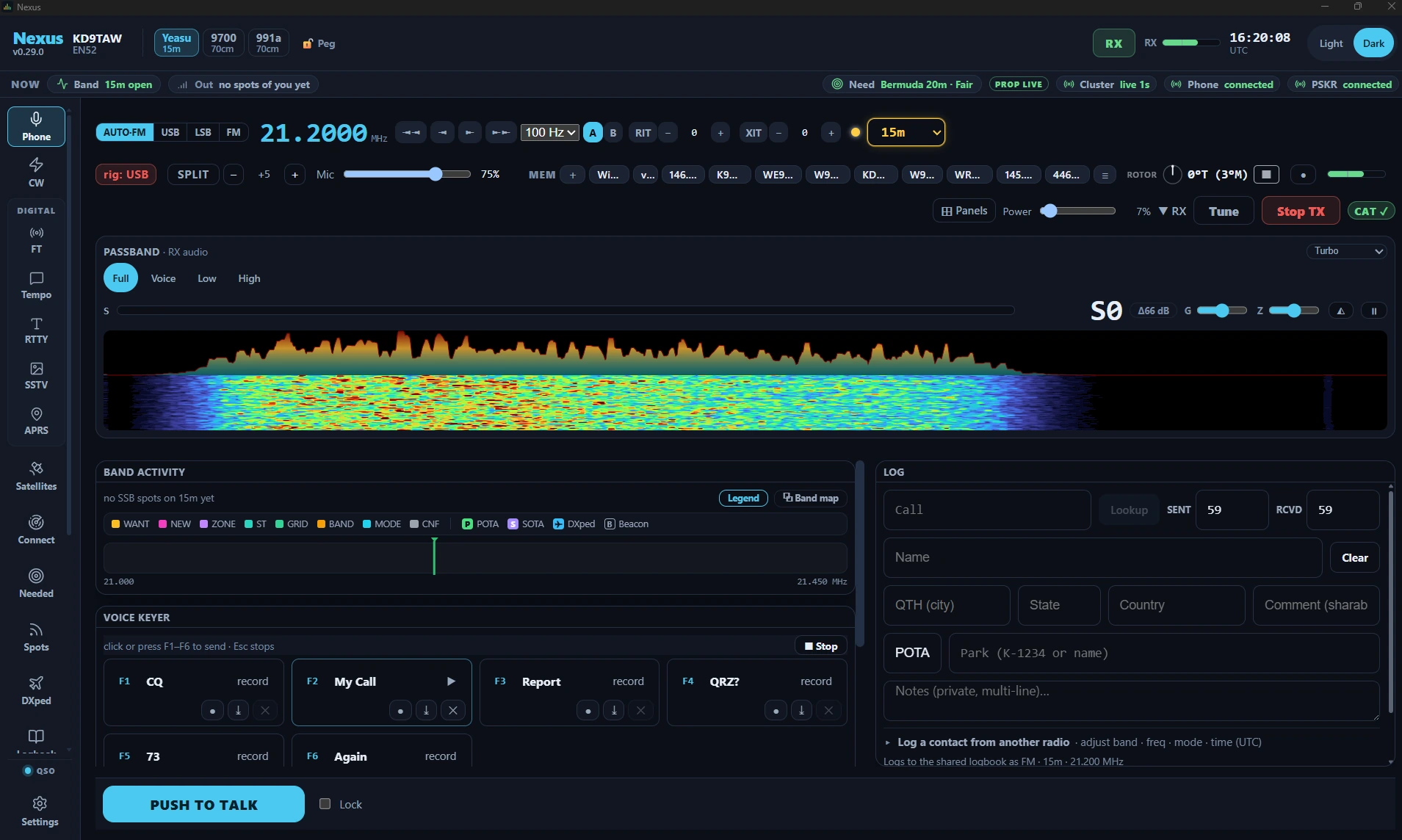
| SSB · FM | Phone with the bandscope, a six-slot voice keyer, and repeater shift and CTCSS. |
| CW | Keying through CAT, a serial keyline, a K1EL WinKeyer or the sound card, with an AI decoder (the DeepCW model by e04). |
Each mode keeps its own rhythm and its own calling frequencies, from WSJT-X's frequency table. Rover calls (/R) keep decoding outside contest mode, where upstream 3.0.2 drops them.
−21.3dB
Nexus decode floor
−20.7dB
stock WSJT-X, same audio
Radios and the rest of the station
Most radios connect with nothing else installed. On the radios that can stream it, Nexus shows the rig's own spectrum.
| Connection | Radios | What you get |
|---|---|---|
| Hamlib, built in | Most CAT radios: Yaesu, Kenwood, Elecraft, Xiegu and the rest | Frequency, mode and PTT, with click-to-tune and drag-a-passband on the audio scope. Hamlib is inside every download, on every platform. |
| Icom over CI-V | IC-7300, IC-7610, IC-9700, IC-705, IC-905 | Nexus's own CI-V connection, with the radio's spectrum scope as a real panadapter. |
| Icom over the network (Beta) | IC-7610, IC-9700, IC-705, IC-905, IC-7760, IC-7300MK2 | On your LAN or Wi-Fi with no bridge program in between. Receive and control only. |
| FlexRadio | SmartSDR radios on your network | Through the SmartSDR CAT app and DAX, the way WSJT-X connects, or through Nexus's own Flex client (Beta) with the radio's panadapter, DAX audio and native meters. |
| Shared with other programs | wfview, and anything that speaks rigctld | Nexus shares wfview's rigctld, and its own rigctld-compatible port lets other programs share a radio through Nexus. |
| Two or three radios | Any mix of the above | A routing table in Settings sends each band and mode to the right radio, first match wins, so a 2 m FT8 spot and an APRS tune can go to different rigs. |
| Interfaces | Digirig, RIGblaster | Recognized by name when you click Detect, and paired with their sound device. |
| Amplifier | SPE Expert 1.3K-FA, 1.5K-FA, 2K-FA; Elecraft KPA500, KPA1500 | On its own serial port: power out, SWR, supply voltage and current, temperature and the amplifier's own alarms, with Standby/Operate and band in the operating screens. Readings clear the moment the amplifier stops answering. Nexus has no command that switches an amplifier off. |
| Rotator | Anything rotctld drives | Point at a station from the map, or at the station in your log entry. |
The Radios page lists every radio by name, with how each one connects.
Contesting and Field Day
Contest mode is one switch for whichever contest you pick. It stays off until you turn it on, because it reshapes the program for the weekend.
| How it works | |
|---|---|
| Contests | ARRL Field Day and Winter Field Day (on the 2027 rules), ARRL November Sweepstakes (CW or phone), the ARRL January, June and September VHF contests, CQ World Wide DX (CW or SSB), CQ World Wide RTTY, CQ WPX (CW or SSB), and the California, Illinois, New York, Ohio, Tennessee and Texas QSO parties. |
| The keyboard | In the CW, RTTY and phone log strips: Enter Sends Message (off until you turn it on), the standard contest F-key layout, Ctrl+D twice to take back the last contact and Ctrl+Y to fix one in place. |
| Calls as you type | Super Check Partial lists the active contest calls that match what you have typed, from MASTER.SCP, and an imported call history file fills in the exchange. Unassisted mode turns both off. |
| The score | In every log strip while a contest runs: points, contacts, multipliers and your rate over the last ten contacts. Field Day scores against all 85 ARRL sections. |
| FT8 and FT4 | Running calls CQ and works whoever answers; S&P answers the first CQ it hears. Each contest sends the messages WSJT-X sends in it. |
| A second operator | The contest logger window lets a second person log at a second monitor and keyboard. It shares the contact you are both typing and never transmits. |
| Club sync | Every laptop in the club runs the same contest under its rules, on the club's log with shared dupes. The club board shows each position in a band × mode grid, and a scoreboard is made for a TV across the room. |
| After the contest | Cabrillo 3.0 (CQ WW and CQ WPX files carry the category, club, name and email lines CQ asks for), live feeds to N1MM+ and N3FJP, and a Contest over? checklist that merges the log, exports it and puts back what the contest changed. |
Chasing, awards and the map
Your log drives all of this: the Needed board, the award totals and the coloring on every decode and spot.
| What it does | |
|---|---|
| Needed board | Every station on the air, ranked by what it would add to your log: a new country first, then a new zone, band and so on. Each row carries its evidence, such as heard by K9LC (EN52, 26 km) + N9CO (62 km), 4 min ago, and one click puts the radio on that band and mode. |
| Alerts | Cluster and skimmer spots are scored against your log as they arrive. A needed station plays a tone, even when Nexus is not the window you are looking at, and shows a banner that offers a one-click Work. A desktop notification is there too. |
| US states | A callsign-to-state index built from the FCC license file, so a new state shows on CW, phone and cluster spots that carry no grid. |
| Awards | DXCC, Challenge, Honor Roll, WAS, WAZ, VUCC per band and IOTA, worked out from your own log on your own computer. An eQSL or QRZ match shows as confirmed but does not count toward DXCC or WAS, because those awards do not accept it. |
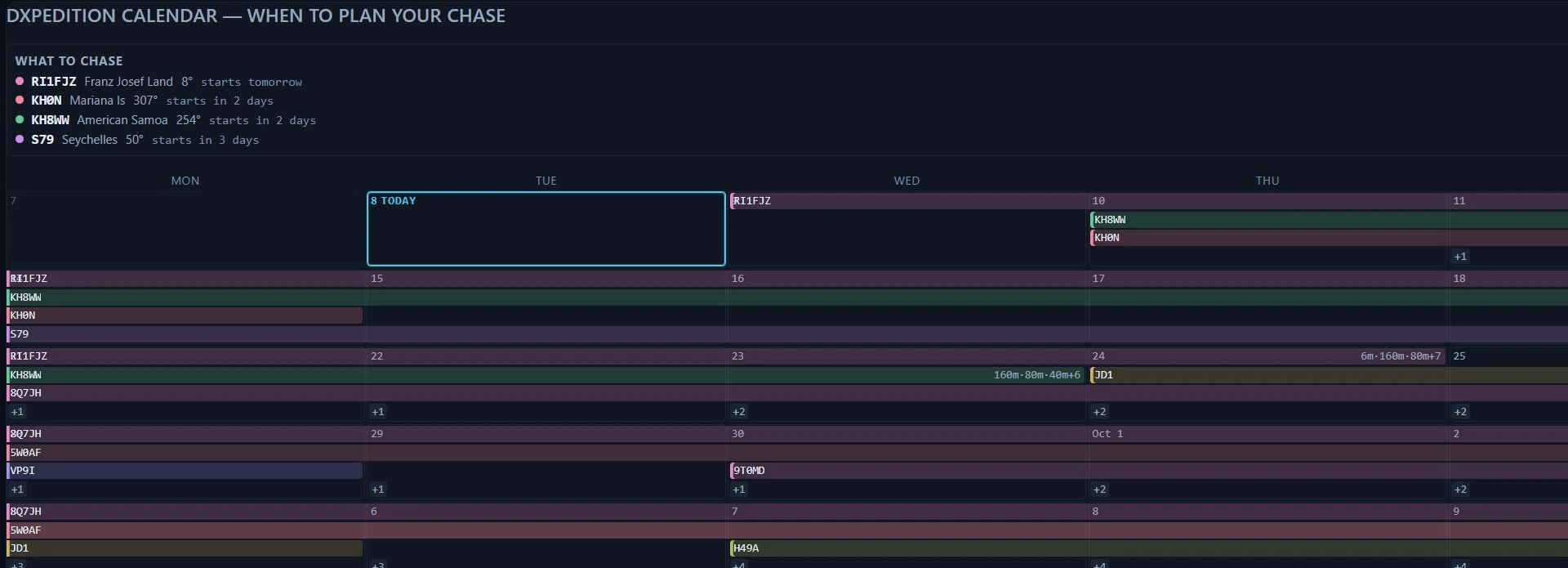
| DXpeditions | A calendar with one bar per operation and its announced bands, the modelled best band and time to work each one from your station, and alarms. |
| Propagation | A 3-D globe with the greyline, live spots and propagation layers; predictions from a built-in ITU-R P.533 engine; and an openings detector that weighs reports from receivers near you. |
| POTA and SOTA | Live activator spots and one-click hunting, with the reference tagged on your contact for upload. |
| Satellites | Pass schedules, a polar plot of each pass, Doppler correction and rotor tracking. |
| Memories and repeaters | Curated memory packs, recall with Ctrl+1 to Ctrl+9, reminders for your nets, a repeater search and a CHIRP CSV round trip. |
Logging and confirmations
| Detail | |
|---|---|
| Uploads | Each contact goes to LoTW (through TQSL), QRZ, ClubLog, eQSL, HRDLog, Cloudlog or Wavelog, DXKeeper and your contest logger, as you set them up. |
| Corrections | Fixing a busted call sends the corrected contact to the logging services again. |
| Confirmations | LoTW brings in your whole confirmation history, and each confirmation lands on the contact it confirms. Every confirmation keeps its source. |
| ADIF | Import from any logger, with duplicates skipped, and export at any time. |
| Backups | A plain ADIF copy of the log kept up to date beside the database, and dated backups taken by themselves, including one before any change that would make the log smaller. |
Other programs Nexus works with
You can run Nexus beside the programs you already use, and it feeds your logger and your alert program the whole time.
| Program | What happens |
|---|---|
| WSJT-X UDP | Nexus sends the WSJT-X UDP messages, so JTAlert, GridTracker and your logger see a WSJT-X. |
| Companion mode | Work from the decodes of a WSJT-X, JTDX or MSHV that keeps the radio. |
| CAT sharing | A rigctld-compatible port, so other programs share the radio through Nexus. |
| N1MM+ · N3FJP | Each contact is sent as you log it, in a contest or not. |
| DXKeeper · Cloudlog · Wavelog | Each contact goes to DXLab's logger or to your own Cloudlog or Wavelog server. |
| LoTW · QRZ · ClubLog · eQSL · HRDLog | Uploads as you log, and confirmations back. |
| PSK Reporter | Your decodes go up as reception reports, and reports of your signal come back. |
| DX cluster · RBN | The spots feed the Needed board and the alerts, with VHF spots checked against receivers near you. |
| APRS-IS | The internet APRS feed, read-only, and a receive-only iGate. |
| CHIRP | CSV round trip, so channels move to and from roughly 1,000 radio models. |
Setup, safety and platforms
| Detail | |
|---|---|
| Setup | A four-step wizard that detects the radio, pairs its sound card and imports your log. Every step can be skipped and run again from Settings. |
| Transmit | TX is a switch you turn on; Nexus never keys up on its own. Your license class locks out every segment you cannot use, the 60 m channels included, and a watchdog stops a transmission left unattended for six minutes. |
| Launch | Nexus opens the radio read-only and commands nothing until you act, so a rig parked on 40 m LSB for a net stays there. |
| Updates | Signed and checked before they install. An update waits while you are transmitting, tuning, in a contact or calling CQ, and says which. |
| Crash reports | On Windows, a crash writes a report naming the component at fault. It records addresses and module names only: no callsign, no log and no personal information. |
| Accessibility | Works with JAWS and NVDA with nothing to switch on. Band Activity, the Call Roster and the Needed board are keyboard-navigable, and spoken decodes and a TX/RX tone are there if you want them. |
| Languages | English, German, Spanish, French and Japanese. Frequencies, callsigns, grids, reports and mode names are never translated: 14.074 is 14.074 in every language. |
| Platforms | Windows 10 and 11 (64-bit); macOS 12 or later on Apple Silicon, signed and notarized; Linux on a PC (Ubuntu 24.04 or newer), as a .deb or an AppImage; Raspberry Pi 3, 4 and 5 on 64-bit Raspberry Pi OS. |
When nothing decodes
A dead band, a deaf receiver, the wrong sound card and a radio on the wrong frequency all look the same: silence. Nexus says which one it is.
| Cause | What you see |
|---|---|
| Wrong frequency | The readout says where the radio is and where the mode lives (on 144.174 USB when APRS needs 144.390 FM, for example), with a Tune button that fixes it. |
| Squelch or sound card | A closed squelch (the receiver is alive, the level is zero) is reported apart from a sound card that delivers nothing, with the input level in dBFS so you can see what the decoder hears. |
| Rig or audio at setup | The Setup health strip shows whether the rig answers, whether receive audio arrives and whether TX works. Hover a light for the radio's own reply. |
TempoFast and TempoDeep
Nexus carries two weak-signal modes of our own. TempoFast is a coherent 4-CPM mode on a four-second cycle with incremental-redundancy HARQ: when a decode fails, the next transmission adds new parity, and the receiver combines everything it holds until the message decodes. TempoDeep is a non-coherent 8-FSK mode on a 15-second cycle, for paths that fade.
Both have completed real contacts on the air, including a two-station QSO on 6 m. The thresholds below come from our simulations, and on-air reports are what will replace them. Both modes are plain text with a published specification.
| TempoFast | TempoDeep | |
|---|---|---|
| Modulation | Coherent 4-CPM (h = 1/2, BT = 0.3) | Non-coherent 8-FSK |
| T/R cycle | 4 s | 15 s |
| Occupied bandwidth | about 42 to 67 Hz (estimated) | 50 Hz |
| FEC | LDPC(174,91) + CRC-14 | LDPC(174,91) + CRC-14 |
| HARQ | Incremental redundancy, on by default | None |
| AWGN threshold | ≈ −15 dB (sim) | ≈ −18.6 dB (sim) |
| Fading penalty | Large (coherent) | ≈ 3.7 dB (sim) |
What Nexus does not do
-
Other contests
Contest mode covers the contests listed above. The ARRL RTTY Roundup and the WW Digi contest are not in it yet; for those, keep N1MM Logger+, and Nexus will send it every contact.
-
Running a DXpedition
Nexus works a DXpedition as a Hound. It has no Fox role for running one.
-
Transmitting iGate
APRS traffic from the internet is never sent out on the air. That would key a radio with nobody at it, so it stays out for good.
-
Digital-voice programming
DMR, D-STAR and Fusion repeaters show in the repeater search with badges, so you know they are there, but Nexus does not program them.
Nexus 1.21.0
Windows · macOS · Linux · Raspberry Pi · GPL-3.0