APRS
The APRS section is a 2 m packet monitor with a map: it decodes AFSK-1200 off your rig’s receive audio, plots what it hears, and lets you send a position beacon or a short message when you choose to. It is receive-first by design — opening the screen only ever starts a decoder, never a transmitter — and it is deliberately not a tracker: there is no periodic beaconing, no GPS input, and no digipeating. The header says the scope in one line: “AFSK-1200 packet — decode positions/messages, send a beacon.”
APRS ships enabled — the wizard turns everything on; there is no goal or mode picker to miss it in. If you have trimmed sections, switch APRS back on in Settings ▸ App ▸ Features.
The tour
The screen is a header strip over two columns: a rail on the left carrying the controls and the lists, and the map taking everything else. Below 768 effective px — a small window, or a large UI zoom — they stack with the map on top, since the map is the thing worth seeing on a small screen. Either way the rail scrolls inside itself rather than forcing the section wide or tall.
The header. Left to right: the station count, a N pkts count beside it
whenever the packet log’s count differs from the station count, then the
controls.
- Frequency — the seven regional APRS channels, all 2 m FM, all AFSK-1200, which is what this decoder handles: 144.390 N. America, 144.800 Europe / Africa, 145.175 Australia, 144.575 New Zealand, 144.660 Japan, 144.930 Argentina, 145.570 Brazil. Picking one retunes immediately — it is a band-picker, not a preference — and hands off to your 2 m-capable radio in FM simplex, because a 2 m packet signal demodulated as USB/DATA never decodes. The selection always sticks even on a radio that cannot get there, since it is also what the decode chip judges “wrong frequency” against; only the retune is gated. The channel is derived from your grid square the first time and then remembered — a European station opens APRS on 144.800 with nothing to configure — and a pick you make here is pinned for good, in the same setting Settings ▸ Digital ▸ APRS shows.
- Re-tune puts the rig back on the selected channel after you have been elsewhere. It is disabled, with the reason in its tooltip, when the radio provably cannot receive that frequency — “This radio doesn’t cover 144.390 MHz — RF APRS needs a VHF radio.” A button whose only possible outcome is a refused CAT command is worse than no button.
- The dial readout — frequency, band and mode straight from CAT. This view hides the top bar’s readout, so this is the one that speaks.
- TX On / TX Off is APRS’s own transmit-enable latch, present for the same reason: the top bar’s is hidden here. “Transmit is OFF — enable it before a beacon or message can send.”
- Monitor arms and stops the decoder, and it has three faces, because “decoding” and “may transmit an ack by itself” are different things: Monitor (off), ● Monitoring (auto) — armed by opening the view, and “RECEIVE ONLY. It will never send an automatic ack” — and ● Monitoring, which is an arm you performed yourself and is the only one that permits automatic acks. It reads the engine, not a local copy, so the button and the decode chip can never disagree.
- The decode chip is the one that turns an empty screen into a diagnosis. Hover it for the full sentence; the label is the verdict. Eight of them, and the chip shows the topmost one that is true, in this order: No 2 m radio (the rig’s Hamlib coverage table says it cannot receive this channel at all — above everything, because no amount of arming, tuning, squelch or audio routing fixes it), Monitor off (the decoder is not running), Wrong frequency / Wrong mode (CAT knows where the dial is; “FM packet audio demodulated as SSB is garbled, so nothing will decode however strong the signal is”), No input (armed, and no samples arriving at all — a real capture fault), N decoded, which latches once a checksummed frame lands so the readout cannot flap back to an alarm in the gap between packets, N failed CRC (bursts heard, none passing the checksum, with the burst’s peak level and headroom advice), Silent (audio flowing at zero level — normally just a closed squelch, which is what an idle FM channel looks like) and Listening (a quiet channel). The order is the order to work in, and it is why a disarmed decoder reads Monitor off even when the dial is also in the wrong place: arm Monitor and read the chip again rather than trusting the frequency because the chip did not complain about it. The bottom four — N decoded, N failed CRC, Silent, Listening — carry the live input level in dBFS in their hover sentence, the peak of the most recent 0.1 s drain, so once audio is known to be arriving “what is the app actually hearing” is a number rather than an inference. Listening goes further and gives you the targets to compare it against: roughly what the hiss should read with the squelch open, and the range a packet burst should peak into. The four above them carry no level: each has already found a fault the level cannot speak to. When the verdict is a wrong dial, a Tune to 144.390 button appears beside the chip.
- on <radio name> appears only when more than one of your radios covers the band. The tap follows the active radio, and wrong-radio silence is indistinguishable from a dead band unless the app names the rig.
- The internet chip — Internet off / connecting / quiet / N, or Internet for JS8 when the feed is off but JS8’s @APRSIS gateway is using APRS-IS — is a second, deliberately separate chip. The RF chain and the APRS-IS feed fail independently, and a green internet chip beside a silent RF chip is the whole diagnostic: it proves the fault is in the radio path. Click it and it opens the feed’s controls in place: the on/off switch, Radius (km), and Watched calls (committed on blur, not per keystroke, because each write reconnects the feed). Server, port, traffic types and the iGate live in Settings ▸ Digital ▸ APRS, and the panel says so.
- Internet N / Internet N hidden appears once the feed has contributed stations your own antenna has not heard. One click hides them, leaving the honest picture of what this radio can actually reach. The count is in the button so the effect is never a surprise.
The station table is one row per station, newest-heard first, fading as a station goes quiet — same thresholds the map fades on, so the two readings cannot disagree. Columns: Age, the station’s own symbol, From, Via, Type, Position, Dist and Info.
The Via tag is the load-bearing one. RF means “your receiver decoded
this station off the air”; net means “reported by APRS-IS — your receiver
has not heard this station”; RF+net means both. An RF sighting is evidence
about your antenna; an internet one proves nothing about your range, and
collapsing them would hide the only fact that says anything about your station.
Type is what the packet was — position, mice, message, status,
object or other. Position carries lat/lon and, for a station under way,
its speed and course. Dist is great-circle km plus an eight-point bearing
from your grid, so it is blank until your grid is set. Clicking a row selects the
station on the map; clicking it again clears it.
With no stations to show, the table is replaced by the decode chip’s full explanation — the empty state answers the question the emptiness raises.
The message list appears when message packets have arrived, newest first, as their own chronological list rather than folded into stations: a conversation of several lines from one station has to show all of them. Each row is age, sender, addressee, the sender’s line number if any, and the text.
The map opens on the local picture, not the planet — zoom 25, roughly 275 km in every direction, which keeps WIDE2-2 digipeated traffic on screen while a local net spreads across it instead of stacking into one smear. It centres on your grid (or, with no grid set, on the mean position of what you have heard). Drag to pan, wheel to zoom. Relief, coastlines, state borders and the grid are on; nothing propagation-related is, because APRS is a local terrestrial picture.
Each station draws as its own APRS symbol — the shape says what the station is (car, weather station, digipeater, balloon, boat…), colour-coded by family, and any overlay character rides on top unrotated. The ring around the glyph says how it reached you: solid for RF, doubled for both, dashed and dimmed for internet-only. Vehicles under way are drawn nose-up to their course with a short course/speed vector. Below zoom 4 symbols become plain dots, because a screen of 18 px glyphs is unreadable mush and the question at that scale is “where is there traffic”. Only the selection and moving stations are labelled — labelling everything turns a busy local net into a wall of text.
When nothing is plotted the map says why, and “No positions heard yet — status and message packets carry none” is a normal state, not a fault.
The station card opens over the map when you select a station, from either
the list or the map — one selection, two ways in. It carries: the resolved symbol
and its name; per-source lines with separate ages (“Heard on RF — your
receiver decoded this station 4 min ago”, “Via APRS-IS — the internet feed
reported it 20 s ago”), never collapsed into one “last heard”; position with its
Maidenhead square; From you — distance, a 16-point compass point and the
bearing in degrees; motion (speed, course, and altitude if the comment carries an
/A= token); the comment; the path, read as “direct — no digipeaters in the
path” or “digipeated via WIDE1-1*, WIDE2-1*”; the packet count and how long
this station has been in the roster; decoded weather for a weather station —
temperature, wind and gust, humidity, pressure, rain in the last hour and 24 h,
with any sensor the station does not carry simply omitted rather than shown as a
zero; and a Raw packet disclosure holding the TNC2 monitor line verbatim.
Two links close it out: QRZ and aprs.fi. QRZ opens the callsign alone,
without the SSID (PI1UTR-10 opens PI1UTR), since the SSID is not part of the
call; aprs.fi opens that exact station, SSID included. Both just open a page in
your browser, nothing is sent to it. Esc closes the card and
hands focus back where it came from; as everywhere on this screen, the same press
also stops transmit.
Safety — why transmit works the way it does
A radio that keys up with nobody at the desk is the failure this design refuses, so:
Opening APRS only ever starts a receive-only decoder. Entering the view arms Monitor so the section does not open on a dead screen you have to notice and fix. That auto-arm can only upgrade from off — it never demotes an arm you performed yourself, it never confers ack capability, and once you have explicitly stopped the decoder it refuses for the rest of the session rather than restarting behind you. The policy lives in the engine, not in the screen, so a remount cannot lose it.
Every transmission from this section is one you asked for. Three things can key: the Send beacon button, the Send message button, and an automatic ack. All three pass the same gate first — TX enabled, the frequency inside your license privileges, and nothing else already owning the transmitter (a slot over, a tune carrier, a held mic, the voice keyer, CW, RTTY or SSTV). A refusal names its reason rather than failing quietly. So does a drop: what was queued and had not keyed yet when transmit went off, or when the dial left your privileges, is dropped rather than sent later, and the status line says why.
The automatic ack — the only thing here that can key with nobody asking — needs two independent operator acts. You must have armed Monitor yourself (an auto-arm never counts, whatever the TX latch says), and TX must be on. That is why the Monitor button distinguishes “Monitoring (auto)” from “Monitoring”, and why clicking it while auto-armed always stops rather than quietly upgrading to ack-capable: a click that reads as “stop” never grants unattended-transmit capability.
Internet traffic never gates back out onto the air. Nexus has no
internet→RF path at all. The iGate is receive-only and says so on the wire — it
appends the qAO construct, not qAR, because qAR advertises a gate that can
also deliver messages back over RF, and asking the network to route traffic at a
station that can never deliver it is a lie with consequences. Nexus does not
digipeat either: nothing it hears is ever repeated back onto the channel.
Core workflows
Get on the channel and confirm you are hearing it

The same strip as the capture further down, with the RF side alive, in Nexus 1.10.3. Left to
right: the channel picker on 144.390, Re-tune, CAT’s own dial readout 144.390 MHz · 2m · FM, the TX Off arm latch, ● Monitoring (auto), the decode chip reading 21 decoded,
the radio the tap is following, and Internet off — so nothing on this strip came from the
internet feed. The counts are a documentation fixture, not packets pulled off the air.
- Open APRS. The decoder arms itself, receive-only, and the rig hands off to your 2 m radio on the selected channel in FM simplex.
- Pick your region’s frequency if it is not the default — the rig moves on selection.
- Read the decode chip. Listening or Silent with a sensible dBFS level means the chain is intact and the channel is quiet; Silent is the normal resting state of a squelched FM channel, not a fault. To prove the routing, open the squelch — hiss should appear here as a level, around −30 to −25 dBFS.
- Anything else is telling you what to fix, in order: the radio cannot reach the channel, the dial or mode is wrong (with a one-click Tune to beside it), no samples are arriving from the capture device, or bursts are arriving and failing their checksum. A packet burst should peak between −30 and −6 dBFS; outside that band you are losing margin, though level alone is never why a checksum fails.
Turning the internet feed on is not a step in this list, and it does not shorten it. The feed fills the map without touching the radio; the checklist under A full map is not a working radio is what tells you whether the RF side is alive.
Read a station

The map hover in Nexus 1.10.3. The third field is the source, and it is the whole point:
reported by APRS-IS means the internet feed carried this station, not your receiver. The
same field reads heard on RF, or heard on RF + APRS-IS, when your own antenna is in it.
The tail is the station’s own comment text, garbled characters and all — Nexus prints what
arrived.
- Hover a symbol for the one-line version: call, what the symbol is, how it reached you and how long ago, its path, its motion, and its comment.
- Click a row in the table or a symbol on the map — either selects both, and opens the station card.
- Work the card: how it reached you and how long ago, where it is and how far from you, whether it came in direct or through digipeaters, what it said, and the weather if it is a weather station.
- Open Raw packet when you want the TNC2 line itself — the path markers and the information field exactly as they arrived.
- A station with no position is a normal thing to have in the list: message and status packets carry none, and the card says “none reported — heard, but nothing to plot” rather than pretending.
Turn on the internet feed
- Click the internet chip and switch Internet feed on. It needs a real
callsign — it is a login identity on a public amateur network — but no
passcode: a read-only login (
pass -1) receives the full stream normally. - Set the Radius (km) around your grid (150 km by default; 0 means no distance limit, which is busy) and any Watched calls, which come through from anywhere on earth however far outside the radius they are. The server sends what is inside the radius; the weather, objects and messages switches in Settings reach beyond it only when the radius is 0.
- Internet stations arrive tagged
net, dashed and dimmed on the map. When they appear while the RF chip stays silent, the fault is in your radio chain, and that is the feed’s real diagnostic value. The Internet N button hides them whenever you want the picture of what your own antenna reaches. - Changing the radius or watched calls reconnects the feed — the server does the filtering, so a new subscription has to be sent.
A full map is not a working radio
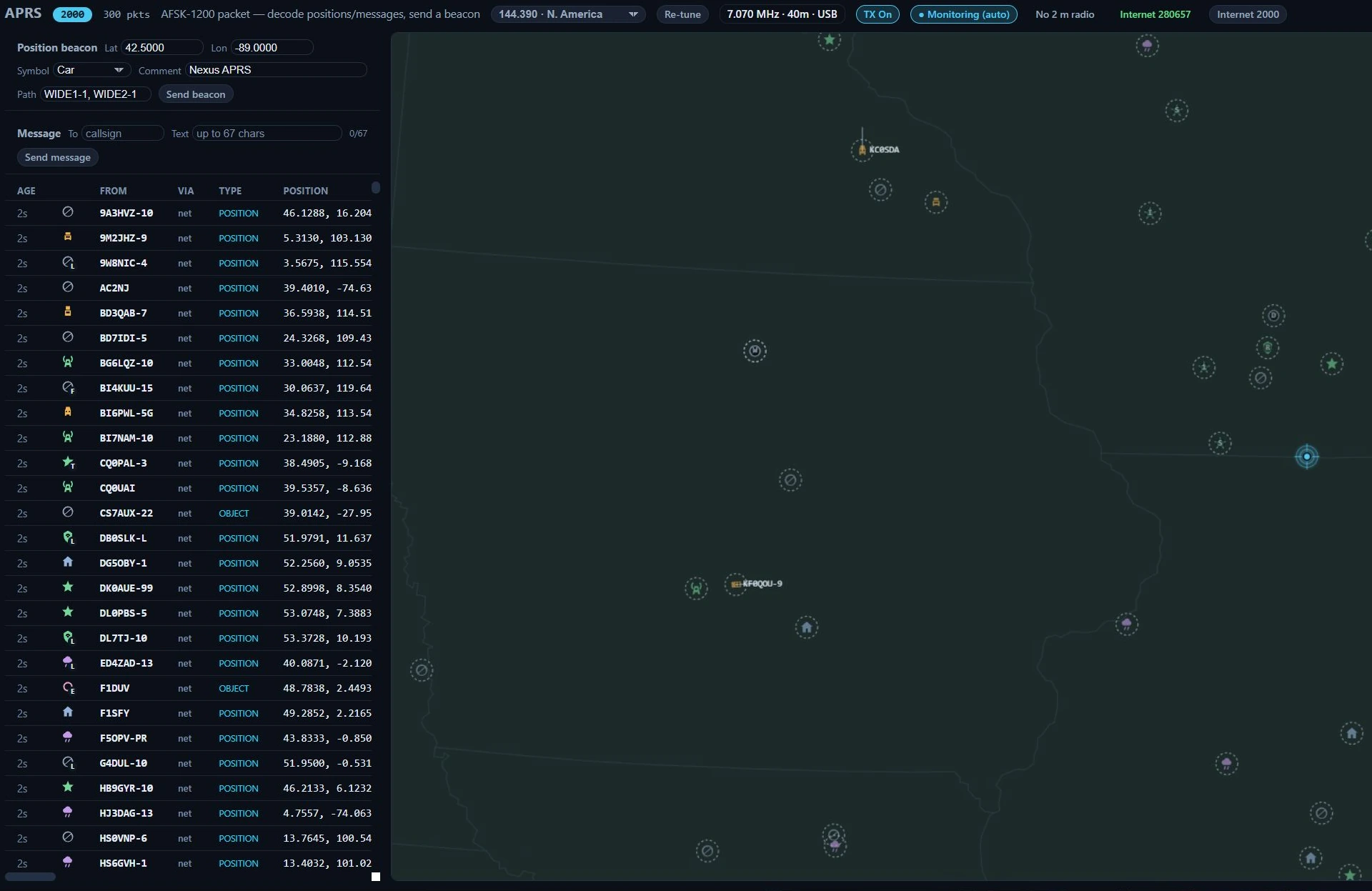
APRS in Nexus 1.10.3 with the internet feed on and no VHF radio in the station. Two
thousand stations are plotted and 280,657 packets have come in over the internet, and none of
it is evidence about this station’s antenna. The decode chip says so in three words —
No 2 m radio — and every row in the table says net.
This is the picture the section is designed to keep you from misreading. Nothing the internet feed shows you says anything about your RF path. Read the two chains separately:
| What you are looking at | What it proves |
|---|---|
Stations on the map, net in the Via column, dashed rings | An APRS-IS server told you about them. Nothing about your antenna, your radio or your audio. |
| The Internet N chip counting up | Your network connection works. |
RF or RF+net in the Via column, solid or doubled rings | Your own receiver decoded that station off the air. This is the only APRS evidence about your station. |
| The decode chip reading N decoded | A checksummed frame arrived from your radio. This is the receive path proven. |
The RF-readiness checklist, in order — each line is a thing you can read off the screen:
- A radio that covers the channel. The decode chip reads No 2 m radio when the rig’s coverage table says it cannot receive 144.390 at all. No amount of arming, tuning or audio routing fixes that; it needs a VHF radio. Everything below is moot until this clears.
- The dial actually on the channel, in FM. The dial readout beside Re-tune is CAT’s
answer, not the app’s intention — in the capture above it reads
7.070 MHz · 40m · USB, which is an HF SSB dial, not APRS. Press Re-tune and read it again. - Monitor armed. The chip reads Monitor off while the decoder is stopped, and it outranks a wrong dial — so arm it and read the chip a second time rather than concluding the frequency is fine because nothing complained about it.
- Audio arriving. No input means no samples at all from the capture device. Silent with the squelch open means the wrong input device. Open the squelch and look for hiss around −30 to −25 dBFS.
- A frame decoding. N decoded is the finish line. Until then you have a receiver that might work; after it you have one that does.
Transmit is its own question and the same rule holds. TX On is an arm latch — it says you have allowed the section to key, not that a beacon will land on the APRS channel. The gate a beacon passes is TX enabled, the dial inside your licence privileges, and nothing else holding the transmitter; it does not check that the rig is on 144.390 in FM. With TX on and the dial parked on 40 m, Send beacon renders AFSK-1200 and keys it there. Confirm the dial first — step 2 above — every time.
Send a position beacon
Before anything else, check the dial readout beside Re-tune actually reads the APRS channel in FM. The send gate does not check it for you — see the readiness checklist above.
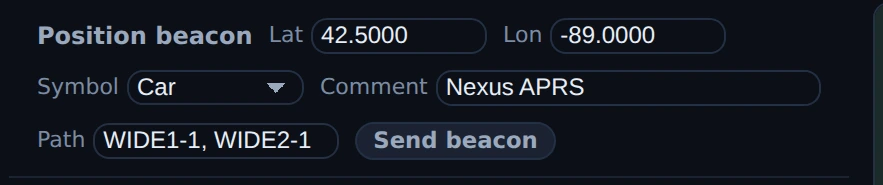
The beacon form in Nexus 1.10.3, staged and not sent. Lat and Lon are prefilled from grid EN52 — the centre of the square, not a fix — and Symbol, Comment and Path are the three remembered fields. Nothing was transmitted to make this picture; the TX Off latch in the strip above holds the queue.
- Turn TX On.
- Check the Lat and Lon in the beacon form. They are prefilled from your Maidenhead grid, which is the centre of the square, not a fix — type real coordinates if you want to be where you actually are.
- Pick a Symbol, set the Comment (43 characters) and the digipeater
Path —
WIDE1-1, WIDE2-1by default. All three are remembered, so this is a once-and-done step rather than something to retype each session; they are the same settings Settings ▸ Digital ▸ APRS ▸ Over the air edits, along with your beacon SSID, which has no control on this screen. - Press Send beacon. The frame is rendered to AFSK-1200 audio up front and keyed as one short burst; the status line reports what happened, including a refusal and its reason. It fires once. Nothing repeats it.
Send a message, and answer one
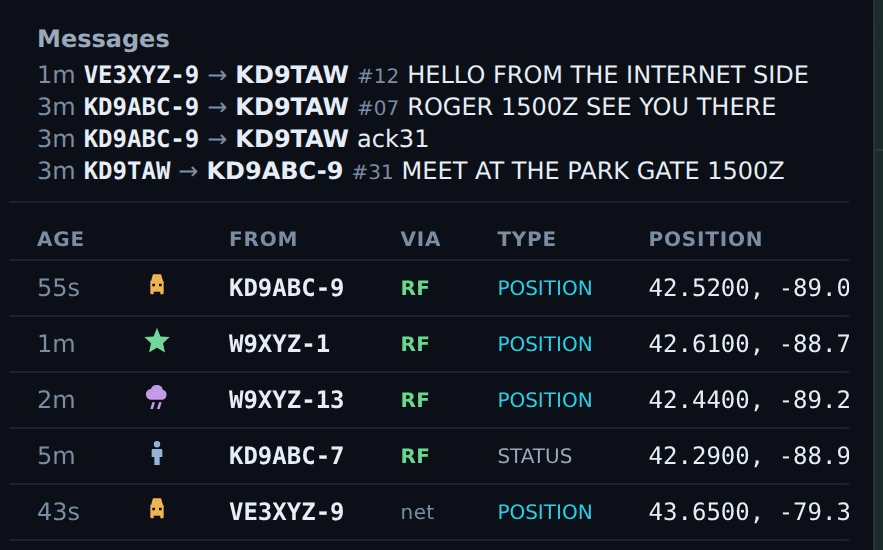
Messages and the station table in Nexus 1.10.3. Reading up: #31 went out to KD9ABC-9,
ack31 came back, then the reply #07. The top line is from VE3XYZ-9 and arrived over
APRS-IS. The table’s Via column keeps the two paths apart — RF for what this antenna
decoded, net for what the internet reported. A documentation fixture: no message was sent and
nothing was received off the air.
- With TX on, put a callsign in To and up to 67 characters in Text —
the counter shows where you are, and the engine rejects an over-long message
rather than silently truncating it.
Entersends. - Each message carries a rolling line number 001–999 so the other station can ack it.
- Incoming messages land in the Messages list. If you armed Monitor yourself and TX is on, a message addressed to your base callsign that carries a line number is acked automatically — Nexus never acks itself, and never acks from an auto-armed decoder.
Run the receive-only iGate
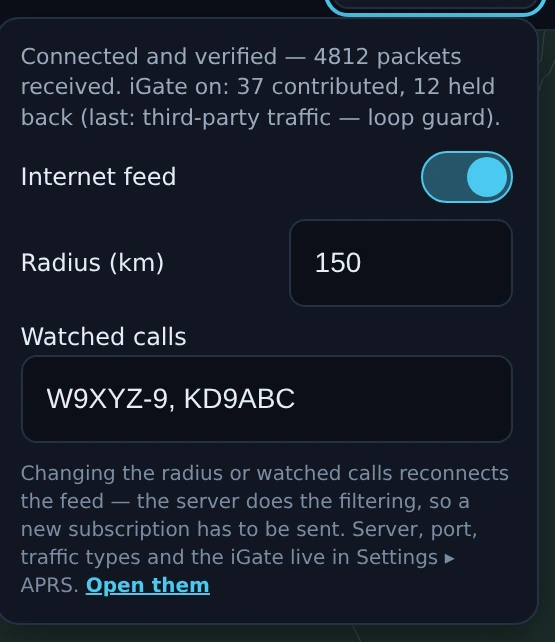
The internet panel in Nexus 1.10.3 with the receive-only iGate on — click the Internet N chip to open it. The first line is the whole score: connected and verified, packets received, then iGate on: 37 contributed, 12 held back (last: third-party traffic — loop guard). Those are Nexus’s own counters of what it sent upstream. No APRS-IS server confirmed receipt of anything, and nothing was uploaded to make this picture — the figures are a fixture.
- Switch Receive-only iGate on in Settings ▸ Digital ▸ APRS (it sits under the APRS-IS feed and needs it on). It publishes under your callsign, which is why it is a separate choice from watching the feed.
- Keep the RF decoder armed — the iGate contributes only what your own antenna heard, and that rule is structural: an internet-sourced packet cannot reach the upload queue at all.
- Every packet then passes, in order: the forbidden-path guards (
TCPIP,TCPXX,NOGATE,RFONLY— a station asking to stay off the internet is honoured, and no setting relaxes it), a bogus-source check, generic-query and third-party-from-internet rejection, a 30-second duplicate window, and a cap of 60 uploads a minute. What survives is uploaded byte-for-byte with,qAO,and your call appended — the RF path is evidence of how the packet travelled and is never rewritten. - The internet chip’s tooltip carries the score: how many packets you have contributed, how many the rules held back, and the most recent reason.
Honest limits
- TX Off is this screen’s one stop control, and the top bar has none here. APRS hides the app-wide TX cluster; its own TX Off stops a burst already keying (PTT drops, and the rest of the packet is not sent) and drops the queue, so a beacon you have queued but that has not keyed yet will not go out, then or when TX comes back on. The burst is short — one packet at 1200 baud — so it is usually over before you can reach the button: decide before you press Send.
- The send gate does not check the dial. A beacon or a message is refused when TX is off, when the dial is outside your licence privileges, or when something else holds the transmitter — and that is the whole list. It is not checked against the APRS channel or against FM, so with TX on and the rig on an HF SSB dial, Send beacon keys AFSK-1200 there. The auto-tune on entering the section is capability-gated and refuses a radio that cannot reach the channel; the send is not. Read the dial before you press it.
- There is no periodic or smart beaconing, and no GPS input. A beacon is a one-shot you pressed. Nexus will not beacon your position on a timer, will not beacon faster when you are moving, and reads no GPS receiver — the position in the form is whatever you typed, prefilled from your grid square’s centre.
- You can beacon ten symbols. Receiving resolves the full symbol space
including alternate-table and overlaid symbols; sending offers car, house,
person, bicycle, jeep, motorcycle, truck and dot on the primary
/table, plus digipeater and iGate on the alternate\table. - AFSK-1200 on 2 m FM only. No 9600-baud packet, no HF 300-baud APRS, no other TNC formats. The seven channels in the picker are the modes this decoder handles.
- Nexus does not digipeat, and never gates internet traffic to RF. Only three things ever key from this section: your beacon, your message, and an ack under the two-act rule above.
- The iGate uploads only with a verified login. The uplink derives your passcode from your callsign, and until the server has accepted that login nothing is contributed — the RF-heard lines waiting to be gated are simply discarded, since the server would refuse them anyway. That queue is bounded at 200 lines, so an uplink left on with no network cannot grow without limit.
- Messages are fire-and-forget from the UI’s side. There is no ack tracking, no retry timer and no per-conversation thread view — the line number is there so the other station can ack and so you can retry by hand. Messages arriving over APRS-IS are display-only: replying to an internet-only station is not wired up, and an RF reply would not reach a station your antenna cannot hear anyway.
- Nothing here reaches the logbook. APRS traffic is not a QSO in the Nexus logbook, and there is no Log control on the screen.
- Nothing here survives a restart. The station roster, the packet log and the decode counters live in memory only. Arming the decoder resets the health counters — a stale “0 decoded” from a previous session would read as a live fault.
- The roster is bounded three ways. A station drops off after 60 minutes of silence by default (adjustable, and 0 means keep forever), starting to fade at a third of that; the store holds 2000 stations, evicting the longest-unheard; and the packet log behind the message list keeps the most recent 300 packets.
- The decoder listens to the active radio only. It follows whichever rig the band activation resolved to. When more than one of your radios covers the band, the header names the one it is on, because that silence is otherwise indistinguishable from a dead band.
- There is no ⊞ Panels menu. Nothing on this screen is hideable and there is no pane layout to save or reset.
Related guides
- Phone (SSB) — the FM side of the same radio, repeaters and CTCSS
- Conditions — map + propagation — the full map, with everything this one deliberately leaves off
- Settings reference — the Radio tab’s Rig & CAT and Audio fieldsets, and the Features toggles this section depends on
This page is synced from docs/guide/aprs.md in the Nexus repo. Corrections belong there.