Needed — DX that's on the air now
The Needed board is the flagship DX-chasing surface: every station on the air right now, ranked by what it’s worth to your log. It’s the answer to “there are 400 stations on the band — which one should I turn the beam at?” And it’s built so you can trust the answer: every row carries the evidence that the path to that station is real for you, not for a superstation two time zones away.
The tour
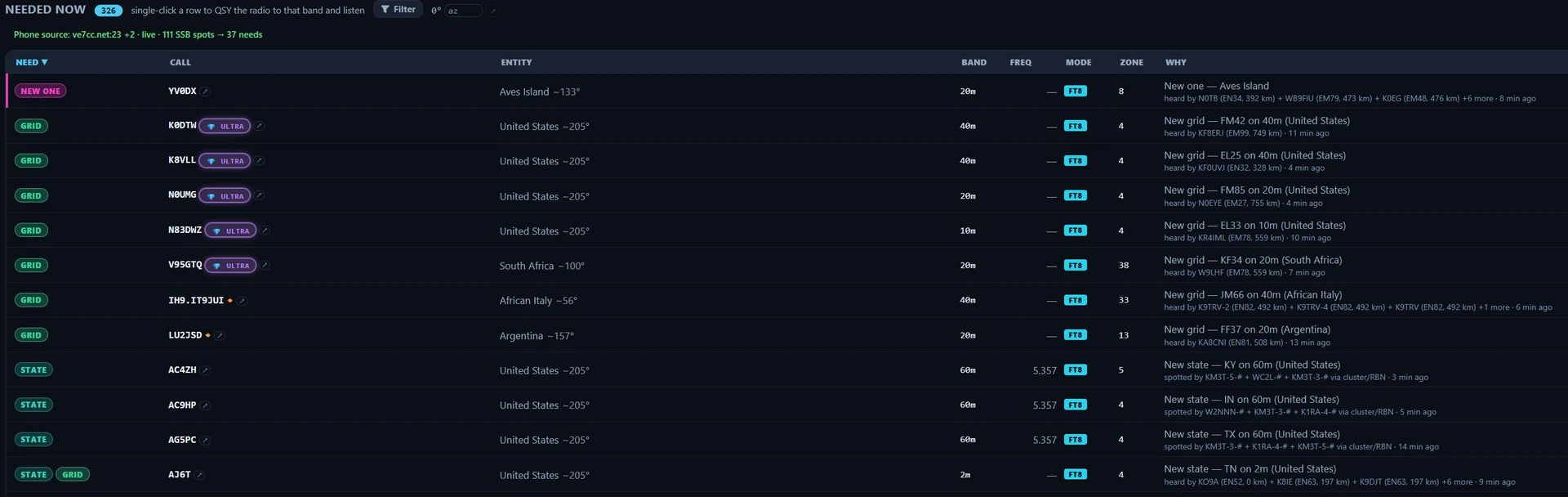
The Needed board in Nexus 1.10.3, 326 opportunities on the air. Read a row left to right: the need chip is what it is worth to your log, the call and entity are who and where, band / freq / mode / zone is where to point the radio, and WHY is the receipts — which receivers heard them, how far away those receivers are, and how long ago. The counts and calls are one evening’s traffic, not a target.
Each row is one opportunity, ranked by value to your log:
- watch list (120) — a station on your watch list (Settings ▸ Spots & Alerts): by call, prefix, country or grid, worked or not. It is on the board whenever it is heard, even when it advances nothing, and nothing outranks it,
- ATNO (all-time-new-one, 100) — an entity you’ve never worked,
- new zone (70),
- new state (60) — a state you still need for WAS,
- new grid (55) — a Maidenhead square you have not worked,
- new band (50) — an entity you’ve worked, but never on this band,
- new mode (30) — an entity you’ve worked, but never in this mode class (CW / Phone / digital) on any band. The row reads “(any band)” because that is the whole claim: it is the per-mode DXCC axis, not a band slot. Working the station on the band in front of you closes it.
- confirmation opportunity (10) — worked on this band, not yet confirmed.
What your log counts as worked. Each contact counts as the Awards count it: by the DXCC entity and CQ zone its record carries (from an ADIF import or a LoTW download, LoTW’s entity first), else by its callsign. So a 2015 K1N contact that LoTW confirmed as Navassa Island makes Navassa worked here too, a contact from Sicily counts for Italy, and a contact with a deleted entity such as East Germany fills no current entity’s slot. A station on the air has no record, so it is placed by its callsign alone.
The chips, and what each one says. The chip is the short form; hover it for the sentence. The same vocabulary appears on the decode feed in the cockpits, so the two read as one system:
| Chip | Need type | What it means |
|---|---|---|
| WATCH | watch list | On your watch list — the same lime tile the Call Roster, the Stations list and Spots put on that station. |
| NEW ONE | ATNO | New DXCC entity — an all-time new one. |
| ZONE | new zone | New CQ zone on this band (5BWAZ). |
| STATE | new state | New US state on this band (5BWAS) — inferred from the grid, so confirm from the log. |
| GRID | new grid | New grid square on this band (VUCC counts per band). |
| BAND | new band | A new band-slot for an entity you have worked. |
| MODE | new mode | A new mode class for an entity you have worked, on any band. |
| LoTW | confirmation opportunity | Worked on this band, not yet confirmed. A LoTW match or a paper card closes it; eQSL and QRZ do not count toward awards, so they do not clear it. |
DXPED, POTA and SOTA layer on top as icons and never set the row’s colour — the award tier keeps that. A row can carry several, as the STATE + GRID row in the picture does. A separate 💎 ULTRA pill (or the quieter RARE gem) rides in the Need cell for a grid-square rarity tier: RARE is almost no land, ULTRA is open water — only a rover, a maritime mobile or a DXpedition can activate it.
Rows dedupe by (call, band, mode-class), so the same DX on 20m CW and 20m FT8 are two distinct, separately clickable opportunities.
The phone-source line under the header is the SSB feed’s own health: the node it is talking to, whether it is live, connected, connecting, idle or down, and how many of its SSB spots became needs. RBN carries no SSB, so this line is the whole of your phone coverage — if it says the source is off, phone needs cannot appear at all.
The evidence line is what makes it trustworthy. Every row shows why it believes the station is reachable from your QTH:
- “heard by K9LC (EN52, 26 km) + N9CO (62 km), 4 min ago” — near receivers on PSK Reporter heard them,
- “decoded by YOUR radio on this band” — you heard them yourself,
- “spotted by 2 near skimmers” — nearby RBN skimmers spotted them.
Spots age out at 15 minutes, and each row shows its age, so you’re never chasing a station that left twenty minutes ago.
The alert that finds you
You do not have to be looking at this board. When a needed station lands in the cluster/RBN firehose, a banner comes across the top of whatever section you are in, after an earcon has already played:

The alert in Nexus 1.10.3. Chip, call, entity, beam heading from your grid, and where to point the radio — then Work it, which QSYs and sets up the QSO. It fires the moment the spot lands rather than waiting for the board’s own 30-second poll.
It carries the same need chip vocabulary as the board, and the bearing is there because turning the antenna is what those seconds get spent on. It does not time out. An alert that vanished while you were turning the rotator would be worse than none, so it stays until you work it or close it with the ✕.
Reading an evidence line
The admission rules are deliberately conservative, so a row only appears when the path is genuinely plausible for you:
- PSK Reporter evidence must come from receivers near you — within 1500 km on HF, 250 km on VHF (the sporadic-E patch radius).
- VHF needs require at least two distinct near receivers and a far transmitter, so a single superstation can never light up 6 m for you.
- Cluster spots on VHF need two near spotters.
- The “getting out” inference (your signal is reaching region X) is disabled on VHF entirely, where Es-patch disjointness makes it invalid.
If a row is on the board, the receipts are on the row. If the evidence looks thin, it’s telling you the truth about a marginal path.
Core workflows
Work a spot in one click
- Click any row. Nexus QSYs band + mode + exact frequency atomically, opens the matching cockpit, and — for CW/Phone rows — prefills the callsign in the log strip. A POTA or SOTA row prefills the park too, without setting a hunt, so Clear on the log strip leaves nothing behind (see Hunt an activator).
- If the DX is running split, Nexus reads it: it parses pileup split offsets
from cluster comments (
UP 2,DN 1.5,QSX 7.205) and pre-sets rig split so your transmit lands where the DX is listening.
That’s the same atomic “work it” path as double-clicking a spot on the Conditions map or pressing ▶ Work in a Chase pane.
Filter the board

The filter row in Nexus 1.10.3 with nothing narrowed — All lit and the board still at its full 327. The Filter button reads Filtered once any chip is set, so a short board always says what is shortening it.
Filters persist across restarts. Filter opens one row of chips in three groups:
- Need type — All, Watch list, ATNO, New band, New mode, New zone, New grid, New state, Needs confirm, then the programme chips DXped, POTA and SOTA. Watch list keeps exactly the stations on your watch list (Settings ▸ Spots & Alerts) that are on the air, and follows an edit of the list straight away. ATNO and New grid filter within the bands chosen under Settings ▸ Spots & Alerts ▸ Alerts (New DXCC, New grid, Rare grid 💎): with New grid and Rare grid 💎 at VHF+, the defaults, no HF grid is listed however the chips are set. The alert switch beside those menus turns the sound and the pop-up on and off and changes nothing on the board.
- Band — 160 m through 2 m, multi-select. Selected means show only these.
- Mode class — Digital, CW, Phone.
Clear wipes them all. Which chips are offered follows what your station can produce: CW and Phone rows appear only when those operating modes are enabled (Settings ▸ App ▸ Features), so a digital-only operator’s board stays clean. This is also why phone/SSB needs can look sparse: RBN auto-spots only CW and digital, so SSB needs come from the human DX cluster — see which cluster nodes are working, or list your own, in Settings ▸ Services.
As a box on Conditions or beside your cockpit
The board can also stand in a Conditions slot, or in the dashboard rail beside any operating cockpit: pick Needed in a box’s picker. It is the same list, with filters of its own, so a chip in the box leaves this screen’s alone, and a click works the station as it does here. Nothing transmits. Beside a cockpit, a click selects the station in the rail only, never the station your cockpit is working. On Nexus Remote the box says the list is not available there; the Needed screen itself is.
Pop it out to a second monitor
The board tears off into its own OS window. A header checkbox, “open at launch,” controls whether that detached window force-opens on every start — untick it and it stays where you left it (the setting persists).

The detached Needed window in Nexus 1.10.3. It carries its own header count, its own Filter drawer and chips, its own column sort and its own open at launch tick — none of them shared with the docked board. The rows are documentation fixtures. The way back is the window’s own close button, which belongs to the operating system and is outside this capture.
Honest limits
- The board only shows what’s on the air now — it’s a real-time chase tool, not an all-time wanted list. Age-out is 15 minutes.
- Phone/SSB needs are sparse by design — RBN carries only CW and digital; SSB depends on human cluster spots you configure.
- VHF is held to a higher evidence bar (two near receivers, no getting-out inference) — this is deliberate, to keep a single superstation from fabricating an opening.
Related guides
- Spots — the same cluster and RBN traffic as a raw table, with none of this scoring applied
- Conditions — map + propagation
- DXpeditions
- Awards & Journey
- Operate — FT8/FT4 digital
This page is synced from docs/guide/needed-dx.md in the Nexus repo. Corrections belong there.