RTTY
The RTTY cockpit is a Baudot/ITA2 teleprinter station — 45.45 baud and a 170 Hz shift out of the box, the HF standard. It gives you a live decoder with per-character confidence, a mark/space waterfall you click to net onto a signal, eight F-key macros in two sets you can edit where they are (Everyday and Contest), a type-and-send bar, two keying back-ends (soundcard AFSK or true FSK on a serial line), an optional QSO auto-sequencer that never transmits until you start it, and a log strip that fills when you double-click a callsign in the transcript. It is not a full contest station: it issues no serial numbers, and the auto-sequencer knows only the casual and Field Day exchanges. In any contest you pick on Settings ▸ Contesting, CQ WW RTTY included, the log strip takes that contest’s exchange and flags dupes, and the contest log exports to Cabrillo.
RTTY ships enabled — the wizard turns everything on; there is no mode picker to miss it in. No goal profile enables it, though, so if you pick one in Settings ▸ App ▸ Features, switch RTTY back on there — or take Everything (expert), which includes it.
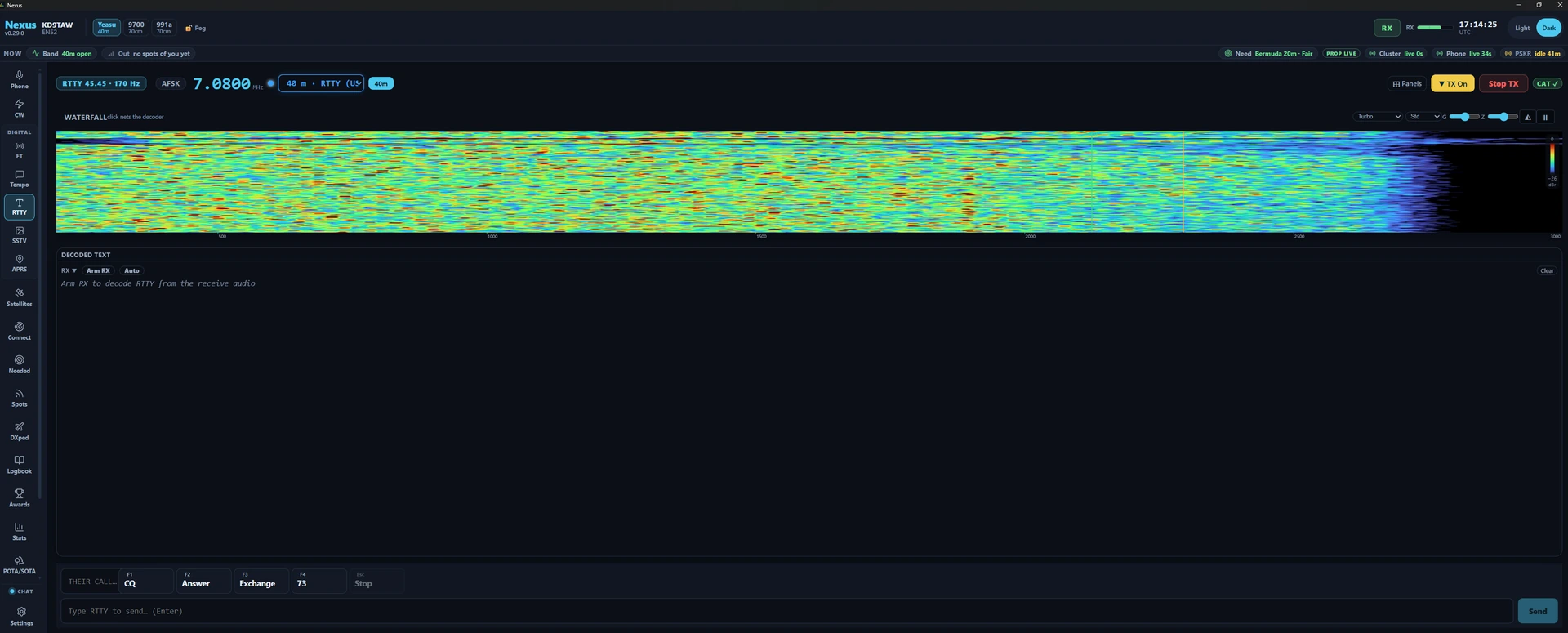
The tour
The header. Left to right: a mode badge reading RTTY 45.45 · 170 Hz — your live baud and shift, so you can see at a glance what the decoder and the transmitter are set to — then a keying-backend pill reading AFSK or FSK, then a TX ▲ pill that appears only while an over is on the air or queued behind one. The badge explains itself on hover: “RTTY — Baudot/ITA2 at the configured baud + shift (45.45 / 170 Hz is the HF standard; change it in Settings → RTTY).”
The big frequency readout is editable — type a dial and press Enter. It tunes wherever you type, off the ham bands included, so a shortwave RTTY station is reachable from here. Beside it, a compact band picker serves the built-in RTTY watering holes: ten HF channels from 160 m (1.838) through 10 m (28.083), each with a note on what shares the window — 40 m carries both the US 7.080 and the EU/DX 7.045 entries, and 20 m parks at 14.083, above the FT4 cluster at 14.080. The list is filtered by license class per band, so a band where your class holds no digital privileges never appears.
On the right: ⊞ Panels, the TX On / TX Off latch, Stop TX and the CAT pill. The latch is this cockpit’s Enable-Tx — the top bar’s TX cluster is hidden behind the digital chrome here, so without it a send would sit at “TX is off” with no way to arm from this screen. Since 1.7.5 the header also carries a Power slider, Tune, and an ATU button when your rig reports a tuner — RTTY keys the carrier for the whole over, so most rigs want it run well under their SSB rating. Set it the way you would on the radio: key Tune, wind Power back until the ALC barely moves, press Tune again. Soundcard drive is still Tx Power in Settings ▸ Radio ▸ Audio.
The waterfall is the same instrument the FT cockpit uses, run at the live-band cadence: a new row every 50 ms rather than the 120 ms the slot-synchronous FT surfaces use, so a signal drifting across the passband moves smoothly instead of in steps. Two named cursors replace the usual RX/TX markers — a green M at the mark tone and an orange S at the space tone, drawn from exactly the tone pair the demodulator built its filters from, so what you see and what you decode can never disagree. The hint above the canvas reads click nets the decoder and your transmit tones: any click moves the decode centre, and the AFSK tones you transmit, to that audio frequency (clamped 300–3700 Hz) and drops the demodulator for a clean re-acquire. While you transmit the click does nothing and the hint reads tuning held while transmitting. Palette, view span, the G/Z contrast knobs, the 3D stacked-spectrum toggle and pause-with-scrollback all work as they do elsewhere.
The scope is a fixed share of the window — 22% of the effective viewport height, with a floor that yields on a short or heavily zoomed display so it can never eat the transcript. RTTY is the one scope in Nexus with no operator splitter: there is no grip to drag, so the scope/transcript split is what the window gives you. On a short window the whole cockpit scrolls rather than clipping anything.
Decoded text is the pane you work from. It and the waterfall are the two entries in this cockpit’s ⊞ menu; the LOG pane below it is not removable. Its head carries, in order:
- Arm RX — “start decoding RTTY from the receive audio (RX only, never keys the rig).” Opening the section arms it for you, so most of the time you will find it already reading RX armed and never press this. It arms by hand in two cases: when you have switched Start receiving when RTTY opens off in Settings ▸ Digital ▸ RTTY, and after you have stopped the decoder yourself — that stop is remembered for the rest of the session, so re-entering the section will not restart it behind you. Arming is session state and is never persisted either way, so the app never launches with a decoder running. Disarmed, the pane reads “Arm RX to decode RTTY from the receive audio.”
- Auto — arms the QSO sequencer. “It runs the QSO after you click CQ (run) or answer a heard CQ (search & pounce); it never transmits on its own.” Turning it off is itself a stop: the queue is cleared and the rig unkeyed.
- The AFC pill, shown while armed: a signed offset such as
+12 Hz, gaining a 🔒 once the correction has acquired and frozen. It freezes on purpose — a locked decoder that keeps tracking walks onto a stronger neighbour mid-QSO. - Re-tune, shown while armed: “drop and rebuild the demodulator (use when it froze on the wrong signal).”
- Clear wipes the transcript and re-pins it to the bottom, so an emptied pane follows new copy even if you had scrolled up.
Double-click a callsign in the transcript and it lands in the dock’s Their
call… field and in the log strip’s callsign at once. A compound call such as
VE3/K1ABC comes across whole, and a call garbled by a lost figures shift (W1AW printed as
WQAW) is filled as printed, for you to correct. Double-clicking anything that is
not a call — 599, 5NN, CQ, TEST, TU, 73, a grid square — does nothing.
The caret stays where it was: if you were typing into a latched transmission, you
still are.
The transcript itself prints every character the demodulator produced, and fades the ones it was unsure about. Confidence is the ATC slicer’s own margin, carried out per character: above 75 prints solid, then progressively fainter at 50 and 25, and the weakest copy at 30% opacity. Nothing is ever hidden — faint means “read this twice”, not “discarded”. The ring holds the last 4000 characters and follows new copy while you are at the bottom; scroll up and it stays where you put it, so you can re-read a callsign mid-over.
Underneath the print, the decoder is a Rust port of fldigi’s receive path. Mark and space go through baseband mixers into 1024-point overlap-add FFT filters — one matched filter per tone, so what reaches the bit decision is your tone pair rather than the rest of the passband. The W7AY SNR-optimized ATC slicer leans each decision on whichever of the two tones currently has the better signal-to-noise, which is what holds copy together through the selective fading that takes one tone of a pair down. Straddle-point bit-clock recovery judges every bit at the middle of its window and re-centres on each character’s start bit, so a sender running a little off 45.45 baud does not slide into garbage part-way down a line. Phase-difference AFC is clamped so it can never cross onto the neighbouring tone (±45% of your shift — about ±76 Hz at 170). A signal-presence squelch gates the printed output, so an armed decoder on a quiet band stays silent instead of streaming garbage. It runs in its own thread on a 100 ms drain and keeps decoding while you are on another section; the cockpit polls it twice a second while RTTY is the visible view, so the first tick after you come back catches the display up.
The LOG pane sits under the transcript: call, sent and received report, name, QTH, state, country, a POTA reference and private notes, with a Log button. It is where a contact you work by hand is written down. Its callsign and the dock’s Their call… field are one field shown twice: type in either, or double-click a call in the transcript, and both follow; logging the contact clears both.
In a contest the same double-click fills the exchange. With a contest running, the pane becomes that contest’s entry strip — Call and one box per value it asks you to copy — and double-clicking a word in the transcript puts it in the box it belongs to: a zone in the Zone box, a section or a state in the Section or State box. What fits where is the contest’s own rules, not a fixed list, so this works for the next contest without an update. Nexus only fills what it can recognise: a word that could be two things, or a value Nexus has no list for, is left for you to type, and a callsign is always a callsign. Enter in any of those boxes logs the contact, exactly as the Log button does.
The TX dock — macros, compose, and the sequencer row when Auto is on — is
pinned below the pane and cannot be scrolled out of reach or hidden. It holds the
eight F-key macros, F1 to F8, in keyboard order, and — beside them on a wide
window, under them on a narrower one — the Their call… field feeding the {CALL}
token, the Everyday / Contest switch with Reset set, and at the right the
TX continuous-transmit button and Esc / Stop.
Two sets are built in. Everyday is the set this cockpit has always had, with four empty keys for your own:
| Key | Label | Sends |
|---|---|---|
F1 | CQ | CQ CQ CQ DE {MYCALL} {MYCALL} K |
F2 | Answer | {CALL} DE {MYCALL} {MYCALL} K |
F3 | Exchange | {CALL} DE {MYCALL} UR 599 599 K |
F4 | 73 | {CALL} DE {MYCALL} TU 73 SK |
F5–F8 | — | empty |
Contest follows the run and search-and-pounce convention RTTY contest loggers use — a CQ that starts and ends with CQ, the exchange sent twice, a TU that asks for the next caller:
| Key | Label | Sends |
|---|---|---|
F1 | CQ | CQ TEST {MYCALL} {MYCALL} CQ |
F2 | Exch | {CALL} 599 {EXCH} {EXCH} |
F3 | TU | TU {MYCALL} CQ |
F4 | My call | {MYCALL} {MYCALL} |
F5 | His call | {CALL} |
F6 | S&P exch | TU 599 {EXCH} {EXCH} |
F7 | B4 | {CALL} QSO B4 TU {MYCALL} |
F8 | AGN | AGN? AGN? |
Click a macro, or press its F-key. The keys work whenever the RTTY cockpit is on screen, including while you are typing in Their call…, the compose bar or the log strip; holding one down sends it once. On a Mac keyboard, hold fn. Every macro goes out on a line of its own and ends with a space, the way RTTY contest messages are written: your call starts a line on the other station’s screen, and the last word of the message is complete for their logger. What you type in the compose bar goes out exactly as typed.
The tokens: {MYCALL} is your callsign from
Settings ▸ Station; {CALL} is the Their-call field;
{RST} is the report, always 599; {EXCH} is your exchange for the contest you
are running, without the report. A message that needs a value it does not have —
{CALL} with Their call… empty, {EXCH} with no contest running — is not sent,
and a toast says which. Hovering a macro shows it with your call and theirs filled
in, so you can read what will key before you click it. The tokens also expand in the
compose bar, where Enter sends.
To change a macro, hover it (or tab to it) and click ✎, or click an empty
key. To change what a key sends on the fly, right-click it, or press Ctrl+Shift
with its F-key (Ctrl+Shift+F3 for F3, wherever the cursor is in the cockpit): the
same editor opens with the cursor at the end of Message. None of these sends
anything. The editor opens over the dock with Title, Message, the tokens (click
one to insert it), Save, Send once, Cancel and Reset this button. Save takes effect
at once and is kept with that set — there is no separate Settings save.
Send once sends the message as it stands in the editor, one time, exactly as the
key would send it: the tokens are filled in and every check the key gets applies (no
call in Their call…, no contest for {EXCH}, outside your license, TX off). The key
keeps the message it had. When the message goes, the editor closes; when the cockpit
refuses it, a toast says why and the editor stays open with what you wrote. Titles and
messages you write are shown as you wrote them, in any language; the built-in
titles follow the app’s language. A token Nexus does not know is flagged and cannot
be saved (RTTY has no braces, so it would go out as a bare word), and a macro may
not have a title that reads as a stop — Stop, Esc, Abort, Cancel or
the same in any language the app ships (Stopp, Parar, Arrêter, 停止),
whatever language the app is in. Those name the controls that stop a
transmission, and a macro only ever transmits. Esc closes the editor when
nothing is on the air; while an over is going out, continuous TX is up or an auto
sequence is running, Esc stops as it always does, editor open or not.
Reset set asks first, then puts every key of the set on screen back to its built-in message. The other set is untouched.
Every send is checked by the engine before anything is queued, and a refusal tells you why: not in the RTTY section, TX not armed, the frequency outside your license privileges, another mode holding the transmitter, or — on the FSK backend — the data line and a serial PTT line configured onto the same physical line. Sending while an over is already going out queues behind it (type-ahead); Stop TX or Esc / Stop drops the whole queue and unkeys.
Errors surface as a banner above the pane: an FSK port that would not open, a rig that refused PTT, or a sequencer whose gate closed mid-QSO.
How this differs from the FT8 cockpit
RTTY is free-running. There is no slot clock, so nothing here is timed against UTC, the clock-offset discipline FT8 lives or dies by does not bear on your copy, and there are no transmit periods to pick — you key when you key. The sequencer, when you use one, is driven by pattern-matching the decoded text rather than by a slot boundary, which is why it needs timeouts where the FT8 sequencer needs none. The decoder prints one running transcript instead of a decode list, a band activity table and a call roster, because a teleprinter signal is text and there is nothing to tabulate. One tone pair decodes at a time: whatever the M and S cursors sit on, not the whole passband. And you start every transmission, directly or by starting a sequencer run — double-clicking a call fills Their call… and the log, and never transmits. RTTY and FT8/FT4 are mutually exclusive by construction: the transmit gate demands the RTTY section owns the rig, so the two sequencers can never key together.
Core workflows
Copy a station
-
Pick a band from the header’s channel list, or type a dial into the readout. Entering the cockpit commands the rig’s mode for you — a DATA submode on the LSB side for AFSK, the rig’s own RTTY mode for FSK — and re-homes the frequency when you have genuinely changed mode, not when you are returning to a section you were already in.
-
Check the decoder is running. The pane head reads RX armed already if you have left Start receiving when RTTY opens on (the default) and have not stopped the decoder yourself this session; otherwise click Arm RX. On a quiet frequency the pane then reads “listening…” — the squelch is holding the print closed until a real signal opens it.

The decoded-text pane head with the receiver running, in Nexus 1.10.3. The AFC pill and Re-tune appear only while armed; Auto is the QSO sequencer and is off here. 3. Click the signal on the waterfall. The M and S cursors jump there and the demodulator re-acquires; the AFC walks onto the tone and freezes after eight consecutive clean frames, which on a diddle preamble is a handful of characters. The pill shows the offset it settled on and gains its 🔒. 4. If the copy is upside down — the classic all-garble against a strong signal — turn on Reverse (swap mark/space) in Settings ▸ Digital ▸ RTTY. There is no reverse button in the cockpit; the M and S cursors trading places on the waterfall are the only on-screen sign of which sense you are running. 5. If the AFC locked onto the wrong signal, press Re-tune to drop and rebuild the demodulator rather than fighting it with the VFO.

Copy running in Nexus 1.10.3. The padlock means the AFC has frozen on the signal. The faint run is the decoder’s own per-character confidence — those are the characters to ask AGN about rather than the ones to write in the log.
Tune with the tuning scope
The square to the right of the waterfall is a tuning scope: the crossed-ellipse picture of a classic terminal unit. Two narrow filters sit on the mark and space tones the decoder is listening to, after the AFC’s correction; the mark filter moves the trace left and right, the space filter up and down.
- A tuned signal draws a square ”+”: a flat ellipse along the M axis for the mark tone and an upright one along the S axis for the space tone.
- A mistuned signal turns the cross. It turns clockwise when the signal sits higher than the decoder’s tones and counter-clockwise when it sits lower, and the arms get fatter as it moves further off.
- Noise draws a round blob that fills the middle, with no arms.
The line beside the square says the same in words, for anyone who cannot use the picture: Tuned, Signal 20 Hz high, Signal 20 Hz low, or No signal. It changes at most once a second while only the number moves.
To tune, click the signal on the waterfall first (step 3 above), then use ◀ and ▶ beside the square to move the decoder 5 Hz at a time; hold one down to keep stepping. Move towards the words: Signal 20 Hz high wants ▶. The figure between the buttons is the mark tone in hertz.
⚠️ The nudges move your transmit tone as well. In AFSK the transmitter follows the decoder’s centre, exactly as a waterfall click does, so a nudge is also a change to where your own signal lands. That is why both buttons are greyed out while you transmit (an over, continuous TX or Tune): a held button cannot slide your tone in the middle of an over. Nexus also refuses any net while RTTY is transmitting, so a click on the waterfall mid-over does not move your tone either; net between overs.
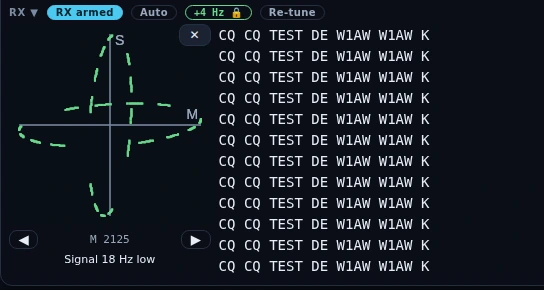
The tuning scope in its earlier place in the Decoded Text pane, drawn from a test pattern rather than off the air, in a development build after Nexus 1.19.0. It now stands beside the waterfall, with ◀ ▶ and the words to the right of the square.
The scope is a ⊞ Panels entry, Tuning, shown by default; hide it there or with its own ✕, and the waterfall takes the full width. It shares the waterfall’s strip, so the waterfall keeps its usual height and gives up the width instead. The square grows with the window, from about 120 px at 1024×768 to about 200 px on a large one; drag the waterfall’s divider shorter than that and the square follows the strip. With the waterfall hidden the scope keeps the strip on its own. It goes blank while you transmit and while the decoder is not armed. On a second computer driving the station with Nexus’s own Remote client it works the same way, fed from the station.
Send an over by hand
- Arm transmit with the header’s TX Off latch, so it reads TX On.
- Double-click the other station’s call in the transcript, or type it into
Their call…. It feeds
{CALL}, and the log strip’s callsign follows it. - Click a macro, or type in the compose bar and press Enter. Text is uppercased and filtered to the ITA2 character set before it is queued, so what is queued is exactly what keys — a line with nothing encodable in it is refused with “Nothing to send — RTTY carries A–Z, 0–9 and basic punctuation.”
- Esc / Stop is live exactly while an over is on the air. It aborts the transmission, drops anything queued behind it, and unkeys. Stop TX in the header does the same and is never disabled.
Key up and type
The dock’s TX button keys up and stays keyed. It reads Continuous when it is off and On air while you are transmitting. Type and the characters go out as you type them; between keystrokes the air carries diddle — the LTRS idle every RTTY station sends — so the far end holds sync instead of hearing you drop out at the end of every line. Click TX again and it sends the rest of what you typed and unkeys.
While the latch is up, Enter puts a new line on the air instead of sending, and the F-key macros type into the transmission already in progress rather than queueing an over behind it, each on a line of its own. Enter-per-line works exactly as before with the latch down. Continuous TX and the auto-sequencer will not run at the same time, and each says so if you try.
This is the one transmission in Nexus with no fixed end, so it carries more stops than the rest. Stop TX, the dock’s Esc / Stop macro, the header’s TX On latch and the Esc key each cut it immediately, and so does anything that takes RTTY off the rig without you pressing a stop at all — leaving the RTTY section, tuning to a frequency you are not licensed for, starting a tune carrier, or switching radios. Your TX watchdog applies as it does to any other over (typing keeps it happy, walking away does not), and above it one continuous over is capped at ten minutes, which no amount of typing extends.
Run a QSO with the auto-sequencer
-
Turn on Auto. This builds the state machine and nothing else — no transmission happens on the toggle.
-
To run: click CQ · Auto call. To pounce: when a
CQ … DE <CALL>appears in the transcript the Answer button lights up with that callsign; click it. Those two clicks are the only doors in, which is what keeps a contact operator-initiated (ARRL Field Day rule 6.4). Answer offers the newest CQ still in the 4000-character transcript, so it can be several minutes old — Clear drops a stale one. Until there is one the button sits disabled showing a dash, explaining itself on hover: “No CQ heard yet — Answer lights up when the decoder surfaces one.” Nexus only looks for CQs at all while Auto is on.

The sequencer’s two doors in, in Nexus 1.10.3. Answer carries the newest
CQ still in the transcript and stays dead until there is one, so nothing here
starts a contact except a click.
3. The row then shows the live state — Calling CQ, Answering, Exchange sent,
Confirmed, Done — plus the station being worked and their exchange as you copy
it. Callsigns are matched with one character of fuzz, forgiven only where the
demodulator itself was unsure; 599 garbled to TOO by a lost FIGS shift and
the 5NN cut convention both normalize.
4. When both exchanges validate, the contact is logged — if Auto-log QSOs is
on — your sign-off goes out, and the row reads Confirmed while it waits
for their 73. It reaches
Done on whichever comes first: their 73, your sign-off finishing keying,
or 30 seconds.
5. Done is where the run stops. The CQ and Answer buttons come back only from
idle, so press Esc · Abort to end the session before you can start
another. Abort also drops the queue and unkeys, and it works from any state.
Where the machine goes, and why. Every wait is 30 seconds; three fruitless cycles inside a QSO end it.
| State | It advances when… | 30 s of silence does | Ends at |
|---|---|---|---|
| Idle | you click CQ · Auto call or Answer — nothing else | nothing; decoded text only accumulates | — |
| Calling CQ | a station answers you → your exchange goes out | sends the CQ again, indefinitely | never on its own |
| Answering (S&P) | the runner comes back to you with their exchange | calls them again while they have not come back to you, otherwise asks AGN; the third cycle aborts to idle | idle |
| Exchange sent | running: their exchange arrives · S&P: their TU/QSL arrives → logged | asks AGN; the third cycle aborts — running falls back to Calling CQ, S&P to idle | Calling CQ, or idle |
| Confirmed | their 73 arrives, or your sign-off finishes keying | goes to Done | Done |
| Done | — | nothing | terminal — Esc · Abort to return to idle |
“Falls back to Calling CQ” is the timeout path, not the finish line: a run that
loses a station mid-exchange goes back to calling, while a run that completes
a contact stops at Done like any other. A peer who asks for a repeat (AGN) is
alive, so that resend does not count against the three.
The exchange is table-driven: casual RST/name/QTH, taking name and QTH from your Settings ▸ Station operator name and state, or Field Day class and section when the Field Day master switch is on. Those are the only two exchanges it knows, so in any other contest (CQ WW RTTY, a QSO party) Auto refuses to turn on and says so — send your exchange with the macros and log each contact in the strip. Once both exchanges validate, the contact is logged — if Auto-log QSOs is on — with mode RTTY, 599 sent, their copied report received, and any class/section riding the comment field so nothing you copied is lost.
Choose a keying backend
Set this in Settings ▸ Digital ▸ RTTY; the cockpit’s pill shows which one is live.
- AFSK (default) plays a two-tone waveform through the same TX audio path FT8 uses, with the rig in a DATA submode on the LSB side (DATA-L / LSB-D / PKTLSB) — soundcard-clocked, so the bit timing is jitter-free. The DATA submode is what routes the USB codec to the modulator: plain LSB takes TX audio from the mic on most Icom and default Yaesu setups, which is the red-light-no-output failure. Mark and space NCOs run continuously and each bit edge is a raised-cosine cross-fade, which is what keeps the keying sidebands narrow. This is the robust path: if FT8 transmits on your station, RTTY will.
- True FSK bit-bangs DTR or RTS into the rig’s FSK input with the rig in its own RTTY mode, which unlocks its narrow RTTY filters. Bit edges come from OS thread scheduling, so a loaded machine can jitter individual edges by a few ms — casual and Field-Day grade rather than contest grade. Edges are scheduled against absolute deadlines, so jitter never accumulates into baud drift. PTT must ride CAT or the other control line; Nexus refuses the send outright if you point PTT at the same line as the data.
Either way the bit stream is identical — the same framed Baudot, 1 start bit, 5 data bits, 1.5 stop bits, at true 45.45 baud never rounded to 45.
Choose the AFSK sideband
AFSK runs on LSB by default, the RTTY convention MMTTY and N1MM use: mark on the lower audio tone, which lands higher on the air. If your station is set up for USB instead, set AFSK sideband to USB in Settings ▸ Digital ▸ RTTY. Nexus then puts the rig in its upper data mode (DATA-U / USB-D / DIGU) on every band and swaps the tones itself, so mark still lands higher on the air and the decoder still copies. Leave Reverse off for this; Reverse is for copying a station that is sending upside down, and it inverts whichever sideband you picked. True FSK has no sideband choice: the rig’s own RTTY mode sets the sense.
Land here from the Needed board
Click an RTTY row on the Needed board and Nexus QSYs to the spot’s exact frequency and opens this cockpit. Unlike CW and Phone it does not pre-fill a callsign — double-click it in the transcript, or type it into Their call…. If the RTTY section is switched off, the click still QSYs the rig to the spot so you can work it from wherever you are.
Honest limits
- F1–F8 are bound only while this cockpit is on screen, and not while the macro editor is open. Ctrl+Shift with an F-key opens that key’s editor; any other Alt, Ctrl or Cmd with an F-key is left to your system.
- A contact you work by hand you also log by hand. The LOG pane under the transcript is the strip for it — call, sent and received report, name, QTH, state, country, POTA reference and notes, with a Log button. A double-click or the Their-call field fills the callsign; the rest you type, and Log is always your click. The auto-sequencer is the only path that writes a QSO on its own, and only when Auto-log QSOs is on in Settings ▸ Digital — with auto-log off, even a completed auto-run contact is not written anywhere. During Field Day the strip becomes the class/section entry and routes the contact to the event log, scored as Digital.
- An auto run works one station and stops. After the contact is logged and your closing goes out, the sequencer reaches Done and stays there. Press Esc · Abort to return it to idle before you can call CQ again — it will not chain into the next QSO. See the state table under Run a QSO with the auto-sequencer.
- An unanswered auto CQ repeats indefinitely — every 30 seconds, by design (“the operator owns stopping a run”). A bare repeat deliberately does not reset the transmit watchdog, so the Tx Watchdog in Settings ▸ Digital (6 minutes by default) is the backstop that eventually disarms TX. Abort and Stop TX are the immediate ones.
- The report is always 599. The built-in macros send it literally, the
{RST}token is always 599, and the sequencer substitutes it; there is no field to change it and no signal-report control anywhere in the cockpit. - The sequencer’s messages are not editable. The F-key macros are; the auto-sequencer’s own CQ, answer, exchange, AGN and sign-off templates ship as fixed text — there is no Settings surface and no in-cockpit editor for them. No shipped exchange sends a contest serial either; casual and Field Day are the two schemas.
- Netting the waterfall moves the receiver only. Your transmitted tones are fixed — AFSK always keys 2125 Hz mark with space at mark plus your shift — so clicking a station 400 Hz away lets you copy them but does not move your transmission onto them. Use the VFO for that. There is no TX marker on this waterfall at all, only M and S.
- One signal at a time. A single demodulator sits on a single tone pair, so two stations in the passband do not decode into two columns and the second one does not decode at all. This is a receiver, not a skimmer.
- Send-and-done between overs, unless you latch TX. Sent a line at a time, the transmitter unkeys the moment the final stop bit ends — no idle mark is held between overs, which some stations’ AGC and some contest software expect. The TX button is the way round it: it holds the carrier up and idles on diddle. See Key up and type.
- The character set is ITA2 and nothing else — A–Z, 0–9 and the classic
punctuation. Everything is uppercased, and anything with no Baudot code (
+,=,@, accented letters) is dropped silently before it reaches the rig. One over is capped at 1000 characters, about 2¾ minutes at 45.45 baud. - Unshift-on-space and AFC are always on. Both are decoder defaults with no
control in the cockpit or in Settings — you cannot hold the figures shift
across spaces for contest-style
599 599copy, and you cannot pin the AFC off. - The fade is approximate on badly broken copy. Above 200 quality changes in the transcript the per-character fading regroups into equal blocks scored by their mean confidence, which can average a short bad burst back into a good block. Every decoded character still prints in order; only the fade is smoothed, and only on copy already too broken for per-character fading to mean much.
- Baud and shift are picked from lists, not typed: 45.45 or 75 baud; 170, 425 or 850 Hz shift. The band plan is HF only — 160 m through 10 m, with no VHF RTTY channel.
- The scope has no splitter and no pop-out. It takes its share of the window and that is that.
Hiding Decoded Text in ⊞ Panels takes the Auto toggle away with it, since that toggle lives in the pane head. Stop TX, the Esc/Stop macro and the TX-enable latch all render outside the pane, so no layout you save can leave you unable to stop a transmission.
Related guides
- CW
- SSTV — the other free-running mode in the Digital group
- Phone (SSB)
- Operate — FT8/FT4 digital
- Needed — DX that’s on the air now
- Logbook & QSL
- Contesting & POTA/SOTA
- Settings reference
This page is synced from docs/guide/rtty.md in the Nexus repo. Corrections belong there.