Nexus manual · DX & awards
Awards & Journey
This section has two tabs under one roof: Official Awards, the offline tracker for the official programs (DXCC, Challenge, Honor Roll, WAS, WAZ, VUCC, IOTA), and Journey, a local-only achievement layer that turns your log into progress you can feel — firsts, ladders, collections, and personal bests. Both read straight from your logbook; neither needs an account or a network.
Awards is an opt-in section, nudged on after your first QSO. Turn it on any time in Settings ▸ Appearance ▸ Features.
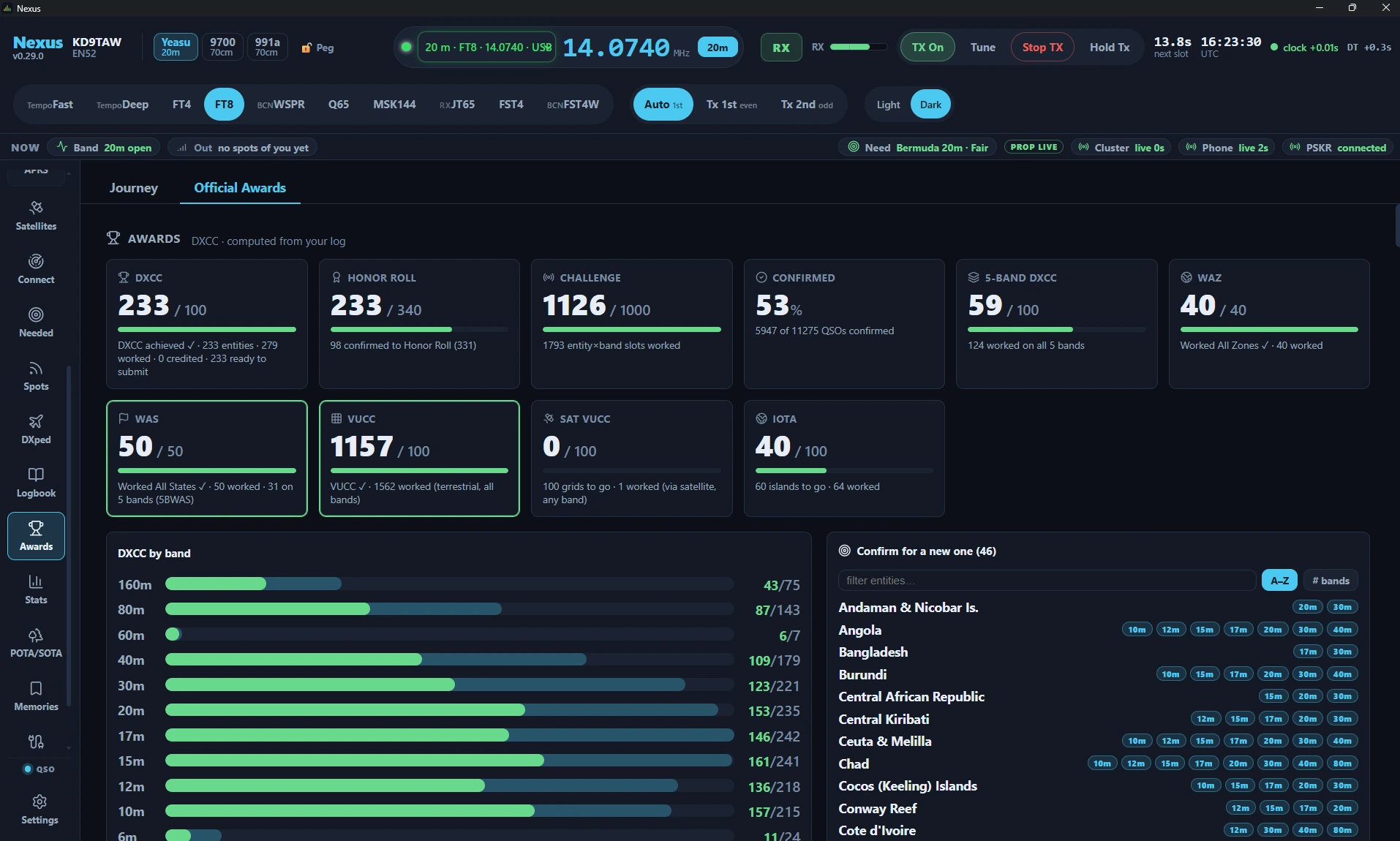
The Official Awards tab in Nexus 1.10.3. The figures are one station’s log; yours will read differently.
Awards — the official programs
Awards are computed offline from cty.dat entity resolution — no upload required to see where you stand:
- DXCC with per-band and per-mode slots, and 5-Band DXCC,
- DXCC Challenge,
- Honor Roll, with a current-entity denominator and a countdown — confirmations still needed to get in, then “N to #1” once you’re in,
- WAS (Worked All States), with the 5BWAS count beside it,
- WAZ (Worked All Zones),
- VUCC, with satellite grids kept on their own Sat VUCC card. ARRL
credits a bird QSO toward Satellite VUCC only, so the two cards never share
a grid. Nexus tags pass contacts itself — log one while the transponder is
held and your dial is in the bird’s downlink and it gets
PROP_MODE=SATplus the LoTW designator, which is what moves this card. The ISS is the one exception (Satellites explains why), and an imported contact moves it only if the file already carried both fields, - IOTA (Islands On The Air).
Under the cards, DXCC is broken out by band, and the chase lists start with Confirm for a new one — entities you have worked but not confirmed, chipped with the bands each is waiting on.
Confirmation handling is source-aware — a distinction most loggers blur.
eQSL and a QRZ-logbook match never count toward LoTW-grade awards; the
confirmed and award_confirmed flags are separate and enforced at every
computation. So a contact can be “confirmed” (you have an eQSL) yet not
“award-confirmed” (no LoTW or card), and the awards math respects the
difference. The
logbook diagnostics
explain per-QSO why a credit hasn’t landed.
That is why the Confirmed card here reads lower than the confirmed figure on Stats — 52% against 73% in the screenshot above. Neither is wrong. This card counts only LoTW and paper cards, because that is what ARRL takes; Stats counts every channel, eQSL and QRZ included, because it is describing your log rather than judging it.
Journey — progress you can feel
Journey exists to carry a newer operator through the motivational dead zone between QSO 1 and QSO 100 — but it credits an imported logbook immediately, so a veteran importing years of ADIF sees their history light up at once. It’s local-only: no accounts, no network, no decaying daily streaks.

The Journey hero card, DX Marathon and Firsts row in Nexus 1.10.3.
What’s on the board:
- XP and levels, with a hero card.
- Firsts — auto-detected milestones (“first DX,” “first CW,” “first park”), each named with heritage context.
- Ladders — tiered progress toward the official awards, plus:
- DX Marathon — entities and zones worked this calendar year vs. your best year (resets Jan 1),
- Grid Gems — rare/ultra-rare grids worked (rungs at 1/5/10/25/50),
- Park Hunter and Summit Chaser — distinct POTA/SOTA references hunted (they appear after your first hunt),
- Seasonal feats — earned in a season, permanent once earned, with no FOMO:
- Sporadic-E Summer (6 m ≥ 1000 km in season),
- Top-Band Season (160 m ≥ 1500 km).
- Collections and personal bests.
Some feats read your station power (from Settings ▸ Digital) — set it to unlock the miles-per-watt and QRP feats.
Optional weekly streak
Off by default: a gentle “weeks on the air” counter (never a daily streak, never a penalty for a break). Enable it under Journey in Settings ▸ Digital.

The Journey hero in Nexus 1.10.3 with the streak switched on. 31 weeks on the air sits beside the QSO count and nowhere else, and it counts weeks, never days — a quiet week ends nothing but the count. With the setting off the phrase is simply absent and nothing else on the card changes. Fixture log.
Share a card
The ⤴ Share control renders the hero card (and any unlocked feat) to a PNG on your clipboard — nothing is uploaded. Click it, then paste into a message, an email, or a post.
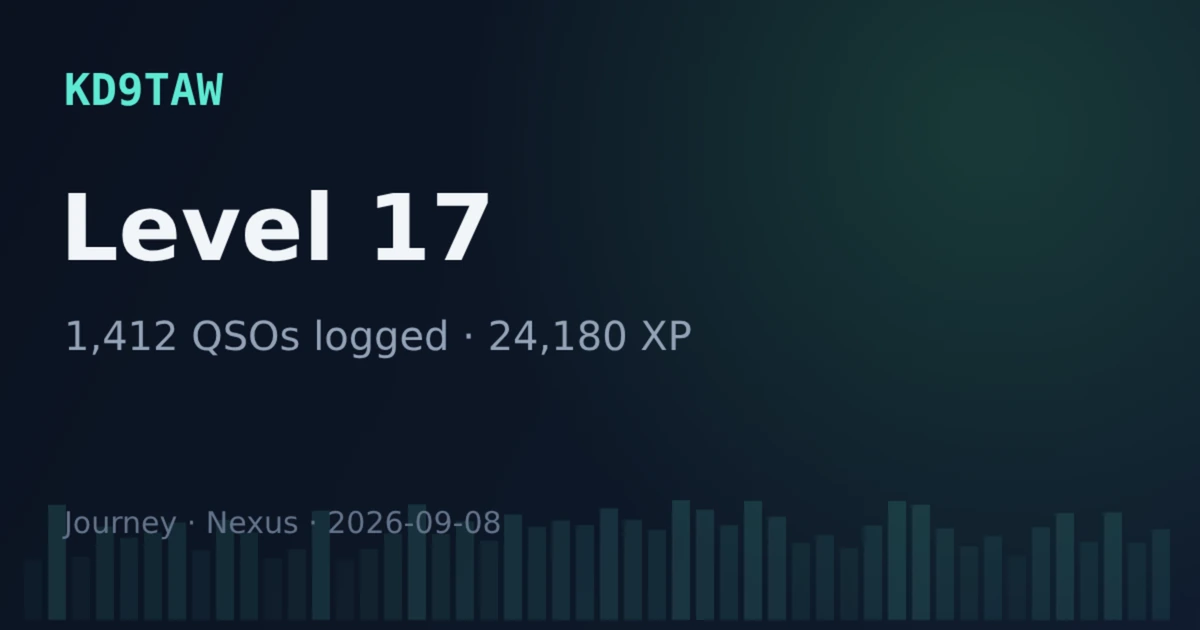
The 1200 × 630 PNG that ⤴ Share puts on your clipboard, rendered by Nexus 1.10.3 from a fixture Journey. This is the card itself, not a screen in the app — there is no preview inside Nexus; you paste it to see it. It carries your callsign, and nothing on it leaves your computer until you paste it somewhere.
Honest limits
- Everything here is local. Journey never leaves your machine — no leaderboards, no accounts, no telemetry.
- Awards are as complete as your log and its confirmations. Offline computation shows worked/confirmed from what you have; pull confirmations with the LoTW / eQSL sync to fill in the award-confirmed column.
- eQSL and HRDLog.net don’t earn ARRL award credit — Nexus won’t pretend they do.
Related guides
- Logbook & QSL
- Stats — the same log counted rather than judged against a list
- Needed — DX that’s on the air now
- Contesting & POTA/SOTA
- Settings reference
This page is synced from docs/guide/awards-journey.md in the Nexus repo. Corrections belong there.