Logbook & QSL
The logbook is Nexus’s system of record: a persistent ADIF 3.1.8 store with full round-trip fidelity. It holds callsign, grid, entity, state, band, frequency, mode, the string RSTs each mode actually uses (FT8’s “−12” and CW’s “599” are both first-class), name/QTH, notes, POTA/SOTA references, and a per-QSO upload state for every online service — so “what has actually been uploaded where” survives restarts.
The tour
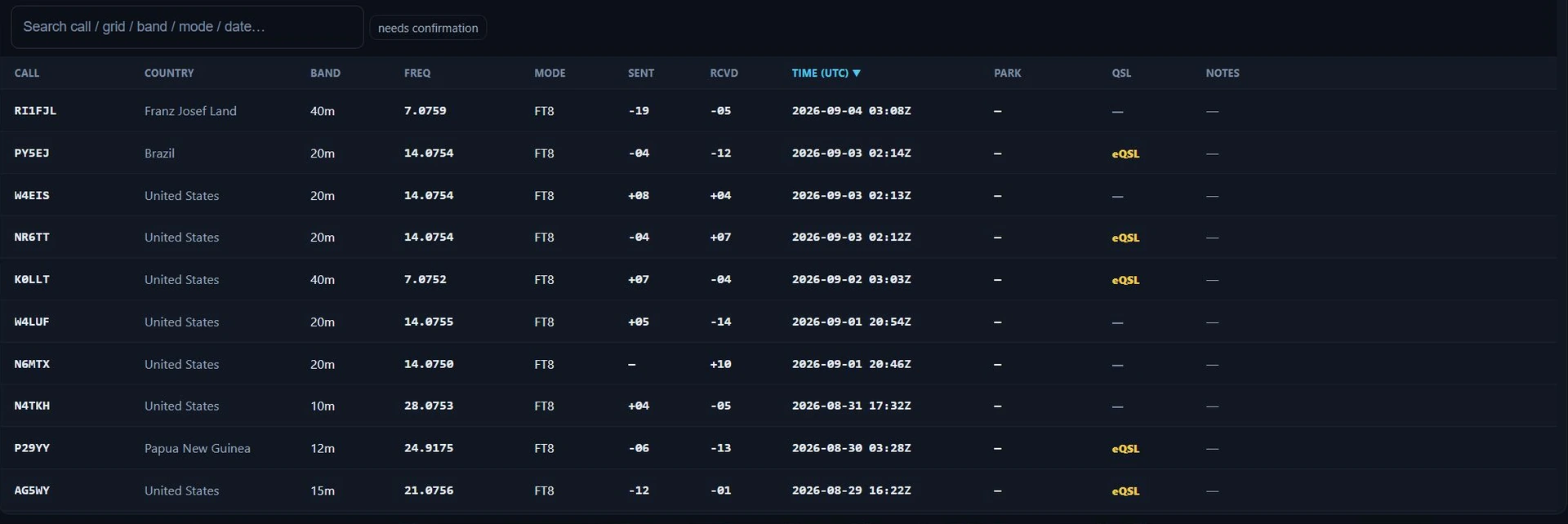
The logbook table in Nexus 1.10.3, sorted newest first.
Above the table, a 3-D globe puts a dot on every grid square in the log; Settings ▸ Appearance ▸ Map & globe ▸ Logbook globe turns it off. On a computer whose graphics have no WebGL2, the band says so instead of drawing the globe, and if the globe stops working the band says that. Either way the table, its search, editing and import work as always.
Each row is one QSO. The columns you’ll use most:
-
Call, band, mode, date/time, RST — the contact itself.
-
Entity / DXCC — resolved from cty.dat, first-class in the table.
-
QSL — which source confirmed the contact. It shows one of four things:
- L, C, E, Q — LoTW, a paper card, eQSL, your QRZ logbook,
joined by
·when more than one channel confirmed. Hover for the eligibility tooltip. - ✓ — award-confirmed, on an older record that predates the per-channel split and so cannot say which channel.
- the word eQSL in yellow — confirmed, but not by LoTW or a card, on a record that does not say which service confirmed it.
- — — not confirmed.
eQSL is clearly labelled non-award: it counts as a confirmation but not toward DXCC/WAS (ARRL doesn’t accept it). Nor does a QRZ match. This matters — see Awards & Journey.
- L, C, E, Q — LoTW, a paper card, eQSL, your QRZ logbook,
joined by
Search matches callsigns and grids. The “needs confirmation” chip beside the search box filters to contacts without an award-eligible (LoTW/paper) confirmation — a QSL you’ve requested but not received still counts as unconfirmed and stays in that list.
Columns, beside it, chooses what the table shows. Tick a column to add it: your own grid and rig, the name, QTH, state, power and operator, and what the log stores about the station you worked — their grid, IOTA, county, CQ and ITU zones, continent and distance, the dates a card was sent and a QSL received, each service’s upload state, and a contest contact’s exchange. Untick one to hide it. Drag the right edge of a column’s header to change its width (or press Alt+← / Alt+→ on the header); double-click the edge to put it back. Drag a column’s header left or right to move the column (or press Alt+Shift+← / Alt+Shift+→ on the header); a click on a header still sorts by it. The table uses the whole width of the window; one with more columns than fit scrolls sideways inside the table, its header with it. Nexus keeps the choice, the order included, in your settings, and Reset to the default columns in the same menu, or Settings ▸ Logbook ▸ Logbook display, puts the default table back.
What each contact records. Besides the call, band, mode and reports, a contact you log carries:
- When it started and ended. A contact from the Phone, CW, RTTY, PSK or Satellites entry strip starts when its call was entered and ends when you press Log, as a JS8 contact does.
- Your side of it: the operator (Operator at the key, or your station call when that is blank; ADIF OPERATOR), your grid (MY_GRIDSQUARE) and, on everyday contacts, your State (MY_STATE), all from Settings ▸ Station; the rig (the active radio); and your Station power (TX_PWR) from Settings ▸ Digital ▸ Station Housekeeping, or no power when that is blank. A park or summit activation logs the park’s state, never your home one. Your LoTW uploads leave out a grid or state Nexus filled in itself, so TQSL keeps signing from your Station Location.
- The worked station’s continent (CONT) and the distance to it in km (DISTANCE) when both grids are known.
- What your callbook lookup said, when you looked the station up before logging (the callsign card or the log strip): name, QTH, grid, state, county (CNTY), CQ and ITU zones, position (LAT/LON), e-mail, web page and QSL manager (QSL_VIA), plus whether they use LoTW, eQSL or paper cards and their UTC offset. Every way of logging takes it, the FT auto-log too; nothing waits for a lookup. Where the station is comes only from its own callbook entry, never a home call’s entry for a /P or a station at a park, and a LoTW confirmation’s grid, county or zones replace a callbook one.
- An IOTA reference only when you take it. When a DX-cluster spot comment for the call names an island group, or your callbook lookup does, the log strip, the Logbook’s Add form and the log popup show it as a chip (“IOTA EU-131 · from the spot”). Press Use to log it, or × to leave it out; nothing is filled in by itself, and a reference you typed is never replaced. Use is for that one contact: the next starts with nothing taken, even with the same station. When two spot comments for the call in the last 20 minutes name different groups, none is offered. An FT contact logged by itself with no popup logs without one. A reference taken this way stays in your log and its exports but goes to no service, and not to DXKeeper or HRD Logbook (both can upload it themselves), until you confirm it on the contact card or edit it. Confirming it later does not send it on to DXKeeper or HRD Logbook, which keep the contact as they first got it; once confirmed, a LoTW confirmation no longer replaces it.
- Space weather, when Log space weather on each contact is on (it is for a new installation) in Settings ▸ Services ▸ Integrations & Feeds ▸ Propagation: the K index, A index and solar flux (K_INDEX, A_INDEX, SFI), and nothing when the latest reading is more than 3 hours old.
- The path it took, when the Path card had worked out the path to that station within six hours of the contact: whether the signal most likely went the short or the long way round, how sure, and why. Nexus keeps this in your own log and its exports only; no service is sent it. Nexus never fills in the antenna heading or antenna path (ANT_AZ, ANT_PATH) itself; set ANT_PATH yourself on the contact card when you know it. A contact that did not go by the ionosphere (a satellite, EME or repeater contact) is not graded.
A field the contact already carries (from WSJT-X, an import or what you typed) is kept. A contact whose start is more than 3 hours before you log it gets no operator, rig, power, grid or state from your current settings, since they may not be what you used then.
Core workflows
Add or edit a QSO by hand
Press Log QSO for the manual entry form. It seeds the draft from what you were actually running: log a contact from the Phone cockpit and the draft says SSB, from CW it says CW — no more accidental “FT8” voice contacts. Edit any field inline; the store round-trips to ADIF, so an export re-imports without loss.
The form also takes My grid and Rig, your side of the contact (ADIF MY_GRIDSQUARE and MY_RIG). Left blank, Rig fills itself from the active radio and My grid from Settings ▸ Station, as on any contact you log as you make it (see below). A contact whose time is more than 3 hours ago gets neither, so enter them for contacts made on another radio or away from home. When you edit an existing contact, the form adds QSL sent (not sent, bureau, direct or electronic) and Card received, the same marks as the row’s QSL menu. LoTW and eQSL confirmations still come only from those services.

The manual entry form in Nexus 1.10.3. Every box here is showing its placeholder — nothing has been typed yet.
When the open form stands taller than the pane holding it — 1024×768 at a large UI zoom is where you meet this — the pane scrolls and the Log button that commits the contact is one drag away. It is a scrollbar rather than more room: nothing moves at any window size where the form already fits.
Upload to LoTW
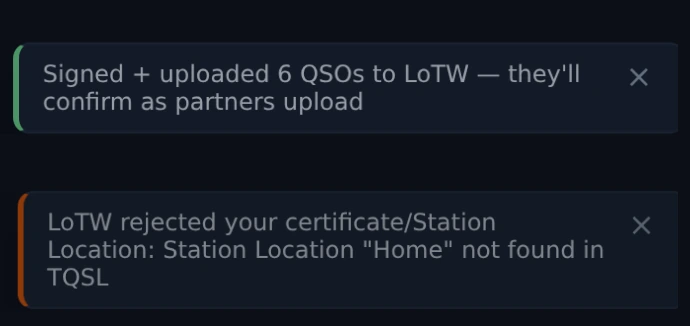
The two answers to Upload to LoTW, in Nexus 1.10.3 — from two separate runs, stacked here so you can tell them apart. Above, the batch was signed and sent and now waits on the other operators. Below, TQSL refused it, and the notice names the thing to go and fix rather than saying “failed”. Both replies are mocked for this capture: nothing was signed and nothing reached LoTW.
-
Set your LoTW Station Location (and optionally the TQSL path) in Settings ▸ Services. Nexus signs through your installed TQSL against that named Station Location — no certificate or password is stored by Nexus.
-
Click Upload to LoTW in the logbook. The button shows the count of un-uploaded QSOs; it signs and uploads the unsent batch. If you would rather not remember, turn on Upload to LoTW automatically in the same Settings group and Nexus runs that batch every few hours. It stops and waits for you if a batch is ever refused, and it is unavailable while Sign from ADIF location is on — that mode signs everything from wherever you are now, so it needs you to pick the moment.
-
Pull confirmations back with Download confirmations (Settings ▸ Services ▸ LoTW). That button only goes one way, down; the upload is step 2 above. The first pull covers your whole history; later ones are incremental. Pulling also marks which of your uploads LoTW holds on file, so a pending contact reads “waiting on the other op,” not “never uploaded.”
Purging the logbook resets that incremental position, so the next sync after a purge pulls your whole history again rather than only what LoTW has matched since you last synced.
You can also feed Nexus a report you downloaded from the LoTW website by hand — either Sync confirmations (which only ever updates contacts you already have) or Import ADIF works. Import adds any contacts the file has that you lack and applies the confirmations and award credits to the ones you already hold; its toast reports the two separately, so “0 imported, 24,163 existing QSOs updated” is the normal and correct result for a confirmation download.
Push a single QSO to QRZ / ClubLog / HRDLog / WRL
Auto-upload (configured per service in Settings ▸ Services) pushes each QSO as you log it. When one fails — a service was down, a key was wrong — the logbook gives you a per-row re-push for QRZ, ClubLog, HRDLog.net, and World Radio League so you can retry that one contact after fixing the cause. A “duplicate” result is the benign “already there” answer, not an error.
The buttons live at the right-hand end of the row and appear on hover, so an untouched table shows none of them. Left to right they are 📢 (spot this station), QRZ (push to QRZ), QRZ✎ (correct a contact QRZ already holds), CL, HL, WRL, LoTW (sign this one contact with TQSL and upload it, the way Upload to LoTW does), a QSL▸ menu, ✎ to edit and ✕ to delete. They all stay on one line and stay clickable at every window size — that column is floored to the width the whole run needs.
World Radio League

World Radio League in Settings ▸ Services, Nexus 1.10.3. The key box here is empty and showing its placeholder.
Paste your WRL API key in Settings ▸ Services and it is verified against your WRL account the moment you save it — your destination logbook is found automatically. From then on every contact flows to WRL as you log it (the auto-push switch is beside the key), and each logbook row carries a WRL button for anything logged earlier. Bringing an existing log across? Export for WRL writes an ADIF shaped for WRL’s own bulk importer — the right road for thousands of historical contacts, which would otherwise trickle through a rate-limited API one at a time.
Mark a QSL sent
When you send a card or request, record it on the contact with Mark QSL sent, choosing the method — bureau, direct, or electronic. The row then shows a quiet “QSL sent … via …” note. Marking a request sent does not confirm the contact — it stays in the “needs confirmation” list until the reply comes back.
Set a contact’s country by hand
An old log often carries no DXCC number on its contacts, and then a contact counts
by its callsign. That is wrong for a DXpedition on a 1×1 call: K1N reads as the
United States, though the 2015 operation was Navassa Island. Click the contact’s
Country in the Logbook and pick the entity from the list, searching by name or
by DXCC number; the deleted entities are in it too. Nexus keeps the entity’s
number on the contact as its ADIF DXCC, so every export carries it, and the
awards, the Needed board and the statistics count the contact as that entity.
The contact’s country goes with the number: its ADIF COUNTRY becomes the
entity’s name, and every export and upload names a contact that carries a DXCC
number by that number, so the two never disagree. The number is followed
strictly, as ADIF does: a Sicily contact carrying Italy’s 248 is shown and
written as Italy, and so are the other WAE areas carrying their DXCC entity’s
number. The new-entity, new-band and new-mode badges beside a call you type in
the log form, or pick in Operate, count the same way: a call from a WAE area is
its DXCC entity there (IT9 is Italy), so every contact with Italy counts,
including a Sicily contact logged without a number.
A contact that arrives with a DXCC number and no country, from an import
or another program, is given the number’s entity. Clear the DXCC number in
the same list puts the contact back to counting by its callsign, and its country
back to the callsign’s. Where LoTW confirmed the contact as another entity, LoTW’s still
counts, and the Awards view lists the two side by side. This is set on the
station; a Remote browser shows the country but cannot change it.
Understand why a contact isn’t confirmed
A per-QSO diagnostics view explains why award credit hasn’t landed yet — no upload sent, waiting on the partner, a date mismatch — with one-click fixes where they exist. Reconciliation tolerates ±1 day of midnight skew and matches by mode-class, so an FT4-vs-FT8 labelling difference doesn’t orphan a confirmation.

The confirmation diagnostics in Nexus 1.10.3, on a fixture log. Each row names its reason in code and in words — a rejected certificate, a partner who has not uploaded yet, a contact never sent, a state that disagrees — and a row with a fix carries it on the right (Fix STATE), with the batch actions above it. The two closing lines separate what is stuck from what is merely young.
How uploads flow
Uploads happen in the backend log funnel: when a QSO is logged, the configured connectors push it. You don’t push from the logbook UI for the auto-upload path — the per-row buttons are for recovery when an automatic push failed. Credentials live only in the OS keychain; the Connections panel reads back presence, never the secret itself.
Which service does what, and which way
Eight services, and they do not all do the same job. Read the direction column first: out means Nexus sends your contacts, in means Nexus fetches somebody else’s answer, and a service can be one, the other, or both. Only two of them earn ARRL award credit.
| Service | Direction | What it needs | What starts it | Award-grade? |
|---|---|---|---|---|
| LoTW | out | your installed TQSL and a Station Location name (Nexus stores no certificate and no signing password) | Upload to LoTW (N) in the logbook, or the every-few-hours batch if you turn it on | yes |
| LoTW | in | your LoTW website login and password | Download confirmations in Settings, or an ADIF report you downloaded yourself | yes |
| eQSL | out | eQSL username + password (and the QTH Nickname if your account has several) | logging a contact, with auto-upload on | no |
| eQSL | in | the same | Sync in Settings — it pulls your InBox | no |
| QRZ lookup | in | a QRZ.com account username + password | typing a call in a log strip or pressing QRZ in the entry form | n/a — it fills name/QTH/grid, it is not a confirmation |
| QRZ Logbook | out | a QRZ Logbook API key — a different credential from the lookup password | logging a contact, with auto-upload on; or the per-row ↥ button | no |
| QRZ Logbook | in | the same API key | the hourly pull, if you turn it on | no — a QRZ match sets confirmed, never award-confirmed |
| HamQTH | in | a HamQTH username + password | the same lookup, when QRZ is not configured or has no match | n/a — the free fallback for grid and state |
| ClubLog | out | account email, an Application Password (not your main one), the logbook callsign, and an API key | logging a contact, with auto-upload on; or the per-row CL button | no |
| HRDLog.net | out | your station callsign and the account upload code | logging a contact, with auto-upload on; or the per-row HL button | no |
| World Radio League | out | a WRL API key — saving it is the opt-in | logging a contact; or the per-row WRL button. Export ADIF for WRL for a historical log | no |
Two of those pairs are the ones that catch people out. QRZ is two separate connectors — the XML callbook lookup and the Logbook API — with two separate credentials, and configuring one does nothing for the other. And LoTW’s two directions are two different passwords: TQSL holds your certificate for the upload, while the download uses your ordinary LoTW website login.
How to tell it worked
Nothing here asks you to trust it. Settings ▸ Services ▸ Connections carries one row per configured connector, and the dot is painted from the last round trip, never from whether a credential exists — a revoked ClubLog app-password or a rotated QRZ key used to sit green forever because the secret had not stopped existing. The row says one of seven things:
- no credential (grey) — nothing configured. There is nothing to be healthy about.
- paused — auth failed, fix credentials (red) — a kill-switch is holding every upload back. Fix the credential, then clear it.
- failing (red) — the last thing that happened was a failure. A second line gives the service’s own words and how long ago: “failed 10m ago — …”.
- auto-upload off (grey) — it can upload; you turned it off.
- working (green) — an upload got through and nothing has failed since. The second line reads “last upload 3h ago”.
- lookup only (grey) — it never uploads, so it cannot be behind. This is what QRZ lookup and HamQTH read.
- stored — not verified yet (amber) — configured, on, and never once exercised. This is not a problem and it is not a pass. No news is no news.
Under the rows is a connector log — the last few dozen events with their times, so “my log is missing a QSO” has a place to start. The QRZ Logbook row also carries a Test button, which does a real round trip and reports what came back.
Per contact, the QSL column tells you what came back (L / C / E / Q), and the per-row push buttons are the retry. A duplicate answer from any of these services is the benign “already there”, not a failure.
When a push fails, the fix is always the same shape: read the second line on the Connections row for the reason, fix the credential or wait out the outage, then press the per-row button on the contacts that missed. Turning auto-upload off and on again does not resend anything.
Honest limits
- eQSL and a QRZ-logbook match never count toward LoTW-grade awards — they’re a separate confirmation tier, enforced everywhere credit is computed.
- HRDLog.net and World Radio League are logging/awards sites, not ARRL confirmation sources — an upload there never earns DXCC/WAS credit.
- The per-row push buttons cover four services, not five. QRZ (↥), ClubLog (CL), HRDLog (HL) and WRL — there is no per-row LoTW or eQSL push, because both of those go in batches rather than one contact at a time.
- Only LoTW, eQSL, QRZ and ClubLog leave a per-QSO upload stamp. HRDLog and WRL pushes are recorded in the connector log and on the Connections row, not on the contact, so “did this one reach WRL” is answered by the log rather than by the record.
- Nexus doesn’t store your TQSL certificate or LoTW signing password — LoTW signing is delegated to your installed TQSL.
Related guides
- Awards & Journey
- Stats — these same records counted by band, mode, year and entity
- Settings reference — Confirmations
- Operate — FT8/FT4 digital
- Contesting & POTA/SOTA
This page is synced from docs/guide/logbook-qsl.md in the Nexus repo. Corrections belong there.