Nexus manual · Operating
Operate — FT8/FT4 digital
The Operate cockpit is the production core of Nexus: FT8 and FT4 operating brought to operational parity with stock WSJT-X, verified line-by-line against a 207-row behavior matrix and run on the air daily. If you already operate WSJT-X, everything here works the way you expect — the sequencer state table, the decode cadence, the split arithmetic, the UDP wire format. Nexus modernizes the shell around that behavior, never the protocol behavior other operators and tools depend on.
This is the cockpit you land in when the mode switch (top of the left rail) is set to FT8/FT4. Flip it to Tempo for the TempoFast/TempoDeep chat cockpit, covered at the end of this page.
The tour
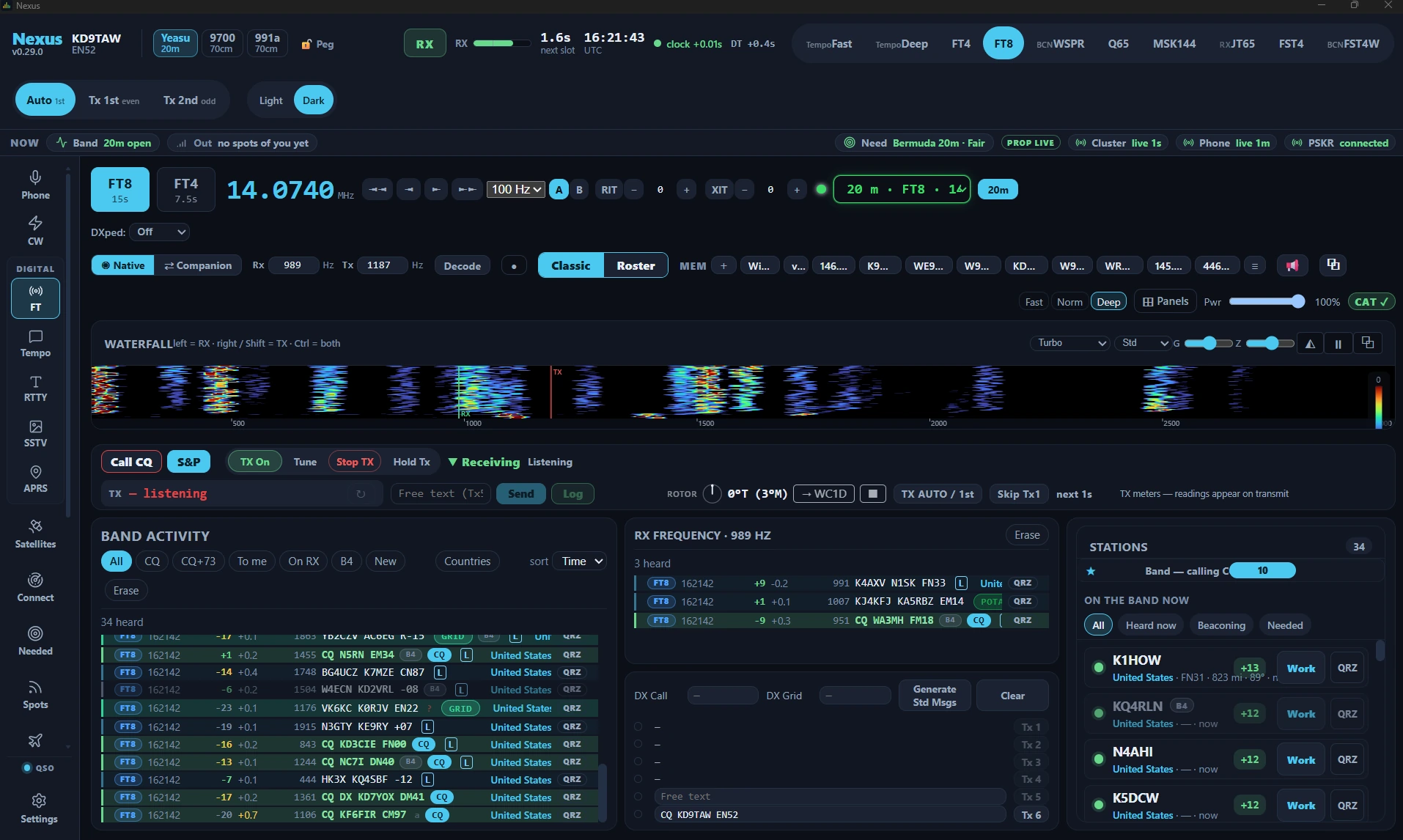
Waterfall + decode feed. The waterfall spans the full width of the cockpit by default, between the rig controls and the QSO strip. Drag the dividers between panes to resize it (double-click a divider to reset), or use the ⊞ menu to show and hide panes; Reset pane sizes in Settings ▸ Appearance ▸ Workspace restores the defaults. Decoding is always on — there is no Monitor toggle to forget; the decoder runs every RX slot regardless of TX state.
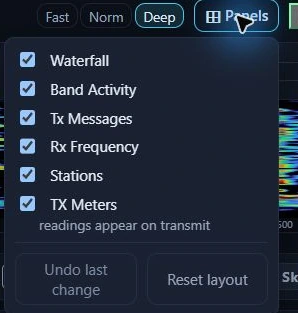
The ⊞ Panels menu in Nexus 1.10.3. Untick a pane to hide it; Reset layout puts the default arrangement back. An entry with nothing behind it right now says so in a line under it, as TX Meters does here.
Waterfall gestures. RX and TX are two separate cursors, and the click that moves one leaves the other where it is. The pane header prints the whole rule next to the word WATERFALL:
| Gesture | Moves |
|---|---|
| Left-click | the RX cursor (green) — where the decoder listens |
| Right-click, or Shift-click | the TX cursor (red) — where you will transmit |
| Ctrl-click | both cursors together |
Working split — answering a station on your own frequency rather than theirs — is therefore a right-click, and moving the pair together to a clear patch of band is a Ctrl-click. These are the same three gestures the quick start uses in its two-minute cockpit tour.

Band Activity scrolls chronologically, bottom-pinned, with a reviewing pause when you scroll up and period separators between T/R cycles. Every row carries annotations stock WSJT-X never had:
- the country / DXCC entity name,
- a B4 chip when you’ve worked the call before,
- new-DXCC and new-grid tags,
- CQ and YOU badges,
- AP / low-confidence markers,
- JTAlert highlight colors (honored over UDP if JTAlert is feeding them),
- a teal L mark on calls known to upload to LoTW (populate the users list in Settings ▸ Logging & Connectors).
The QSO strip sits directly under the waterfall, above the decode panes, carrying your transmit controls — TX On/Off, Tune, Stop TX, Hold Tx — beside Call CQ and S&P. (These live in the QSO strip in this view; Phone and CW keep the cluster in the top bar.)
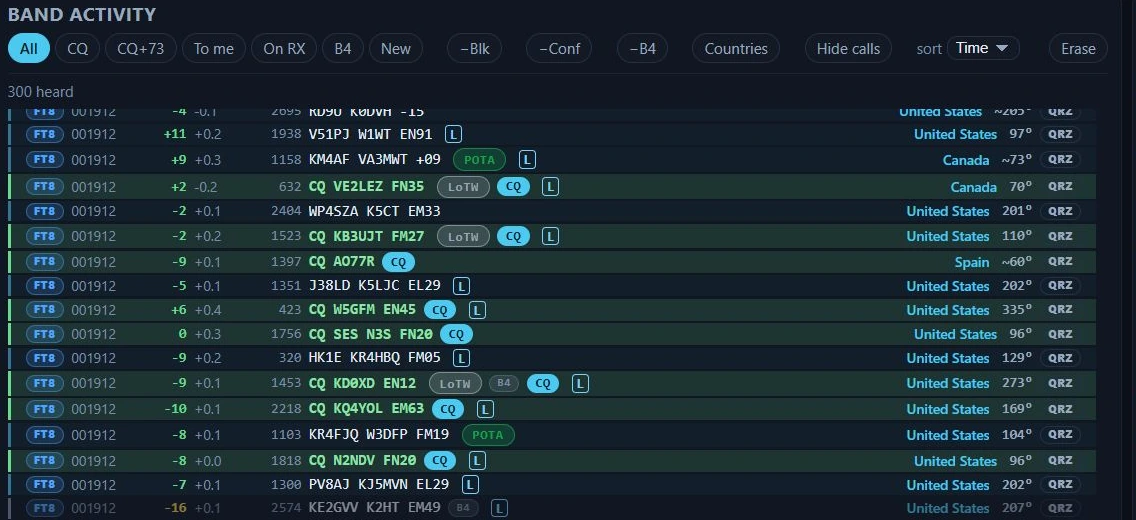
Band Activity in Nexus 1.10.3, with the annotations stock WSJT-X never had. Rows worked before carry B4; L and LoTW mark calls known to upload to LoTW; POTA flags a park activation; the entity name and bearing sit at the right of every row.
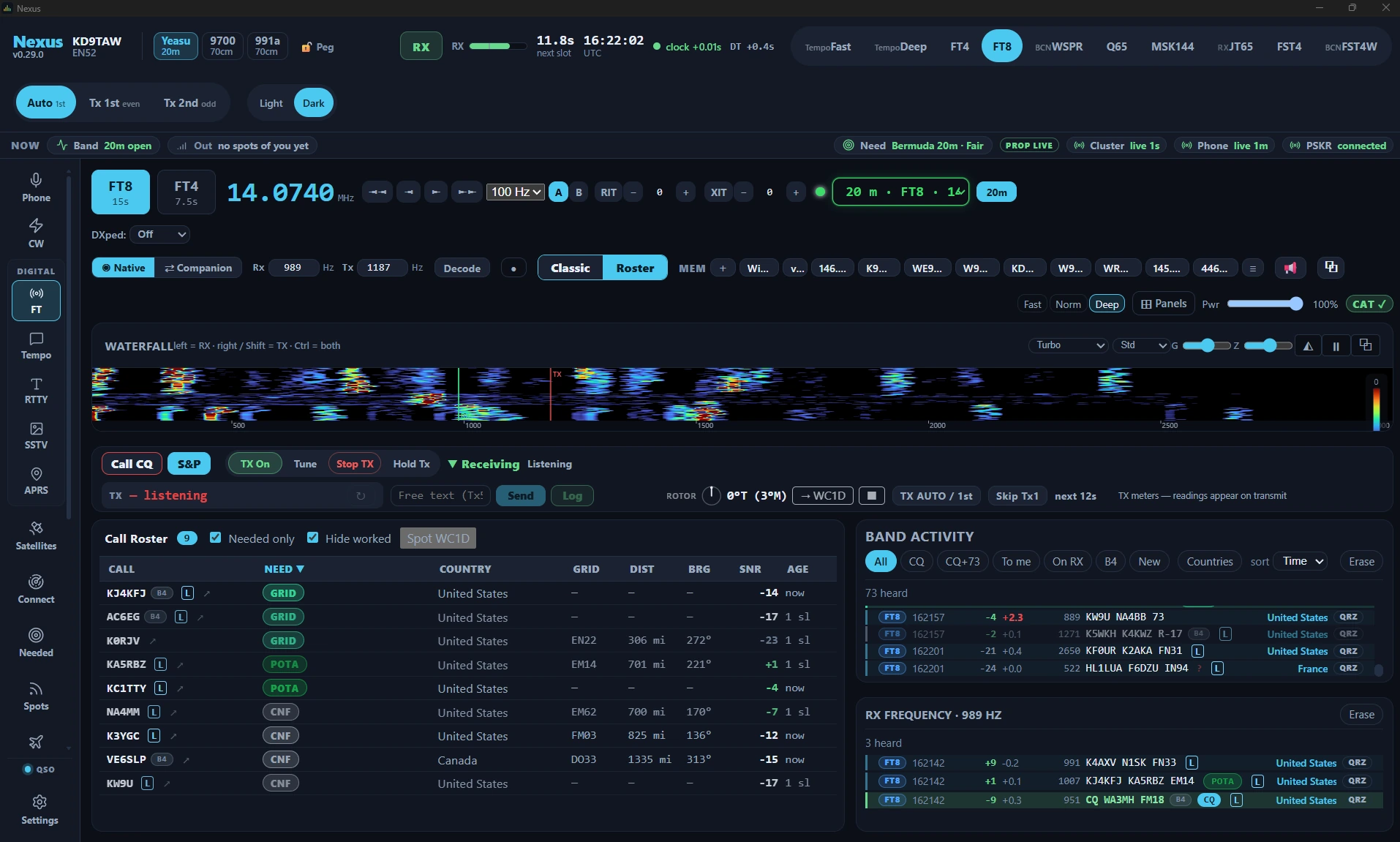
Classic ↔ Roster. A single toggle switches the layout:
- Classic is the stock-style Band Activity view, with the Tx1–Tx6 message panel, editable DX Call / DX Grid fields, and Generate Std Msgs.
- Roster is a modern sortable call roster — one row per station, sorted by what matters to you.
Use Classic when you want the familiar WSJT-X message-by-message control; use Roster when you’re scanning a busy band for the one call worth working.
Core workflows
Answer a CQ (search & pounce)
- Find the station in Band Activity or the roster. New-DXCC/new-grid rows are tagged; a B4 chip means you’ve worked them before.
- Double-click the decode. Nexus jumps to exactly the Tx step stock WSJT-X would choose given what that station last sent, and — with “Double-click arms TX” on (the default) — enables TX so your reply goes straight out.
- The sequencer runs the exchange automatically: your report → their roger-report → RR73 → 73. It locks onto the worked station, so a report from a bystander never advances your QSO, and portable suffixes are matched by base call.
- On the final 73, TX disarms (WSJT-X default — see “Disable TX after sending 73” in Settings ▸ Digital). The QSO logs automatically if Auto-log is on.

The sequencer three overs in, in Nexus 1.10.3. The state word is the engine’s own — AwaitRr73 means your rogered report has gone out and it is waiting for their RR73 — and the TX line is what goes on the next slot.

The same contact after the 73, at the top of the Logbook in Nexus 1.10.3. Digital reports are logged as the dB figures the mode exchanged, not as 59.
Run CQ (call and work the pileup)
- Set your band and audio frequency, then click Call CQ. Directed CQ (CQ DX, CQ NA, CQ POTA, CQ 040…) persists across the run exactly like stock Tx6.
- When a station answers, the sequencer works them, then auto-returns to CQ for the next caller.
- Optional guards in Settings ▸ Digital: “Stop CQ after N calls” ends an unanswered run; “Auto-CQ: drop a silent caller after N overs” abandons a station that answered then went quiet.
Remember to pick your transmit period (Tx 1st / even, or Tx 2nd / odd) — the two stations in a QSO must be on opposite periods. The choice is on the top bar and in Settings ▸ Digital.
Work a needed station
The Needed board ranks everything on the air by what it’s worth to your log. One click on a row QSYs band + mode + exact frequency atomically and opens this cockpit with the DX ready to work — the same atomic path as double-clicking a spot on the Connect map.
Hound a DXpedition (Fox/Hound)
- Turn on DXpedition mode ▸ Hound in Settings ▸ Digital (or start it from a DXpedition board row).
- Nexus spreads your initial calls above 1000 Hz (session-salted so callers don’t stack) and auto-moves your TX to the Fox’s frequency the moment you’re answered.
- Multi-payload Fox frames are split and attributed safely — a bystander’s “73” can never fabricate a confirmation in your log.

Hound armed and split set in Nexus 1.10.3 — nothing in this frame is transmitting. The split stepper appears only once CAT is answering, because the offset is programmed into the radio rather than faked in audio.
Nexus implements the Hound side. The Fox role (running the DXpedition end) is not implemented.
Split, decode depth, and re-decode
- Split Operation offers the stock trio in Settings ▸ Radio ▸ Rig & CAT: None, Rig (VFO B), and Fake It (TX audio held to 1500–2000 Hz with the dial shifted in 500 Hz steps for a cleaner signal).
- Decode depth (Fast / Normal / Deep) and the decoder passband (default 200–2900 Hz) are in Settings ▸ Digital.
F6re-decodes the retained last period and adds only what the first pass missed.Eschalts TX,F4clears the DX call,Alt+1–Alt+6fire the Tx slots.
Working with the rest of the shack
Nexus speaks WSJT-X’s UDP protocol byte-for-byte, so GridTracker, JTAlert, and your logger see Nexus as WSJT-X. Outbound Heartbeat / Status / Decode / QsoLogged and inbound HaltTx / Clear / Replay / Location / HighlightCallsign all use the canonical type numbers, and PSK Reporter spotting batches on the stock schedule.
If another app owns the rig, Companion mode rides an upstream WSJT-X/JTDX decode stream over UDP (default :2237) instead of decoding itself — point it at the source in Settings ▸ Logging & Connectors.

The two ends of the UDP link in Nexus 1.10.3, and they point opposite ways. The left pair is what Nexus sends — the feed GridTracker and JTAlert read. The right field is what Nexus listens to in Companion mode. Loopback here because both programs are on one PC; across the shack it is the other machine’s address.
Honest limits
- Fox role is not implemented — you can hound a DXpedition, not run one.
- No contest modes in the digital cockpit beyond Field Day (no NA VHF, RTTY RU, WW Digi).
What each tier can do in 1.10.3
Every tier the dial offers decodes and transmits. Two of them transmit on a schedule instead of working a QSO, and the sequencer is not offered on those.
| Tier | Decode | Transmit | Auto-sequencer |
|---|---|---|---|
| FT8 | yes | yes | yes — plus Fox/Hound (Hound side) and contest exchanges |
| FT4 | yes | yes | yes |
| FT2 | yes | yes | yes |
| Q65 | yes | yes | yes |
| MSK144 | yes | yes | yes |
| FST4 | yes | yes | yes |
| FST4W | yes | yes | no — a beacon: callsign, grid and power on a transmit-percentage schedule |
| JT65 | yes | yes | yes |
| WSPR | yes | yes | no — a beacon, as FST4W |
| TempoFast | yes | yes | yes |
| TempoDeep | yes | yes | yes |
The table is the code, not a promise: Capabilities.tx in
crates/modes/src/mode.rs is what the engine reads, modes::tx_mode is the only
path to a mode that may key the radio, and
tx_capability_is_declared_not_inherited in that file asserts the two agree for
every tier above. A mode that declared no transmitter could not be armed at all —
Engine::set_tx_enabled refuses the arm outright.
One label in the app is wrong about this. The JT65 pill in the top bar still carries an RX badge and a tooltip reading “Receive only in this build (transmit is disabled pending a fix)”. That was true for 0.19.17 only, as a mitigation while a decoder fault crashed Windows on Call CQ; the fault was fixed and the restriction lifted, but the badge and the tooltip were not. JT65 transmits in 1.10.3 — arm TX and call CQ on it exactly as on FT8.

The tier pills in Nexus 1.10.3. BCN on WSPR and FST4W is correct — those are beacons. RX on JT65 is a stale label; that mode transmits.
The Tempo chat layer (TempoFast/TempoDeep)
Flip the mode switch to Tempo and the operating cockpit becomes a chat-first, per-station conversation surface. This is the original Tempo product, and still the novel part of Nexus: two experimental weak-signal protocols that carry the same WSJT-X 77-bit message set as FT8, so structured exchanges stay bit-compatible with the FT8 ecosystem.
Two tiers share the cockpit, selected on the dial:
- TempoFast — a 4-second-cycle coherent waveform (~−15 dB AWGN threshold in simulation). The short cycle is the point: keyboard chat that feels like a conversation instead of a slideshow.
- TempoDeep — a 15-second non-coherent 8-FSK robust tier, built to shrug off fading (~3.7 dB fading penalty in simulation where coherent modes lose 10+).
Nexus remembers your tier per area, so setting the dial to one tier and stepping away to another section brings you back to the same tier.
On top of the waveform:
- Threaded per-station chat with word-wrapped chunked free text.
- Presence / heartbeat roster — who’s on frequency and reachable.
- Presence-gated store-and-forward — a directed message queues until the recipient is actually heard, then delivers with correct attribution.
- IR-HARQ (on by default) — a weak frame that fails isn’t wasted; its retransmissions are joint-combined (RV0 → RV1 → RV2) until the message lands, for a simulated ~+2.5 dB / ~2× completion gain in the marginal zone. A session rescue counter in the UI shows how often it saved a frame. Toggle it in Settings ▸ Digital.
- Coordinated QSY (Roam) — an announced, plain-text, in-the-clear frequency move for keeping an off-grid net together, with deterministic timing and automatic return-home on lost sync. It is a net convenience, not privacy and not encryption; it is off by default.
Honest status of TempoFast/TempoDeep
Two questions live here and they have different answers. Do the tiers work on the air? Yes — the first over-the-air TempoFast decode was on 2026-07-21 and the first two-station Tempo QSO (KD9TAW and N9UM, 6 m) completed on 2026-07-26, which retires the question every new waveform faces. Did the threshold numbers come from the air? No. Every TempoFast and TempoDeep performance figure above is a bench number from AWGN and fading sweeps, and it is labelled that way for that reason. TempoFast does not beat FT8 on raw sensitivity — it trades roughly 6 dB of raw single-shot sensitivity for a nearly 4× faster cycle plus HARQ. What is still owed is decode rate against signal level on real paths, and an on-air report is the single most useful thing you can send. The FT8/FT4 tier carries the daily-driver load meanwhile.
Related guides
- Needed — DX that’s on the air now
- RTTY — the sibling digital cockpit, free-running instead of slotted
- SSTV — the same waterfall instrument, carrying pictures
- Memories — the bank behind this cockpit’s MEM strip
- Connect — map + propagation
- Logbook & QSL
- Settings reference
This page is synced from docs/guide/operate-digital.md in the Nexus repo. Corrections belong there.