Chat (Tempo)
Chat is Nexus’s own weak-signal conversation mode — the thing the program was originally built to be, and still the only part of it you cannot get anywhere else. It is a text messenger that runs over HF: a roster of who is on frequency, a threaded conversation per station, and free text that goes on the air in slot-synchronous overs like FT8, but carries sentences instead of a fixed exchange.
Two waveforms sit under it. TempoFast is a 4-second cycle, and it is what you will use for an actual conversation — short overs, quick back-and-forth. TempoDeep is a 15-second cycle that trades speed for depth, and it is the one that keeps working when a path is fading badly. Both carry the same 77-bit payload the FT8 message set uses, and both decode the whole 200–2900 Hz passband every slot, so you do not have to be tuned onto anybody.
Be honest with yourself about what this is. Both tiers have closed real links on the air, and every sensitivity figure quoted for them is a bench number from simulation — none are proven on the air yet. Nobody else is running Tempo unless you have arranged it. This is a mode for a sked with somebody who also has Nexus, for a group net, or for finding out whether the thing works. If you want contacts today, the Operate cockpit is where the population is.
The tour
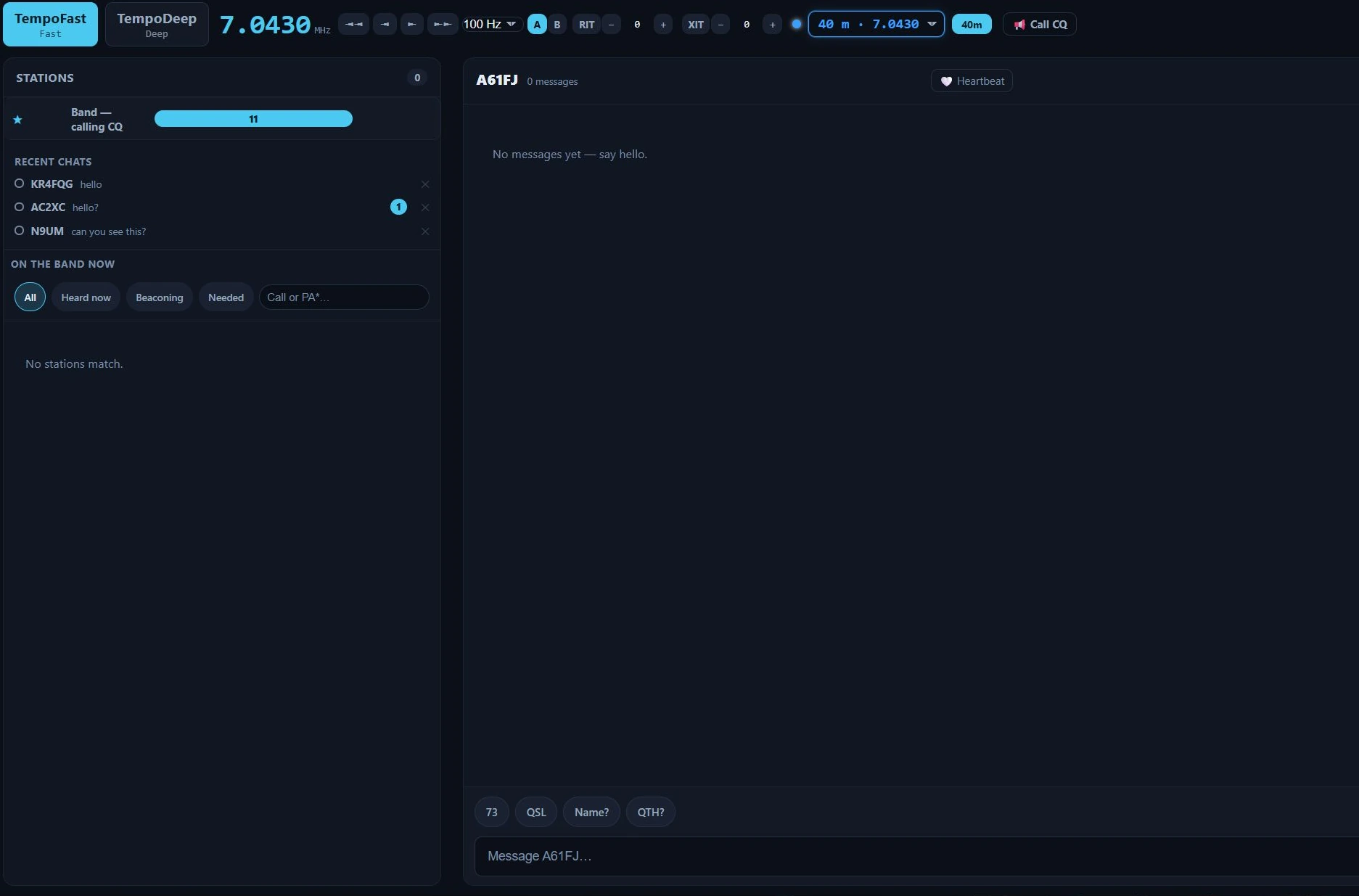
The Tempo workspace in Nexus 1.10.3, on 40 m with nothing heard yet. The right-hand waterfall and Band Activity panes are cropped off — they are the shared digital ones, covered in Operate.
The left column, headed Stations, stacks three things, top to bottom.
★ Band — calling CQ is the broadcast feed: everything heard that was not addressed to anybody in particular. That is where CQs land, and where your own CQ goes. The number on it is how many are in that feed.
Recent chats keeps your threads, so a conversation stays reachable after its station has dropped off the live roster. A badge on a row is unread messages; the ✕ archives that thread.
On the band now is the Stations roster — who Nexus has heard on Tempo, which is not the
FT8 roster. Each card shows the callsign, entity, grid, distance and bearing, how long ago it
was heard, and its SNR. The chips above it filter to All, Heard now, Beaconing
(heard three or more times, so probably sitting there) or Needed, and the search box takes
wildcards — PA* for every PA prefix, several terms for “any of these”. A station stays on
this roster far longer than on the FT cockpit’s, because a queued message needs to know you
heard them recently. With nothing heard it says No stations match, which on a band with no
other Tempo station is the normal reading.
The conversation pane is the middle of the screen and behaves like any messenger: your messages on one side, theirs on the other, oldest at the top. Each of your bubbles carries its own delivery state, and this is the part worth learning, because on HF “sent” is not a simple idea.
What you see on the bubble is a mark, not a sentence. The tier the message went out on
(TempoFast or TempoDeep) is printed under the text, and the delivery state sits beside it
as one of five glyphs. Hover the glyph — or read it with a screen reader — for the sentence:
| Glyph | The sentence behind it | What it means |
|---|---|---|
| ⋯ | “Waiting to send”, or “Waiting to send — call not heard yet” | Queued. If it names a station, they have not been heard yet — see store-and-forward below. |
| ↻n | “Sending — try n” | On the air now, attempt n. |
| ✓ | “Sent” | It went out. |
| ✓✓ | “On air” · “Delivered” · “Confirmed — they answered after this went out” | Three different states share this mark. Delivered means a real acknowledgement came back; Confirmed means they answered afterwards, which tells you the same thing by inference. Hover to see which one you have. |
| ⚠ | “Sent n× — no acknowledgement. Tap to send it again.” · “Not sent — abandoned on restart. Tap to send it again.” | Either it went out repeatedly and nothing came back, or it was still queued when Nexus closed. Tap the bubble to send it again. |
A partly-received incoming message shows how much arrived as its own badge — ”⚠ 3 of 5 received” — rather than pretending it is whole or throwing it away.
The composer is the box at the bottom. Type and press Enter. The quick-reply chips beside it are your own macros from Settings, so they say what you told them to say.
The capacity meter beside the composer is the thing that has no equivalent in a normal
messenger, and it matters: it counts your text in overs, not characters. It reads
0/9 overs on an empty box. An over carries ten characters and a message may span nine of
them, so ninety characters is the whole budget; the meter goes amber two overs from the cap
and says full at it, and anything past the cap is trimmed before it sends. Overs, not
characters, because words wrap whole — a word never straddles two overs, so a flat character
count would lie to you. On TempoFast an over is four seconds, so a five-over message is twenty
seconds of transmission. Short sentences get through; paragraphs do not.
Call CQ transmits the standard CQ <YOURCALL> <YOURGRID> on the band feed and arms
transmit. Heartbeat is a presence beacon: leave it on and Nexus periodically says you are
here, so other Tempo stations can hear you — which is what lets them deliver anything they have
queued for you. Turn it off to sit silent.
Core workflows
Have a conversation
Pick a station from the roster, or click a thread in Recent chats. Type, press Enter, watch the bubble’s state. Keep overs short — this is a mode where a sentence is a transmission.
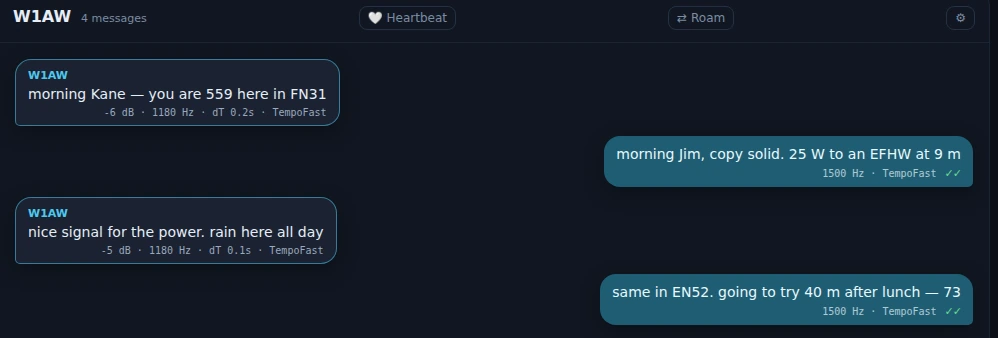
A finished exchange in Nexus 1.10.3. The double tick on an outbound bubble is Delivered: an acknowledgement carrying that message’s own id came back. It is not inferred from the reply that followed.
Call CQ and be found
Press 📣 Call CQ. It goes out on the band feed and arms transmit. Anyone running Tempo who hears it sees you on their roster and can open a thread with you. Leaving Heartbeat on between calls means they can find you even if they missed the CQ.
Send to a station who is not there yet
This is the feature that makes Tempo different from a chat window, and it is worth understanding before you need it. A directed message queues until its recipient is actually heard, and then delivers. The bubble sits at “Waiting to send — call not heard yet” for as long as that takes — minutes, or until the band opens.
This is why the roster keeps stations long after they have gone quiet, and why the heartbeat matters: presence is what turns a queued message into a delivered one. Nothing is broadcast blindly into an empty band on your behalf.
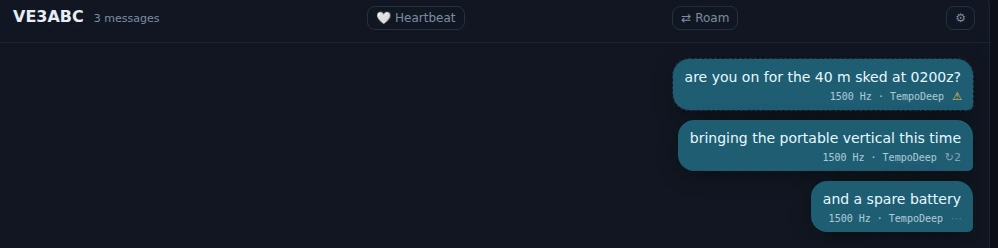
The three states an outbound message sits in, in Nexus 1.10.3. ⋯ has never been on the air — VE3ABC has not been heard yet. ↻2 is on its second transmit cycle. ⚠ spent its whole cycle budget with nothing coming back; tap it to re-queue the same text.
When a message will not go
Marginal paths are the normal case here, so failures are visible rather than silent.

An outbound bubble mid-send in Nexus 1.10.3: ↻1 is attempt one. The mark changes as the
message progresses; hover it for the sentence.
A bubble carrying ⚠, whose hover reads “Sent 4× — no acknowledgement”, is telling you the truth: it went out four times and nothing came back. Tap it to re-queue the same text. Do not retype it — tapping re-sends the identical message, which is what the error-correction machinery below wants.
Underneath, failed overs are not simply thrown away. Nexus combines a failed frame with its retransmissions rather than starting over, so the third attempt at a marginal message is working with everything the first two brought in as well. It is on by default and there is nothing to configure; you will see it as messages completing that felt like they should not have.
Winter Field Day
When Winter Field Day is active, Tempo is a first-class contact surface for it: the header says so, the empty pane tells you to call CQ and send your exchange, and the first quick-reply chip becomes your class and section. That is Winter Field Day only — the summer event’s chrome does not appear here.
Honest limits
- There is no population. Tempo is not a mode you tune to and find people on. Arrange a sked, or run it alongside FT8 and see who turns up.
- Every sensitivity number is from the bench. Simulation figures, not on-air measurement. On-air decode-rate-versus-SNR reports are the single most useful thing a tester can send.
- Text is charged by the over. The capacity meter is not a suggestion; text past the limit is trimmed before transmission.
- This screen has no stop control of its own. Call CQ and the heartbeat put a signal on the air, but neither is a transmit latch. Transmit is stopped from the top bar, as it is everywhere outside the mode cockpits.
- Nothing else on the air speaks Tempo. TempoFast and TempoDeep are Nexus’s own waveforms. WSJT-X, JS8Call, fldigi and the rest cannot decode them, and Nexus cannot answer anything they send. A station has to be running Nexus, in this section, on your frequency. If you want a keyboard mode other software can hear, that is JS8 or PSK.
Related guides
- Operate (digital) — FT8 and FT4, where the population is.
- Conditions — the situational-awareness screen, including who is on the band.
- Settings reference — macros, which are what the quick-reply chips say.
- Logbook and QSL — where a Tempo contact goes once it is worked.
This page is synced from docs/guide/chat.md in the Nexus repo. Corrections belong there.