DXpeditions
The DXpeditions section is your expedition planner: active operations on the air now, the forward calendar of what’s coming, your needed status for each one, and — the part that earns its keep — a per-day forecast of your best shot at each entity plus a wake-me alarm that only fires when the expedition is actually on the air.
DXpeditions ships enabled — the wizard turns everything on — and the DX/awards and 6m/VHF goal profiles both keep it. If you have trimmed sections, switch it back on in Settings ▸ App ▸ Features. It never touches the rig on its own: nothing here retunes until you press ▶ Work on a card, and the QSO itself still happens in a cockpit. It tears off to a second monitor with ⧉ Pop out.
The tour
The section is two halves: Work now at the top, for what is on the air this minute, and the calendar below it, for planning.
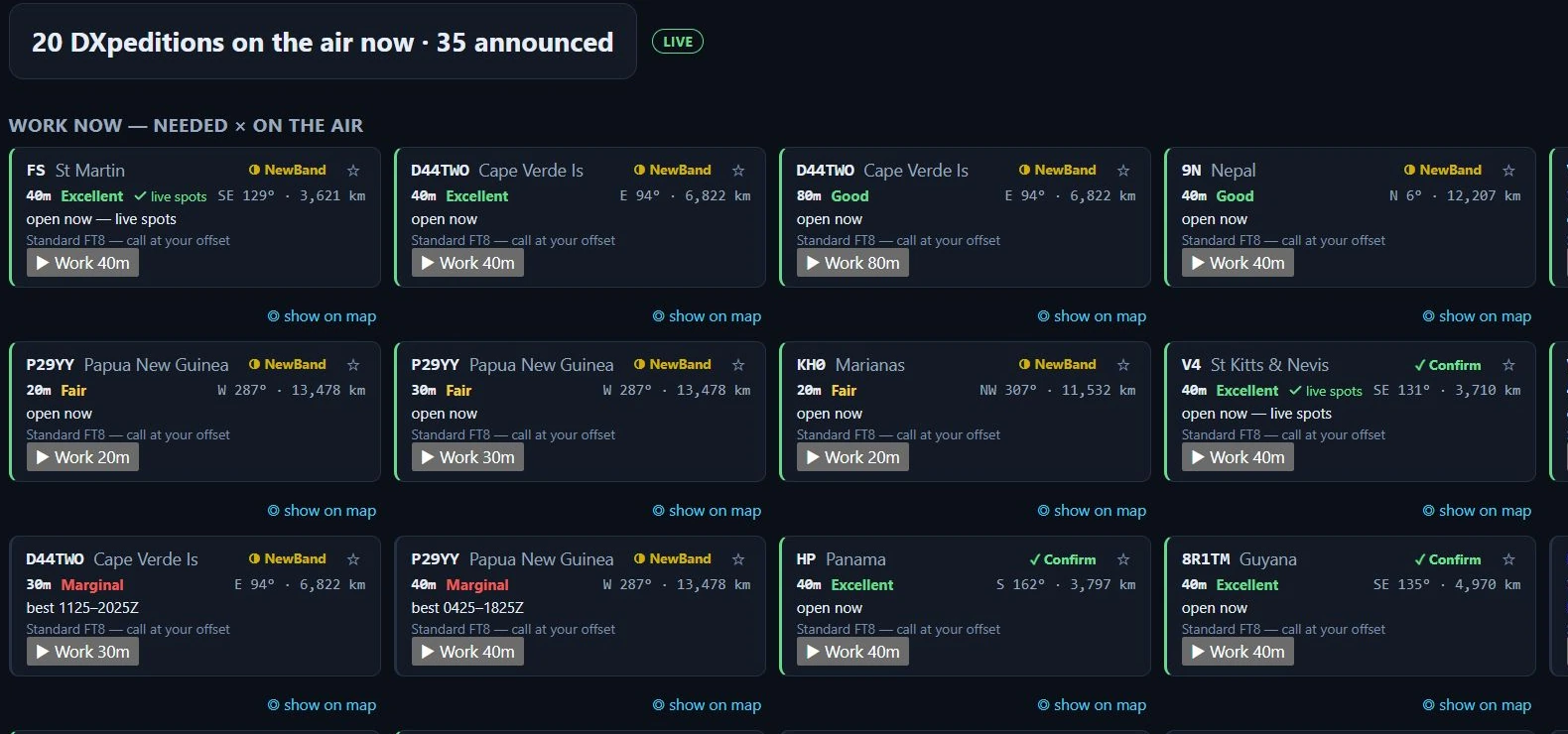
The Work-now grid in Nexus 1.10.3 on one evening. The counts, entities and workability ratings are whatever the feeds and the propagation model said at that moment — they are not a target and they will not match your screen.
The hero line counts what is on the air now against what is announced, and the badge beside it is the data’s own provenance: LIVE, PARTIAL, CACHED nm or NO LIVE DATA. A cached badge means you are reading the last good fetch, not the present.
Work now — needed × on the air is the crossing of two questions: expeditions you still need, and a band with a modelled path to you right now. Each card carries:
- the call and entity, and your need chip for it —
NewBand,Confirmand the rest of the Needed board’s vocabulary; - the ★ chase toggle, which alerts you when your modelled window opens and live spots confirm them;
- the band and its workability — Excellent, Good, Fair, Marginal or Closed — with a ✓ live spots mark when PSK Reporter spots confirm that band toward the DX region rather than only the model;
- the bearing and distance from your grid;
- open now, or best HHMM–HHMMZ when the window is later;
- what to expect on the air (
Standard FT8 — call at your offset, or a SuperFox warning); - ▶ Work band — jump the rig to that band and open the right cockpit;
- ◎ show on map — open Conditions with that expedition selected.
▸ details on a card opens the full 24-hour × band reliability grid for that path, which is where a “Marginal” turns back into numbers you can argue with.
When nothing crosses both tests the grid says so plainly rather than sitting empty: “Nothing you need is workable right now.”
Core workflows
Plan your shot
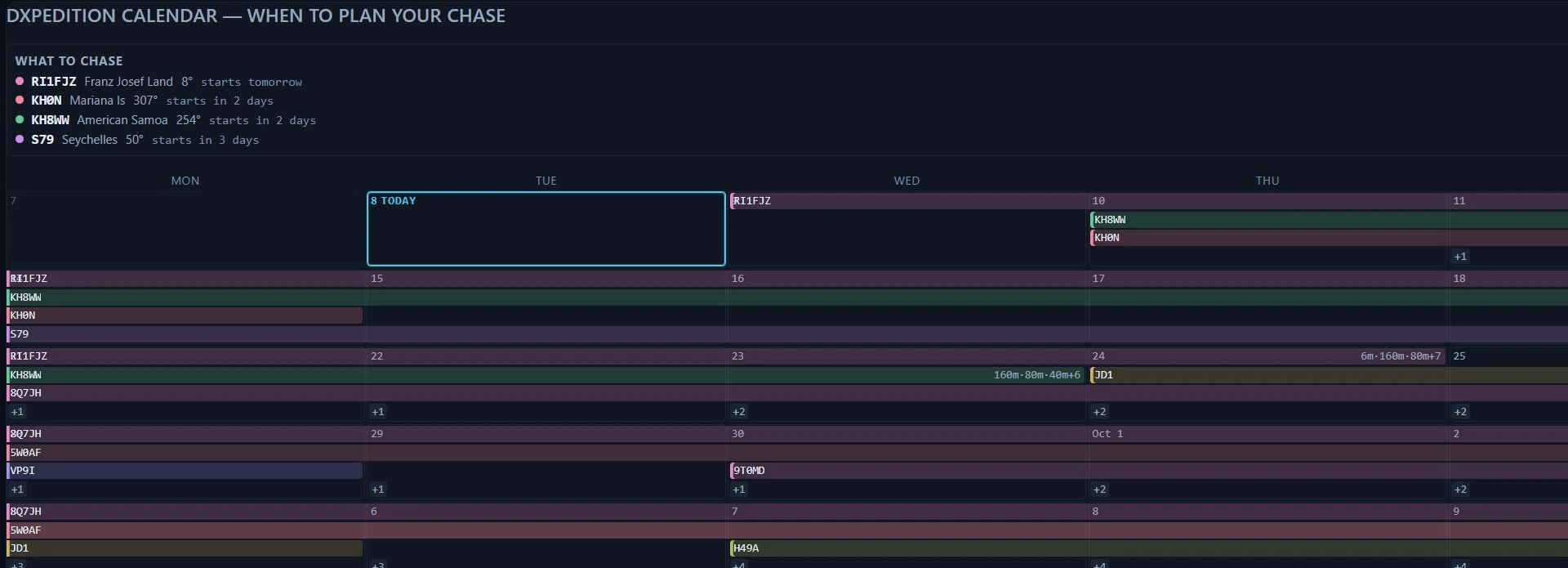
The calendar in Nexus 1.10.3. The grid runs Monday to Sunday — the last three columns and the per-bar band summaries continue off the right of this crop, and the Calendar / Details tabs sit at the top right of the panel.
What to chase is the digest above both views and it does not change with them: the operations worth your attention, each with its bearing and how soon it starts, and beside each one the band, workability and UTC window Nexus models as its best, with the days to aim for.
The panel has two views:
- Calendar is the month grid, and it is what you land on. One bar per operation across the
days it is announced for, today outlined,
+nwhere a day has more operations than fit, and each bar’s own band list at its end. A bar names its call, entity, dates, bands and modes on hover, and says· chasingwhen you have starred it. - Details is the per-operation list, and it is where the planning controls live: the 7-day strip, the reliability heatmap, the ★ chase toggle, the ⏰ alarm and the link to the expedition’s own website (or their QRZ page, labelled as the fallback when no site was announced).
Clicking a bar in the grid — or a row in the digest — switches to Details and scrolls to that operation.
The week planner is that 7-day strip on a Details entry: one chip per day, Su through
Sa, coloured by your modelled best shot that day. Dimmed chips are days the operation is
not on the air — the model still runs, the expedition just is not there. Hover a chip for that
day’s best band and window, or “no modelled path” when there isn’t one. This is your own
station’s forecast, not a generic one: it uses the propagation engine you picked in
Settings ▸ Services, and each entry
says which engine produced its number.
To plan a chase:
- Find the operation in Details and read its 7-day strip.
- Hover the best-coloured day for the band and window Nexus models as your strongest opportunity.
- When the window comes, work them from the Work now grid’s ▶ Work band button, or through the Operate cockpit — turn on Hound mode for the pileup (Settings ▸ Digital, or the DXpedition chip selector in the Operate cockpit). Active expeditions also surface on the Needed board and the Conditions map when heard.
Set a wake-me alarm

An armed wake-me alarm in Nexus 1.10.3, staged on a fixture operation. The ★ is the chase toggle and the ⏰ beside it is the alarm; the lead selector reads 30 min. The time basis is the strip underneath — a 24-hour band × hour grid running 00Z to 23Z — so the lead counts back from the window’s UTC start, never from local time. No alarm was left armed on a real operation.
- Switch the calendar to Details and click the ⏰ beside the ★ on the operation’s entry. (The ★ is the chase toggle — it alerts you when your window opens and live spots confirm them. The ⏰ is the loud one.)
- Pick a lead time — 5, 15, 30, or 60 minutes before the window opens.
- At window-start minus your lead, you get a loud repeating beep (~60 s, with a Stop button) plus a banner that stays until you dismiss it.
The alarm is honest about when it fires: it only goes off while the expedition is actually on the air, it survives an app restart, and it never re-fires the same window twice. To test it cheaply, arm one whose strip shows an opening within the hour and set a 5-minute lead.
Honest limits
- Best-shot colors and windows are modelled, using your prediction engine and station details — treat them as a forecast, not a guarantee. The ✓ live spots mark on a card is the exception: that band is confirmed by real PSK Reporter reception toward the DX region. Live spots on the Needed board are the ground truth.
- The board sets you up; it does not work anybody. ▶ Work band jumps the rig to that band and opens the right cockpit — the QSO happens there, in the digital, CW or Phone cockpit, as it does everywhere else. Nothing on this screen keys a transmitter.
- Nothing here retunes on its own. Opening the section, an alarm firing, a chase alert — none of them move the radio. Only ▶ Work does.
- The counts are as fresh as the badge says. LIVE means the feeds answered; CACHED nm means you are reading a fetch that old; NO LIVE DATA means the board is showing nothing current at all. Read the badge before you trust a “on the air now”.
- A SuperFox operation cannot be worked here. Nexus has no SuperFox decoder in this version, so those transmissions never reach the decode list and Hound mode cannot help. The card says so. Work it in WSJT-X and log it back in Nexus.
Related guides
This page is synced from docs/guide/dxpeditions.md in the Nexus repo. Corrections belong there.