Nexus manual · Operating
Memories
Memories is Nexus’s saved-channel bank — the repeaters, HF nets, calling frequencies, POTA watering holes and digital dial frequencies you tune back to. One click tunes the rig, applies the repeater shift and access tone, and opens the cockpit that mode belongs in. It is Nexus’s bank, not the radio’s: nothing here writes channels into your rig’s memory slots, and the trip to a real radio is a CHIRP CSV, which Memories reads and writes both ways.
Every goal profile turns Memories on; switch it off in Settings ▸ Appearance ▸ Features. Entering the section never touches the rig — only an explicit Tune retunes.
The tour
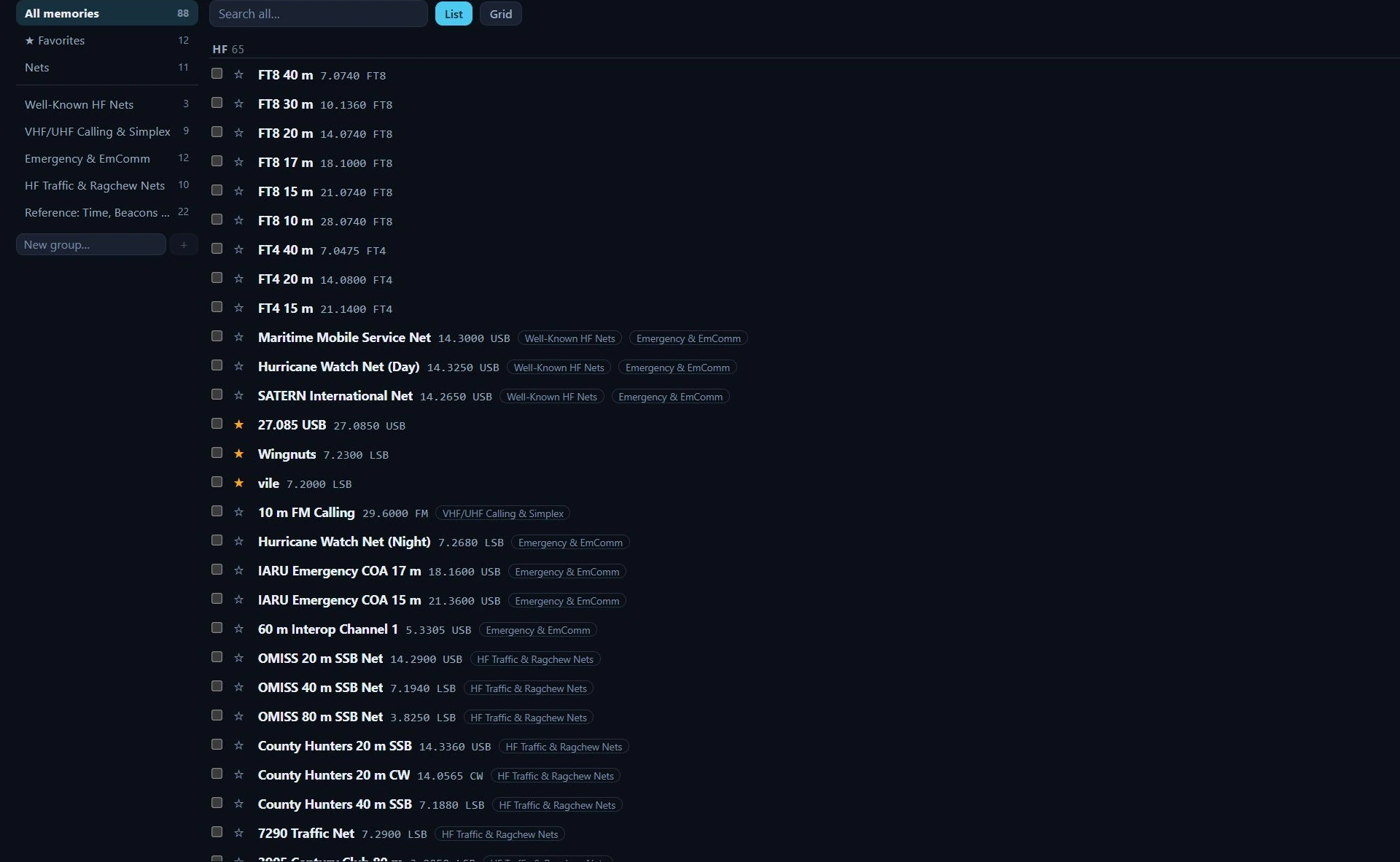
The bank in List view in Nexus 1.10.3, 88 channels in it. The per-row controls — ▲ ▼ for hand-ordering, ✎, Tune and ✕ — and the toolbar’s + Save / + New / Import / Export / Pop out / Packs buttons sit at the right-hand end of each row and of the toolbar, off the right of this crop.
What a memory holds. The RX (repeater-output) frequency in MHz is the one
required field; a mode string is the other thing a row cannot be without. On top
of that: a name (typed, or derived as 146.940 FM when you save without one), a
kind — Repeater, Simplex, HF net, Calling, POTA/SOTA, Digital, Satellite,
EmComm, Reference, Other — an offset direction (simplex / + up / − down / odd
split) with either an offset in MHz or an absolute TX frequency, a tone mode
(None / Tone / TSQL / DTCS) with its CTCSS frequency or DTCS code, a callsign,
free-text notes, group membership, the ★ favorite flag, and for an HF net the
days and UTC start time. A repeater sent over from the Program section also
carries the site’s latitude and longitude, so its distance and bearing are
recomputed from wherever you are now rather than baked in at save time. Nexus
stamps the last recall time. It does not store power, filter width or tuning
step — a CHIRP export writes a fixed 5.00 kHz step.
The sidebar holds three built-in views with live counts — All memories, ★ Favorites, Nets (every row whose kind is HF net) — then your groups below a separator. A memory can be in several groups at once. Select a group and ✎ / ✕ appear beside it: rename, or delete the group. Deleting a group keeps its memories; they just lose the membership. New group… at the bottom adds one.
The toolbar runs across the top of the main pane: a search box scoped to the selected view (it matches name, mode, callsign, notes and frequency), the List / Grid switch, + Save 14.074 FT8 — the button is labelled with the dial frequency and mode it will capture — + New, Import CSV, Export CSV (n) where n is the number of rows the current view is showing, ↗ Pop out, and Packs.
The list is one row per channel: the ★ toggle, then the name, the frequency
and mode, and a one-line summary of everything else — −0.600 · 103.5 for a
minus-shift repeater on a 103.5 Hz tone, →52.030 for an odd split, MoWe 01:00z for a net, 18 mi NE for a repeater whose site is known. Group chips
follow. Clicking the row body tunes it, as does the Tune button at the right
end; ✎ opens the inline editor and ✕ deletes the row. In All memories,
with no sort and no search active, ▲ ▼ arrows appear for hand-ordering the bank —
that order is what the cockpit MEM strip and the Ctrl+1…9 hotkeys follow. Rows
are split into an HF section (below 30 MHz) and a VHF / UHF section (30
MHz and up), with the headers appearing only when the view actually spans both.
The inline editor opens under the row and shows only the fields that kind needs. Name, Kind, RX MHz and Mode are always there — Mode is free text with USB / LSB / FM / NFM / AM / CW / FT8 / FT4 offered as suggestions. Repeater, Simplex and Calling rows add Offset, the offset MHz or TX MHz that direction implies, Tone, the CTCSS frequency (the standard 38-tone EIA ladder is offered, so typing is optional) or DTCS code, and Callsign. An HF net row instead gets day chips Su–Sa, a Start (UTC) time, and a Remind me row: a checkbox and a lead time in minutes, 1 to 120. Notes and group chips close the editor, and Done shuts it. Every text field commits on Enter or when you click away, and Esc inside a field reverts that field — an edit the store rejects (a blanked frequency, for instance) snaps back rather than looking saved. The same editor opens for + New, but pinned along the bottom of the pane instead of under a row, so the channel you are making is always in front of you rather than somewhere in a long list.
The grid is the same rows as a CHIRP-style spreadsheet: ★, Name, RX MHz, Mode, Offset, Tone, Kind, and a Tune / ✕ pair. Name, RX MHz and Mode are editable in place; click Name, RX MHz, Mode or Kind in the header to sort ascending, again for descending, a third time for none. The Offset column carries the same one-line summary the list shows, and the Tone column shows which tone system a row uses (TONE / TSQL / DTCS), not its frequency — for that, open the editor in List view.
Starter packs (the Packs button, or Browse starter packs on an empty bank) is a dialog of eleven bundled channel sets: VHF/UHF calling and simplex, HF FT8 & FT4, digital watering holes, CW & QRP, EmComm, HF traffic and ragchew nets, VHF+ weak signal, satellites, POTA/SOTA/WWFF, DX and contest, and a reference set of time stations and beacons. Each card shows its channel count and region. Installing creates a group named for the pack and puts the channels in it; the button reads Update once that group exists, and the toast separates what it added from what it refreshed, so “already up to date” means nothing changed. Re-installing is safe — duplicates are skipped — and a row whose content you have edited is yours from then on: a later pack update leaves it alone. The dialog closes on Esc, the ✕, or a click outside. The first-run wizard offers the same packs, pre-ticking calling frequencies and FT8/FT4, and only on a bank that is still empty.
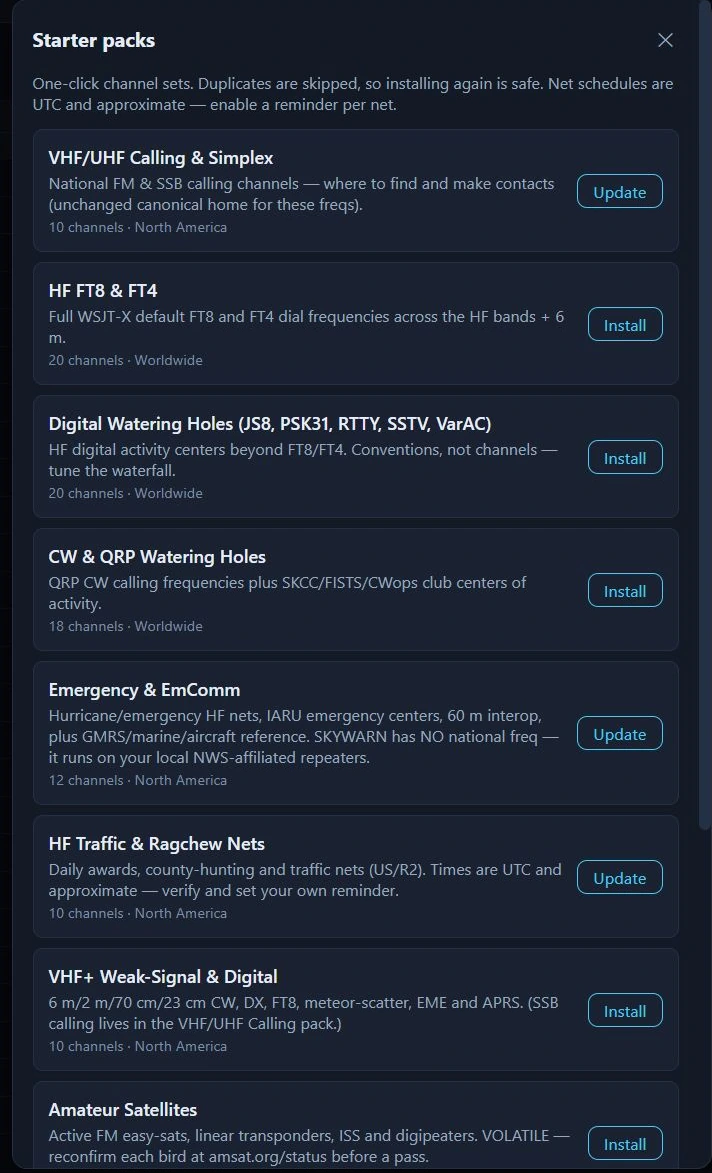
Starter packs in Nexus 1.10.3. The button is the tell: Install where the pack’s group does not exist yet, Update where it does. Nothing here is a recommendation — install the ones that match how you operate.
The MEM strip is the same bank in the header of the Phone, CW and Operate cockpits — the ★ favorites only, in bank order. MEM labels it; + saves the current dial and mode as a favorite; each chip tunes; ≡ opens this section. A chip highlights when the dial is within 500 Hz of its frequency, so you can see at a glance that you are sitting on a saved channel. Chip tooltips carry the full name, the frequency to four decimals, the mode, the tone if there is one, and — for the first nine — the Ctrl+1 … Ctrl+9 hotkey that recalls it from any section. The strip is one row that never wraps: past about 40 rem of chips it scrolls sideways inside itself, so the cockpit header cannot grow taller as your favorites pile up (the header used to, and that is the bug this shape exists to kill). Long names truncate with an ellipsis at 10 rem. The strip is not a ⊞ Panels entry — no layout you save hides it — and it appears only while the Memories section is enabled.
Core workflows
Save the frequency you are on
- From a cockpit, press + on the MEM strip. The channel goes in starred, so a chip appears immediately. Saving the same frequency and mode twice never piles up duplicates; if a matching channel is already in the bank but not starred, + stars that one instead of adding a second.
- From this section, + Save does the same without starring — unless you are looking at ★ Favorites, in which case it stars, or at a group, in which case it joins that group.
- Either way you get frequency and mode only. A repeater needs its shift and tone typed in afterwards (below) or brought over from Program.
Tune a saved channel
- Click the row (or its Tune button, or its MEM chip, or Ctrl+1…9 for the first nine favorites — the hotkeys work from any section and are ignored while you are typing in a field).
- Nexus applies the Phone submode and, for an FM memory, the repeater shift and access tone before the retune, so the rig keys the machine and not just its output. The band, mode and frequency then change in one atomic call, so the rig never lands in the new mode at the old dial.
- The cockpit follows the mode: CW opens the CW cockpit, FT8/FT4/JS8/PSK/RTTY and anything marked Digital opens Operate, everything else opens Phone. A saved USB or LSB memory keeps its exact sideband even where it runs against the band convention — an off-convention net on USB below 10 MHz comes back on USB.
- A toast confirms with the name and where you landed.
Enter a repeater by hand
Read this before you press + New. The channel is written to the bank the moment you press the button — before you have typed anything. The count in the sidebar goes up straight away, and so does the number on Export CSV. There is no draft state and no “save” step: the panel that opens is editing a channel that already exists.
That means backing out is the thing to get right:
| What you do | What happens to the channel |
|---|---|
| Enter in a text field | Commits that field and closes the panel. The channel is kept. |
| Esc in a text field | Reverts that field to its previous value and leaves the field. The panel stays open. |
| Esc anywhere else in the panel — a chip, a button, after leaving a field | Closes the panel. The channel is kept. |
| Click away, switch section, close the window, crash | The channel is kept. |
| Discard, at the right-hand end of the panel’s header | Deletes this new channel and closes the panel. This is the only way out that leaves the bank as you found it. |
Keeping it is the deliberate choice, not an oversight — a row seeded from the dial is a valid channel, and a stray click or a closed window cannot lose the one you were making. But it does mean an abandoned + New leaves a channel named for a frequency behind. Pressing + New again while an untouched new row is still sitting there re-opens that row rather than adding a second, so repeated presses do not pile up blanks — but a row you typed into, or one made at a different dial, is a separate channel. And delete has no confirmation and no undo, on Discard as on the row ✕.
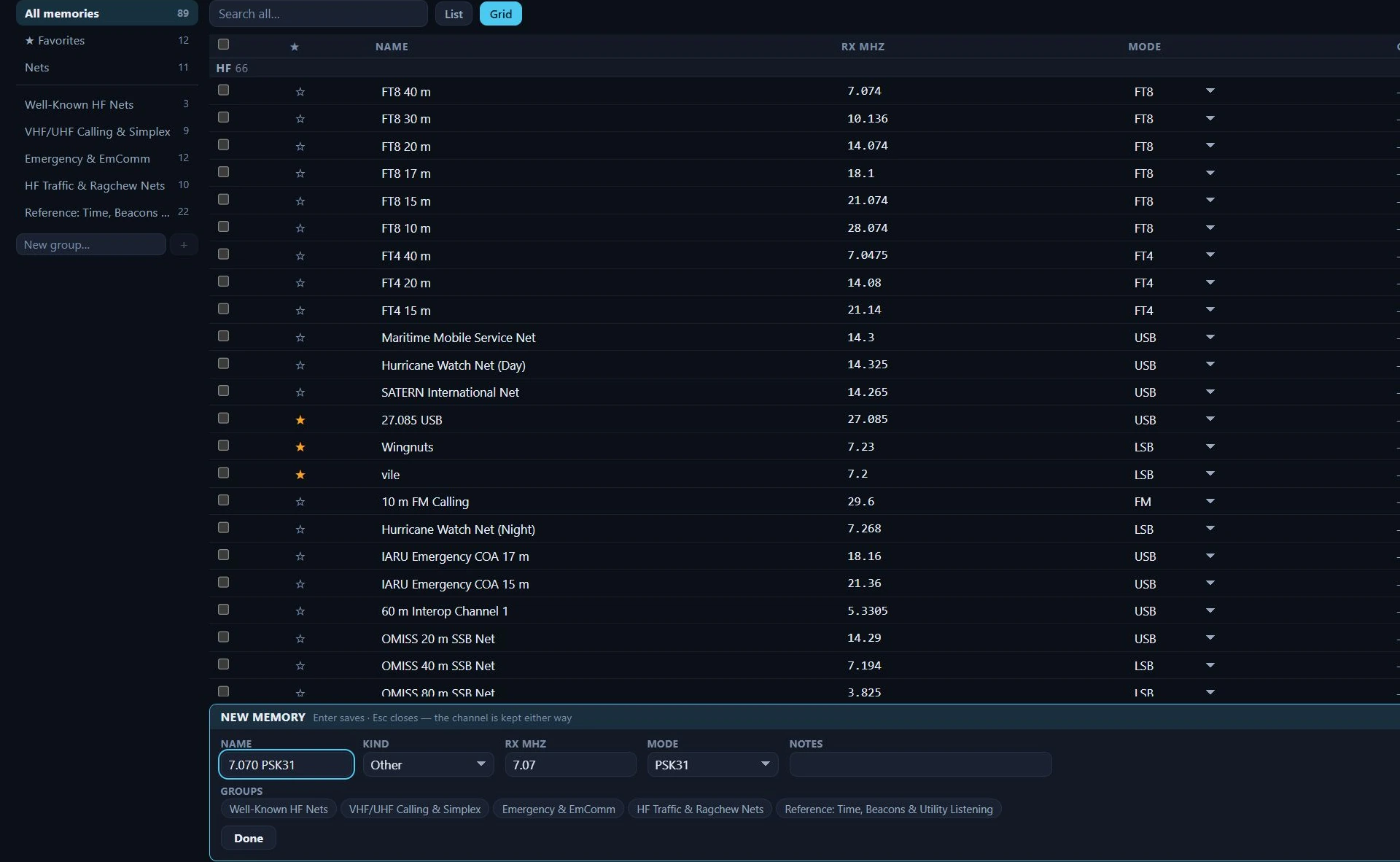
+ New in Nexus 1.10.3, one press in. The bank read 88 before the press (the List-view picture at the top of this chapter) and reads 89 here, with nothing typed and nothing saved — the channel is already in the bank. The panel says so in its own header. Discard sits at the right-hand end of that header row, off this crop.
- + New adds a row seeded from the current dial and opens its editor. The new row matches the view you are in, so it is visible where you created it — starred under Favorites, an HF net under Nets, a member of the group you have selected.
- Set Kind ▸ Repeater, type the output frequency in RX MHz and set Mode ▸ FM.
- Set Offset ▸ − down (or + up) and the Offset MHz. Leave the offset at 0 to use the band standard. For a machine with an odd split, choose Odd split and enter the absolute TX MHz.
- Set Tone ▸ Tone (encode) and the CTCSS Hz the machine wants — TSQL if you also want your receiver squelched by the same tone, DTCS for a digital code.
- Name it, and star it if you want it on the cockpit strips.
Send repeaters over from Program
The Program section searches repeaters near your grid and builds channel lists. Two paths land here:
- ★ a machine in the results list — it goes straight into Memories as a favorite, with its shift, tone and site coordinates, and appears on the cockpit MEM strip without a trip through the list builder. The star toggles back off, and starring a machine the bank already holds stars that row rather than duplicating it.
- Save to Memory Bank in the channel-list builder writes the whole list in one go — analog rows only (digital-only machines are skipped), deduped, unstarred, and each one lands as FM. Star the ones you want on the strips. Rows saved this way carry shift and tone but no site coordinates (the builder persists channels, not the source records), so they show no distance.
Repeater rows carry −0.600 · 103.5-style summaries in the list, and their
distance and bearing from your grid — miles and an eight-point octant — recompute
on every render. Set your grid in
Settings ▸ Station; operate portable and the
mileage follows you.
Track a net and get a reminder
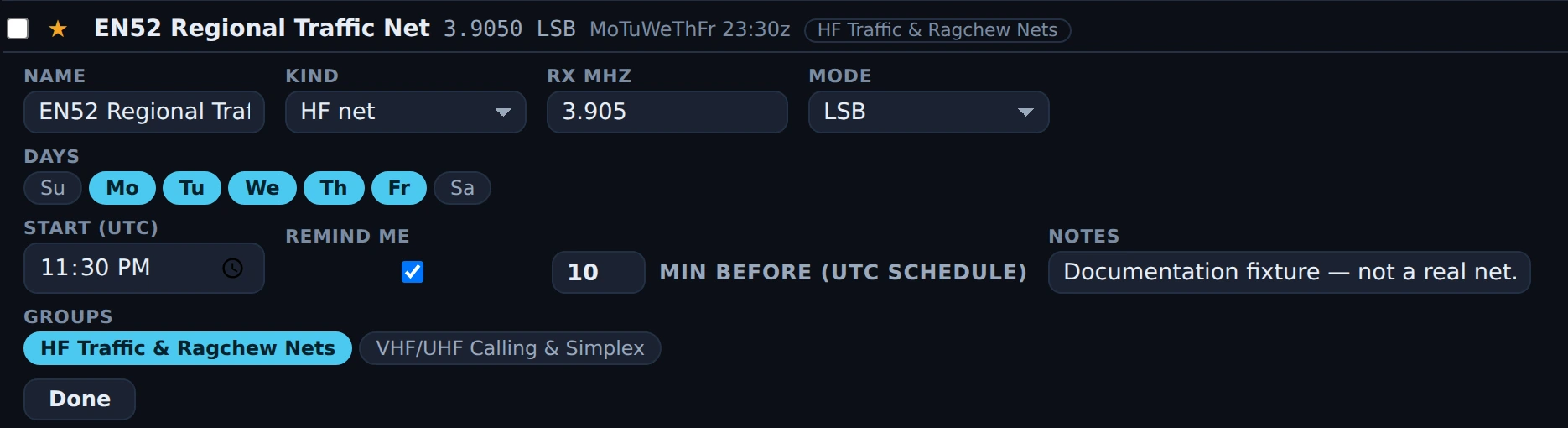
The net editor in Nexus 1.10.3 on a temporary fixture memory. Days has Mo–Fr lit and
Start (UTC) holds the meeting time; the row above prints the same schedule back as
MoTuWeThFr 23:30z, and it is UTC, so it does not drift when the clocks change. Remind me
is ticked with a ten-minute lead. The net is invented for this picture.
- Set a memory’s Kind ▸ HF net (or install the HF Traffic & Ragchew Nets pack, which arrives pre-scheduled). Net rows collect under Nets in the sidebar.
- Click the days it meets and set the Start (UTC) time. The schedule is UTC, so it does not drift when the clocks change.
- Tick Remind me and set the lead time. Nexus checks every 30 seconds and raises one prominent toast per meeting, with a Tune button on it that recalls the memory. Reminders are opt-in per net — nothing fires for a net you did not tick.
Move channels between Nexus and a radio
- Export CSV writes the rows the current view is showing — filtered, sorted,
in the order on screen — as a CHIRP CSV in your Downloads folder, named for the
view (
nexus-memories-favorites.csv). The toast reports the full path. - Open that file in CHIRP and upload it to the radio. CHIRP drives the programming cable; Nexus builds the list.
- Import CSV reads a CHIRP CSV back — header-keyed, so extra or reordered columns are fine. Rows join the group you have selected, duplicates are skipped, and the toast says how many of each. A file with no Frequency and Mode columns is rejected with “No channels found — is this a CHIRP CSV?”
Honest limits
- + Save captures frequency and mode, nothing else. Save an FM repeater off the dial and you get a plain simplex channel — the shift and tone you have set in Settings ▸ Phone do not come with it. Type them into the editor, or bring the machine over from Program, which does carry them.
- Nexus never writes to the radio’s own memory channels. There is no CAT path that fills a rig memory slot; the CHIRP CSV is the whole delivery story. The Location numbers in an export are the row order of what you exported, not channel numbers in your radio.
- Memory scan is not built. The CHIRP Skip flag survives a round-trip through import and export, but nothing in Nexus scans a bank and no field sets that flag.
- Recall reaches three cockpits only — Phone, CW and Operate. An RTTY or PSK31
memory is treated as digital and opens the FT8/FT4 Operate cockpit, not the RTTY
cockpit. SSTV is not on that mode list, so a row whose mode reads
SSTVgets no digital inference: it saves as Kind: Other and recall sends it to the Phone cockpit in SSB, tuned to the frequency, with “set SSTV on the rig” in the toast. Kind is the override — set it to Digital in the editor and the same row opens Operate instead. The three SSTV rows in the bundled Digital Watering Holes pack already carry it: they are stored as modeUSBwith Kind: Digital, so they recall to Operate rather than Phone. - Phone recall commands USB, LSB and FM only. An AM, WFM or DV memory tunes the dial and then tells you to set the mode on the rig rather than claim a mode Nexus did not command — a WWV or shortwave reference channel behaves this way.
- Recall into a disabled cockpit does nothing but explain itself. With the CW or Phone section switched off in Features, a memory for that cockpit is refused with “Enable the … section in Settings to recall this memory” — the rig is not tuned and no settings are written. In a torn-off Memories window the same case is silent, with no toast at all.
- The Operate cockpit’s MEM + labels every non-FT4 tier as FT8. Save the dial from the strip while running Q65, WSPR or JT65 and the memory says FT8. The + Save button inside this section uses the tier’s real name; the strip’s does not.
- Duplicate detection is frequency (to 100 Hz) + mode + CTCSS encode tone. Two channels that differ only by offset, name, group or DTCS code count as the same channel, so the second one is skipped on import or on a Program save.
- + New saves before you type. The channel exists in the bank from the press, and the count moves with it. Escape keeps it; Discard is the only way out that removes it. See Enter a repeater by hand.
- Delete is immediate — no confirmation, no undo. That applies to the ✕ on a row in both views, and to Discard in the + New panel. An Export CSV is your only copy.
- The bank is local to this machine. It lives in the app’s local storage, not in the logbook and not in any cloud sync; a torn-off Memories window shares it live, another computer does not. If local storage is unavailable or full, edits apply for the session and are gone at restart.
- Search covers name, mode, callsign, notes and frequency — not group names and not tone. Sorting is by name, frequency, mode or kind; there is no drag reordering, and the ▲ ▼ arrows appear only in All memories with no sort and no search active.
- Net schedules are days-of-week plus a UTC time. There is no “third Thursday” rule and no per-occurrence exception, pack schedules are approximate by their own admission, and reminders only fire while Nexus is running. The live “is this net on the air now” cross-check against NetLogger is not built — a memory can carry a NetLogger net name, but nothing reads it yet.
- The offset and tone fields appear for Repeater, Simplex and Calling kinds only. A Satellite or Reference channel imported with a tone keeps it, shows it in the row summary and exports it, but has no editor field to change it — switch the kind to edit it.
- CHIRP cannot represent every mode Nexus saves. FT8, FT4, JS8 and PSK31
export as USB with the real mode tagged into the Comment (
[FT8] …), which a Nexus re-import undoes; another program reading that file sees a USB channel. The D-STAR columns (URCALL, RPT1CALL, RPT2CALL, DVCODE) are written empty and ignored on import. - Starter packs are bundled conventions, North America first. They ship inside the app, so they work offline and never go stale mid-contest — and never refresh either. Region 1 differences are written into the channel notes, not applied for you.
- Distances are in statute miles, with no metric option.
Related guides
- Program — building a repeater list for a location, and Save to Memory Bank, which drops it straight into this bank
- Phone (SSB)
- CW
- Operate — FT8/FT4 digital
- Field Day & POTA/SOTA
- Settings reference
This page is synced from docs/guide/memories.md in the Nexus repo. Corrections belong there.