Nexus manual · Contesting & portable
Contesting & POTA/SOTA
Two portable/event workflows live here: Field Day (ARRL or Winter Field Day), which reshapes the app for the weekend and pushes to the club’s master log in real time, and the POTA/SOTA hunter, which finds activators and tags your contact for upload. The hunter ships enabled — the wizard turns everything on. Field Day mode is the exception: it stays off until you switch it on in Settings ▸ Appearance ▸ Features or Contesting ▸ Field Day Setup, because it reshapes the app for a weekend most operators are not having.
Field Day
A settings switch turns the event on and the app reshapes for it: the exchange grammar, a live countdown that knows the real date rules, per-(call, band, mode-class) dupe checking, and a scoreboard.
Set it up first

Field Day Setup in Settings ▸ Contesting, Nexus 1.10.3, with Field Day mode off. The class, section and multiplier shown are one station’s own entries — set yours from the rules for the event you are in.
In Settings ▸ Contesting ▸ Field Day Setup:
- Event — ARRL Field Day or Winter Field Day. This changes scoring labels and export headers.
- Class / Category and ARRL Section — these start empty on purpose,
and Field Day refuses to start until you set yours. (An old default of “WI”
sent the wrong exchange for everyone outside Wisconsin — now it’s a one-time
deliberate step.) ARRL FD wants a class like
1D; WFD wants a category like2O. - Power multiplier — ×5 (QRP/battery ≤ 5 W), ×2 (≤ 100 W), or ×1 (> 100 W). It multiplies your QSO points; the engine clamps it to the legal values.
Operate the event
Field Day is all-mode: once you initiate a contact, the digital sequencer runs the FD exchange autonomously, and the CW and Phone cockpits’ log strips become FD entries with class/section and shared dupe checking — one laptop covers the whole operation.
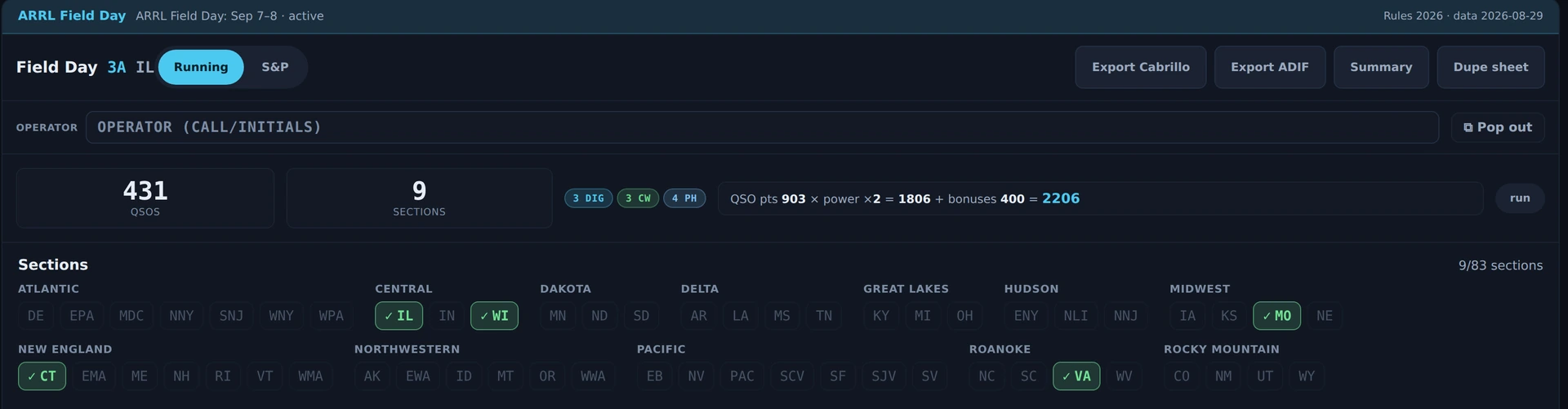
A Field Day test event in Nexus 1.10.3 — a fixture, not a submitted entry. The banner names the event and the rules year it is scoring against; the counters and the arithmetic line show the whole sum (QSO pts 903 × power ×2 = 1806 + bonuses 400 = 2206), and the sections board marks what has been worked out of 83. The per-contact exchange — class and section — is typed in the cockpit log strips and lists under this panel.
The one strip that does not switch is the log strip in the Satellites section: it is not wired to Field Day yet, so a contact typed there during FD goes into your general log and scores the club nothing. Log satellite contacts from the CW or Phone cockpit while you are still on the bird — the FD log stamps each contact with the band the radio is on at the moment you type it, so one entered after you have QSY’d away files on the wrong band, both in the Cabrillo and on the N1MM / N3FJP wire.
The scoreboard shows its work: QSO points (phone 1, CW/digital 2) × the legal power multiplier + a 15-item ARRL bonus checklist = total. Winter Field Day deliberately shows raw counts only — its objectives math isn’t ARRL’s, and Nexus won’t display a fake total.
Opening Bonuses does not cost you the sections board. The board is the only part of the Field Day column that can give height, so it used to give it for everything else and collapse to a blank strip when the fifteen-row checklist opened. It carries a floor now and the column scrolls past that floor, so the board a club watches all weekend stays a board. The checklist keeps its own cap and scrolls inside itself: all fifteen rows are there, in a list of their own, rather than 290 px of checkboxes between you and the log.
Export and club interop
Exports are submittable: Cabrillo 3.0 with real per-QSO UTC timestamps and
per-row mode tokens, plus ADIF with CONTEST_ID.
The club story is native:
- Every FD contact pushes in real time to N3FJP over its official TCP API (default port 1100). Configure the master log’s host/port and use the Test N3FJP button at the site before the event.
- Nexus also broadcasts the native N1MM+
<contactinfo>UDP datagram for N1MM-networked dashboards.
Both are fire-and-forget on background threads, so a hung logging PC can never
stall your TX slot. The WSJT-X UDP Status message sets special_op = Field Day,
so JTAlert/GridTracker auto-activate their FD behavior too.
Configure N3FJP and N1MM+ in Settings ▸ Logging & Connectors.
Run the whole club on Nexus (club sync)
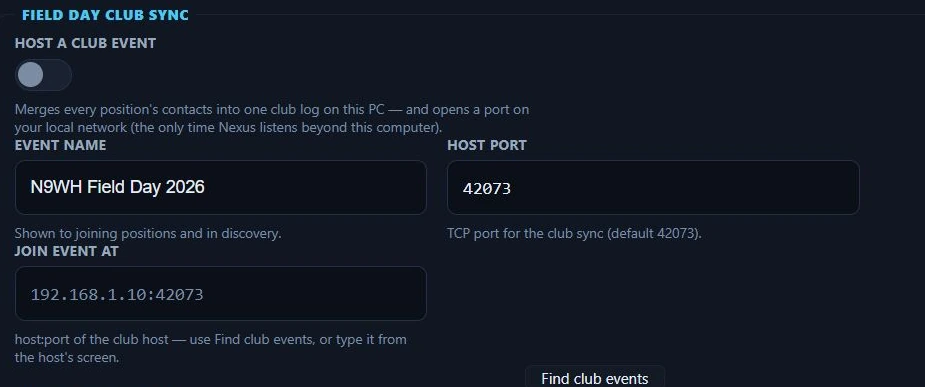
Field Day Club Sync in Settings ▸ Contesting, Nexus 1.10.3. Hosting is off here — nothing is listening on the network until you turn it on.
If every position runs Nexus, you don’t need a third-party master log at all. One PC at the site turns on Settings ▸ Contesting ▸ Field Day Club Sync ▸ Host a club event; every other position presses Find club events (or types the host’s address) and joins. From then on:

The club board in Nexus 1.10.3, torn off into its own window. The chip beside Club is the sync state, the host is named next to it, and the club totals sit on the right; each row is one operating position, and the greyed GOTA row carries a ⚠ because the host has not heard from it inside the stale line. This is fixture state, not two instances that actually synced — no second Nexus was running, so the picture shows what the board looks like, not evidence that a club sync worked.
- Each logged contact streams to the host the moment it lands; the host merges everything into one club log and pushes the club totals back.
- Every position gets a club dupe warning while typing — if another tent already worked that call on this band and mode, you’re told before you call. It’s a warning, not a lock (N3FJP semantics); your own log’s dupes still refuse.
- A live band board shows where every position is (band, mode, operator, rate), stale-marked the moment one goes quiet. It has its own Club Board button in the left rail under Field Day, and its own window — one click, on a second monitor or a corner of the big one, in bigger type than the dashboard copy because it is watched from across the tent. Pop out board in the club header opens the same window. The rail button is there whenever Field Day is on, before you have switched sync on: with sync off the window names the route that starts it rather than showing an empty board. The web scoreboard below carries the same band and mode per position, so the screen facing the room answers “who’s on 20?” too.
- The sync chip tells the truth: Synced, Behind n, or Offline — contacts logged offline are journaled and re-sent automatically on reconnect. If the host PC dies, enable hosting on any other position; everyone re-joins and nothing is lost.
- The host exports the merged club Cabrillo / ADIF, deduplicated the way the rules score it (earliest contact wins).
Hosting is the one time Nexus listens beyond the local computer, and only while the toggle is on. There is no join password — a club site LAN is trusted; the connection can only carry log rows, never key a transmitter or change a setting. The N3FJP/N1MM pushes above keep working alongside if you want both.
POTA / SOTA hunter
The hunter is for finding activators, not running activations. It polls the official feeds (pota.app and SOTAwatch) every 60 s.
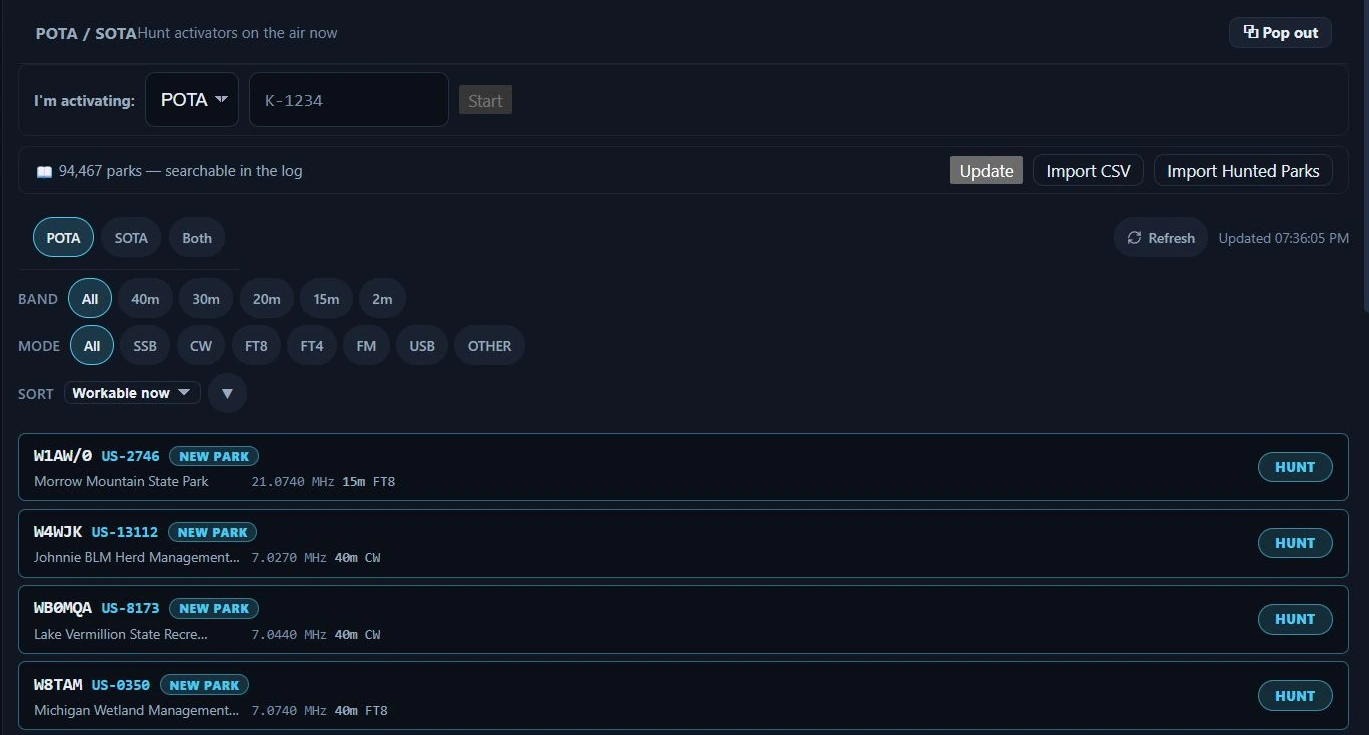
The POTA / SOTA hunter in Nexus 1.10.3, showing live activators.
The tour
Live spots with program toggles (POTA / SOTA / Both), band and mode filter chips, park names, and two ranking badges:
- NEW PARK — the reference has never appeared in your log (computed from your own ADIF, not an external tracker),
- BAND OPEN — PSK Reporter confirms your signal is reaching that band within the last 15 minutes.
Hunt an activator
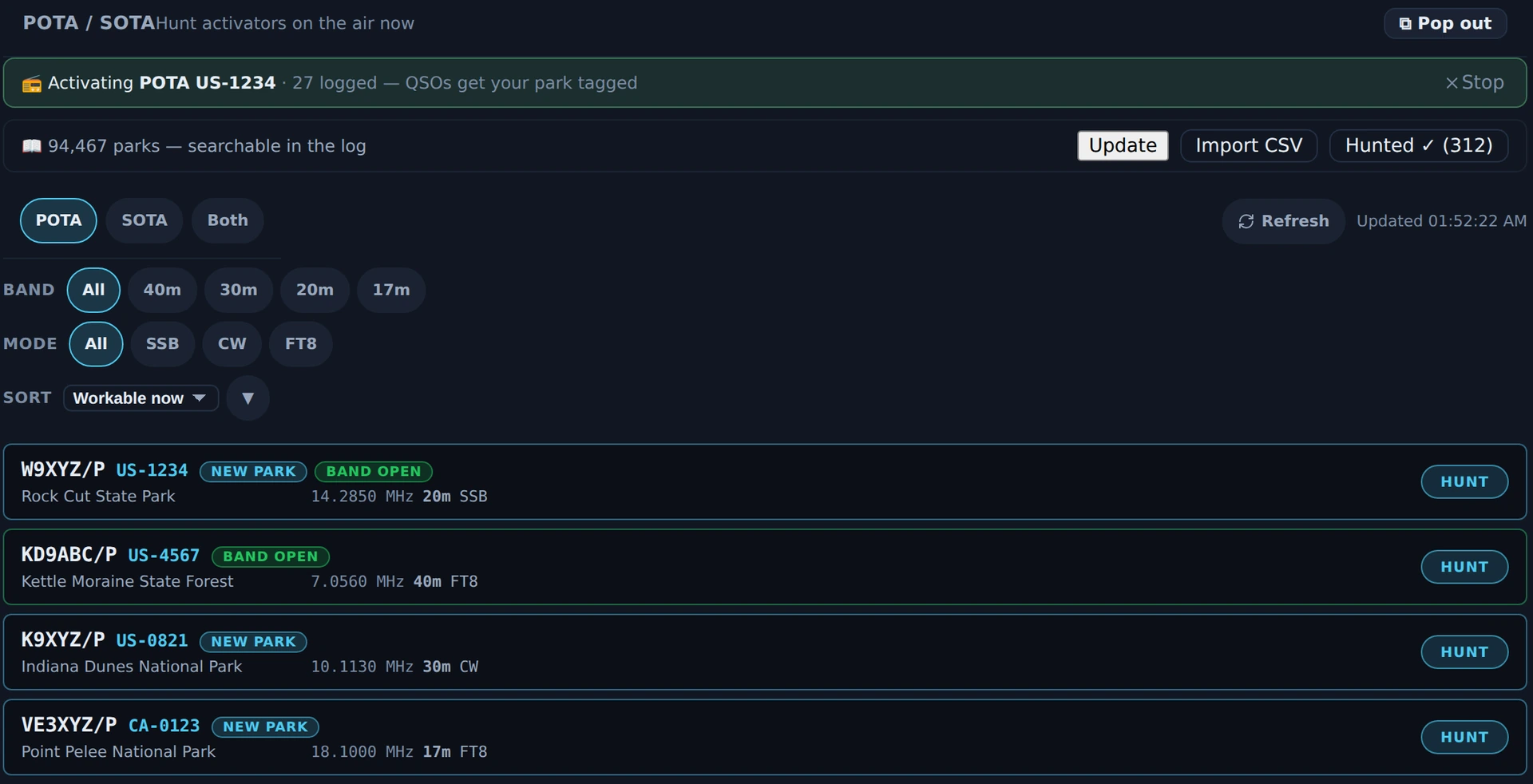
POTA / SOTA in Nexus 1.10.3 with an activation of my own running — the green banner counts the contacts that will be stamped with the park. Under it the hunter list: NEW PARK on references never logged, BAND OPEN where the band is two-way now, and HUNT on every row. The tags themselves land in the logbook’s PARK column. Fixture spots and a fixture activation: nothing was hunted, logged or uploaded to POTA.
- Click HUNT on a spot. Nexus atomically registers the park as a pending hunt target, QSYs to the spot’s frequency and mode, and opens the right cockpit.
- Work the activator. The next QSO you log with that call — matched by base
call, so
/Psuffixes don’t break it — is automatically tagged withSIG/SIG_INFO(POTA) orSOTA_REFin standard ADIF, ready for the POTA uploader.
The pending hunt tags only the first matching QSO and expires after 4 hours, so a stale park reference can’t contaminate an unrelated contact next week. Activators also appear as chips on the Needed board when they’re heard on the air.
Honest limits
- The POTA/SOTA section is hunter-only — Nexus helps you chase activators; it isn’t an activation logger for running your own park/summit.
- Winter Field Day shows raw counts, not a computed total — by design.
- Field Day won’t start until class and section are set — that’s a guard, not a bug.
- The Satellites section’s log strip doesn’t join Field Day yet — unlike the CW and Phone strips it stays on the general log while a session runs. Not a design choice; not wired up yet.
- You can’t tell the Field Day log which band a contact was on — it records a band per contact, but always the one the radio is on at the moment you type the entry; nothing lets you name a different one. Log as you work, not afterwards.
Related guides
This page is synced from docs/guide/contesting-pota.md in the Nexus repo. Corrections belong there.