SSTV
The SSTV section is a receive-first slow-scan station. Opening it starts the receiver for you, and from then on any VIS header that arrives on the receive audio decodes on its own: the picture appears where the waterfall was and is saved to a local gallery with its mode, frequency and time. Transmit lives here too — choose a picture, choose a mode, press Send — but it is always an explicit act, and nothing on this screen keys the rig until you press that button. The composer is not an image editor: it cover-crops your picture to the mode’s size, lets you drag the crop and lay text over it, and does nothing else — no filters, no drawing, no adjustment. It does not log either: no QSO is written from this section.
SSTV sits in the left rail’s Digital group (FT · Tempo · RTTY · SSTV · APRS) and is on by default — the wizard turns everything on. It is a mode rather than a goal, so the five goal profiles in Settings ▸ App ▸ Features leave it out; Everything (expert) keeps it on. If the rail has no SSTV button, switch it back on there.
The tour
The receiver arms itself when you open the section. There is exactly one reason to be on this screen with a receiver, so entering the view starts it — you never have to know to arm anything. The header’s Arm button reads Armed while it is running and turns it off again; hovering it says what it is doing: “Armed — any VIS header heard auto-decodes and auto-saves to the gallery (RX only). Click to disarm.” Stopping it that way is your decision and is remembered for the rest of the session, so re-entering the section will not restart it behind you; pressing Arm again clears that. The decoder is RX-only — arming can never key the rig.
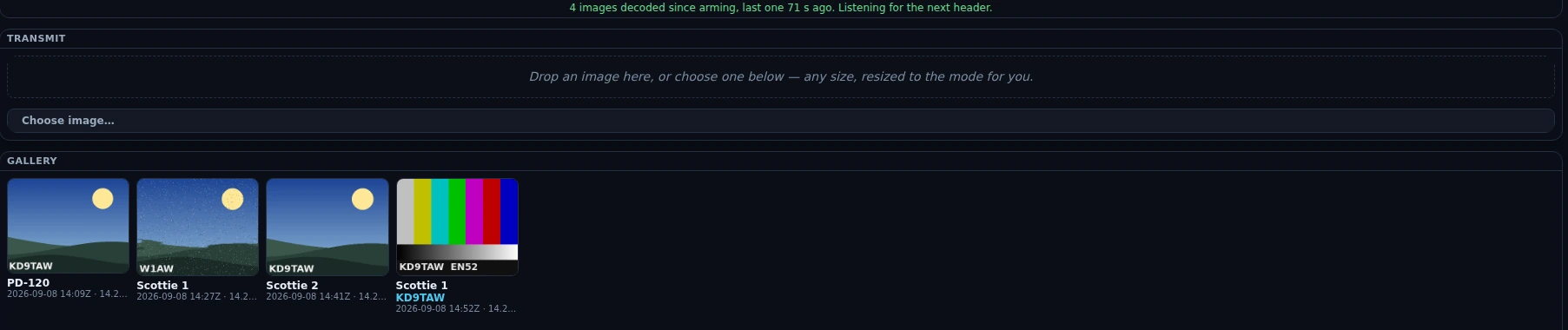
The receive half in Nexus 1.10.3, parked on the 20 m SSTV calling channel. The blue line on the last card is a decoded FSK callsign ID; the third card is torn because the decoder lost sync part-way down, which is what a marginal picture looks like. These are neutral test images, not off-air copy.
The section stays alive when you navigate away: the receiver keeps listening and pictures keep landing in the gallery while you are on the map or in the logbook. Only the on-screen readout pauses while it is hidden, and it catches up on the first poll when you come back. None of this survives a restart, though — a fresh launch is not armed until you open the section (or an ISS pass arms it, below).
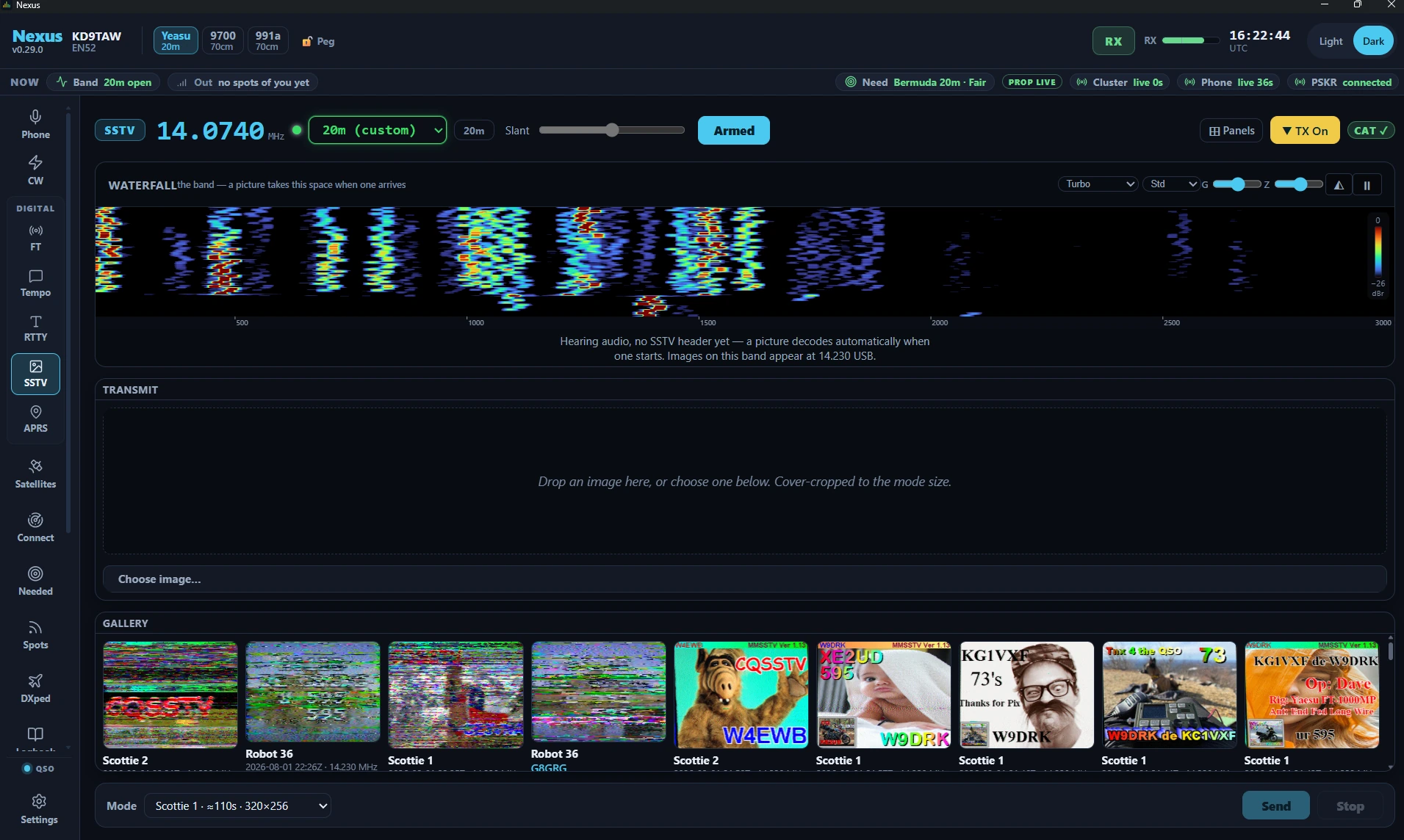
The header. Left to right: a mode badge that reads SSTV and fills in to SSTV · Scottie 1 when a header lands, or SSTV · TX PD-120 while you are transmitting; the big frequency readout, which you can type into and which tunes off the ham bands as readily as on them; the SSTV band-plan picker; the Slant trim, which is deliberately disabled — “Auto-corrected by the decoder; the manual trim comes in a later build”; Arm; and the ▼ TX On / ■ TX Off latch, which is this section’s transmit arm — the top bar’s TX cluster is hidden here, so without it a send would sit at the “TX is off” gate with nothing on screen to open it. ⊞ Panels is in the same row.
The band picker carries the standard SSTV calling frequencies, filtered to the bands your license class can key phone on:
| Band | Dial | Mode | |
|---|---|---|---|
| 160 m | 1.890 | LSB | rare, and a winter-night band |
| 80 m | 3.845 / 3.730 | LSB | NA calling / EU (IARU R1) calling |
| 40 m | 7.171 / 7.165 | LSB | US calling / EU calling |
| 20 m | 14.230 | USB | the worldwide SSTV calling frequency |
| 20 m alt | 14.233, 14.236 | USB | the overflow channels when 14.230 is busy |
| 17 m | 18.160 | USB | |
| 15 m | 21.340 | USB | |
| 12 m | 24.975 | USB | |
| 10 m | 28.680 | USB | General and above — US Technicians have 10 m image only 28.300–28.500 |
| 6 m | 50.680 | USB | activity follows sporadic-E openings |
| 2 m | 145.800 | FM | the ISS downlink — ARISS events transmit PD-120 here |
| 2 m | 144.500 | FM | terrestrial VHF calling (regional conventions vary) |
One region shows the band, then the picture. Until a header arrives that space is a live waterfall so you can see what is actually on the frequency; the moment a VIS lands the picture takes the same space, and takes it back when the image finishes. It is the full waterfall instrument — palette, zoom span (Std 0–3 kHz / Full 0–4 kHz or a window around the marker), the G and Z contrast knobs, pause-and-scroll-back, the 3-D stacked view — running at a 50 ms row cadence rather than the FT surfaces’ slower default, so a signal appearing on frequency shows up immediately. It does not tune: clicking it moves nothing, because there is no audio-offset to place in SSTV.
The line under the waterfall says what the receiver is hearing. It is a status readout, not a fixed hint, and it exists because “I hear a signal but the SSTV is not decoding” has four completely different causes that used to look identical on screen. Where it helps, it names the SSTV frequency for the band you are on — derived from the plan above, so an operator sitting on 14.236 is told about 14.236:
| State | What it says, and what it means |
|---|---|
| Stopped | “The receiver is stopped — nothing is being decoded. Press Arm to start it.” You disarmed it, so nothing is being fed to the decoder. |
| Started | “Receiver started — no audio has reached the decoder yet.” The first seconds after arming, before the decode thread has reported anything. It is not a fault and does not blame your sound card. |
| No capture | “Listening, but no audio is reaching the decoder at all — the capture device is not delivering anything.” Nothing has arrived for 10 s and the decoder has polled at least 20 times (~2 s), so this is a real dead input: check that Settings ▸ Radio ▸ Audio input is the radio. Hearing the signal on the speaker does not mean the app is capturing it. |
| Silent | “Audio is arriving but it is silent.” Samples are arriving with a peak under 0.002 of full scale — a routing or level problem (wrong input, or RX Gain far too low), not a dead band. |
| Listening | “Hearing audio, no SSTV header yet — a picture decodes automatically when one starts.” The healthy idle state, and the one thing the old fixed hint could never say. |
| Unsupported mode | “Heard an SSTV header n min ago in a mode this build cannot decode (VIS 0x…).” A clean header arrived and was thrown away. Your signal and audio path are fine; that transmission is in a mode outside the fifteen below. It stays on screen for five minutes, then stops being news. |
| Decoded | “n images decoded since arming, last one n min ago. Listening for the next header.” A completed picture is a durable fact about the whole chain, so this one latches. |
If the app itself stops answering the readout says so — “Cannot read the receiver state — the app is not answering. The decoder may still be running.” — rather than drawing an idle receiver it has no evidence for. The counters behind all of this are cumulative since you armed; arming again starts them over. Changes of state are announced once for screen readers, and the line is not a live region: the age in it reticks every second and would otherwise be read aloud each time.
While a picture is coming in, the caption under it names the mode and how long the wait is — “decoding Scottie 1… the picture lands when the transmission ends (≈1:50)” — and switches to a line count when lines land. If the decoder measured your radio more than 10 Hz off the transmission’s leader tone it adds ”· tuning +40 Hz”, which is the one thing the spectrum would have told you and the picture cannot.
Transmit (a ⊞ pane) is the image chooser: a drop zone that takes a dragged file, a Choose image… button for the file dialog, and a preview canvas that shows the picture already resized to the selected mode’s exact pixels. Drop a photo at any size — a 4032×3024 phone picture is fine. Nexus reads the file’s rotation tag first (so a portrait phone photo is not sent sideways), crops it to the mode’s shape from the middle, and scales it down in steps so fine detail softens rather than breaking up into speckle. Drag the preview to choose which part of the picture survives the crop; arrow keys nudge it a pixel at a time, shift ten, Home re-centres, and double-click does the same. Only the over-long axis moves — the cursor tells you which — and when the picture already matches the mode it says so instead of offering a control that would do nothing.
Text on the picture. A Text: row under the preview lays lettering over the
image. CQ and 73 drop in a line built from your own call
(CQ CQ DE <your call>); Reply builds <their call> DE <your call> 599 from
the newest FSK ID in the gallery, and is disabled until a station with one has
been received; + Text adds a free line. Each line gets a row of controls —
the text itself, Crisp (the ident’s own pixel font, proven through the
decoder) or Banner (big display type with an outline), a size, eight colours,
and Plate or Outline for what keeps it readable at the far end. Drag a
line on the preview to place it, click to select, arrows nudge, Delete removes.
Text draws under the ID plate, never over it.
Your callsign is burned into the top-left corner, and that is not decoration —
see Your callsign goes out in the picture
below. A line above the preview says where the identification is on this
picture — burned in, in your own text, or already in the artwork by your word.
What you see on the preview canvas is byte-for-byte what goes out, plate
included. Under it, the file name, its original size, the size it was resized to,
the mode and how long the rig will be keyed (sunset.jpg (4032×3024) → 320×256 · Scottie 1 · 1:51 key-down). Change the mode and it re-derives the crop at the new
shape, keeping your framing.
If a file cannot be sent the pane says so and keeps the picture you already had loaded. iPhone HEIC photos are the common one: Nexus has no HEVC decoder, so it names the format and your two fixes (Settings ▸ Camera ▸ Formats ▸ Most Compatible, or Settings ▸ Photos ▸ Transfer to Mac or PC ▸ Automatic). JPEG, PNG, WebP, BMP and GIF all work; a GIF sends its first frame. A picture smaller than the mode is enlarged with a warning that stays on screen, not refused.
Gallery (a ⊞ pane) holds the received images, newest first, each a thumbnail with its mode, the decoded FSK callsign ID if the sender appended one, and the UTC time and dial frequency it finished on. Hovering a card shows the file’s full path. The pane is the one on this screen that grows: it takes the height left over under the picture, keeping at least its head and a band of content, and once the images out-run that it scrolls inside itself rather than pushing the Send bar off the bottom. Thumbnails size to a column at least 140 px wide and keep their own shape, so a 640×496 PD image and a 320×240 Robot image are the same width but different heights and rows do not line up. Until the first image arrives the pane holds a dashed placeholder: “Received images collect here — auto-saved with callsign (FSK ID), mode, frequency, and time.”
The transmit bar is pinned across the bottom and is not a panel. It carries
the mode picker — grouped Scottie / Martin / Robot / PD, each option labelled
with its airtime and pixel size (Scottie 1 · ≈111s · 320×256) — Send,
Stop, and, while an image is going out, a progress bar reading
“TX — Scottie 1 · 1:12 remaining”. It sticks to the bottom of the scroll area, so
on a short window Stop is on screen at every scroll position.
⊞ Panels offers exactly two entries here, Transmit and Gallery, plus Undo last change and Reset layout. The picture, the transmit bar and the header are not panels: no layout you save can put Send, Stop or the TX latch out of reach.
Core workflows
Receive your first picture
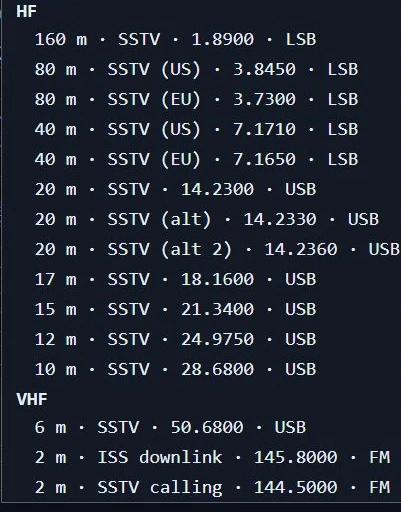
The band picker’s built-in calling frequencies in Nexus 1.10.3 — the same table printed in the tour above. The list is filtered to the bands your license class can key phone on, so yours may be shorter.
- Open SSTV. The receiver starts; the header’s Arm button reads Armed.
- Tune 14.230 USB — type it into the readout or take it from the band picker. Entering the section does not touch the rig, so you can also just spin the knob and watch the readout follow.
- Read the line under the waterfall. “Hearing audio, no SSTV header yet” means the whole chain is working and you are waiting on the band.
- When a transmission starts, the waterfall is replaced by the picture and the caption names the mode and the airtime. Expect a black frame for most of that time — see the limits below.
- The finished picture saves itself: it appears in the Gallery, and a PNG lands
in your Pictures folder under
Nexus SSTV, beside agallery.jsonof the metadata.
Work out why nothing is decoding
The status line is the diagnosis, in order of what to do about it:
- “The receiver is stopped” — press Arm.
- “no audio is reaching the decoder at all” — the capture device is dead to the app. Point Settings ▸ Radio ▸ Audio at the radio. What you hear on the speaker says nothing about what Nexus is capturing, and neither does the waterfall: it rides a separate tap.
- “Audio is arriving but it is silent” — right device, no level. Check the rig’s audio output and RX Gain.
- “a mode this build cannot decode (VIS 0x…)” — nothing is wrong with your station. That station is transmitting outside the fifteen modes below.
- “Hearing audio, no SSTV header yet” — nothing is wrong at all. Check you are on the frequency the line names for your band.
Send an image
- Arm transmit with the header’s ■ TX Off latch (it turns into ▼ TX On).
- Drag a picture onto the Transmit pane, or use Choose image…. Any size works — JPEG, PNG, WebP, BMP or GIF — and it is rotated upright, cropped and resized to the mode for you. Drag the preview to reframe it. (Not HEIC: see the note in the tour above.)
- Pick a mode in the bottom bar. Until you choose one, Nexus follows the band: Scottie 1 on HF (the North American calling-frequency convention) and PD-120 above 30 MHz (what ARISS uses).
- Add text if you want it — CQ, 73, Reply or + Text — and drag each line where you want it. Check the identification line above the preview before you send: if your text already carries your call it will say so and the corner plate is left off, and if the call is in the artwork itself, tick My picture already shows my callsign.
- Press Send. Nexus switches the app to Phone so the image rides the phone segment — without moving your dial — then hands the encoded transmission to the gated transmit path. A refusal is a toast that names the reason: no callsign set, TX off, outside your license privileges, the transmitter already busy with the voice keyer or mic PTT, or a mode whose key-down would out-run your Tx Watchdog.
- Watch the progress bar count down. Stop aborts the image, drops the queued job and unkeys; so does turning the TX latch off.
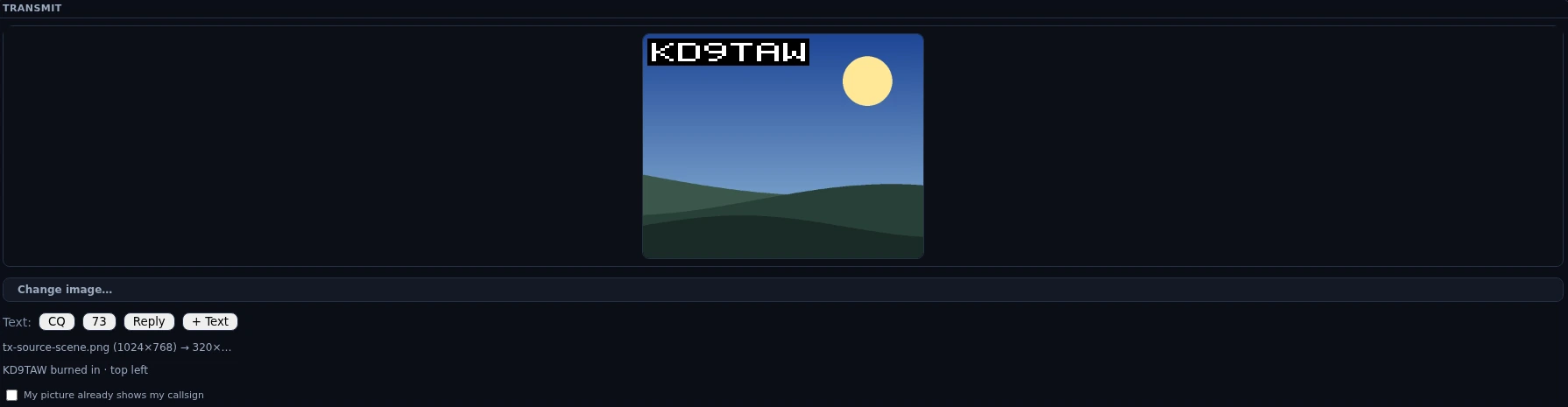
The composer in Nexus 1.10.3, stopped one click short of Send. The line under the buttons is the identification receipt — it names where the plate went — and ticking the box below it skips the plate for this picture only.
On 145.800 MHz — the ISS downlink — Send asks first: “Transmit only during a sanctioned ARISS uplink event. Send anyway?”
Catch an ISS pass
-
Turn on ISS SSTV auto-arm in Settings ▸ Digital ▸ SSTV. It is off by default.
-
At AOS of a pass, with the SSTV or Satellites screen open, Nexus saves your dial, tunes 145.800 FM and arms the receiver, telling you it has done so. On any other screen it only tells you the ISS is up and leaves your radio alone, so an FT8 or CW session is never retuned; open SSTV during the pass and it arms then. If your only radio cannot receive 145.800 MHz (an HF rig, say), it tells you so once per session, with where to turn the auto-arm off, and does nothing else on any screen. While you are working a satellite (a transponder picked on the Satellites screen), it moves nothing on any screen and tells you the ISS is up; on the SSTV screen it says the satellite pass has the radio. It arms if you release the satellite while the ISS is still up.
-
ARISS transmits PD-120, which decodes here like anything else.

The ISS downlink staged by hand in Nexus 1.10.3 — the channel pick sets the dial and FM together, and nothing in this frame transmits. Sending here is gated behind its own confirmation, quoted in the step above. 4. At LOS it disarms and puts your dial back — but only if you are still parked on 145.800 FM, so a mid-pass QSY of your own is left alone. That automatic stop is not treated as your decision, so opening the section later still starts the receiver normally.
See Satellites for pass prediction and the rest of the ISS picture.
Your callsign goes out in the picture
Every picture you transmit carries your call, and Send is refused if you have not set a callsign in Settings ▸ Station — with no callsign the station has no identity to put anywhere, and that refusal has no exception.
Where the call sits has three answers, and the line above the preview always names the one in force:
| What the preview says | When | What goes out |
|---|---|---|
<call> burned in · top left | the default | Nexus draws the plate into the picture for you |
<call> in your text · no plate burned in | one of your text lines contains your callsign | your own lettering is the identification; the plate is left off so it does not cover your layout |
<call> — you’ve said it’s already in the picture | you tick My picture already shows my callsign under the preview | nothing is drawn; you have told Nexus the artwork carries the call |
The tick is for a pre-made QSO card that already shows your call, where a plate would cover the artwork to repeat what it says. It clears every time you load a new image, on purpose: it is a statement about one picture, and Nexus cannot read your artwork to check the next one. Delete the text that carried your call and the plate comes back on the same redraw.
This is how the station is identified, and before this build there was no identification at all. An SSTV over is one continuous key-down of up to about five minutes carrying nothing but picture: no callsign was drawn into the image, no CW ident was sent after it, and the FSK ID that some stations append is something Nexus reads, not something it has ever transmitted. §97.119(b)(4) allows the call to go out in the image itself when the picture is the communication, which is what the plate does — and because the longest over Nexus can key is PD-290 at about 4:50, back-to-back images keep you inside the ten-minute rule with room to spare.
The end-of-communication ident is still yours. If the QSO finishes on voice, or you hit Stop part-way through an image, the last thing transmitted did not necessarily carry your call.
Some detail about the plate, because “there is a callsign in the bitmap” is not the same as “the other station can read it”. The figures below are the plate’s. A Crisp text line uses the same pixel font, but its size, colour and place on the picture are yours — and a callsign that lives in your own artwork was never measured at all. Both of those paths hand the identification back to you:
- It is sized as a fraction of the picture width, so it scales with the mode: 5 px strokes on the 320-wide modes, 12 px on PD-290. That is at or above the smear a receiving decoder’s own demodulator introduces, which is what would otherwise turn thin lettering into mush.
- It is white on solid black, not an outline. Black-to-white is the entire tone range an SSTV mode carries, so the plate is the strongest thing in the frame and does not depend on the picture behind it. A thin outline would vanish at these sizes.
- It is drawn after the crop, in the transmitted picture’s own coordinates, so no amount of dragging the crop box can move your callsign off the edge.
- It is a fixed bitmap font, not system text, so the letter shapes are the same on every machine and every build.
- It is proved by decoding it back. Nexus’s own test suite encodes a picture carrying the plate, runs it through the real decoder, and reads the callsign back out of the resulting pixels — for all fifteen modes, on a clean signal and at 20 dB and 10 dB signal-to-noise. What that cannot prove is how another program’s decoder renders it; if you want certainty there, ask a station running MMSSTV or QSSTV to tell you what they see.
Honest limits
- The picture lands at the end, not line by line. The decoder needs the whole image buffered before it can place any line, so a Scottie 1 preview is a black rectangle for about 110 seconds and then the picture appears nearly all at once. The caption says as much, with the airtime, because otherwise it reads as a hang.
- You have to catch the header. Decoding starts from a VIS header; tuning in mid-picture decodes nothing, and you wait for the next transmission. There is no partial-image recovery.
- Fifteen modes, and nothing else — Scottie 1 / 2 / DX, Martin 1 / 2, Robot 24 / 36 / 72, and PD-50 / 90 / 120 / 160 / 180 / 240 / 290, for both receive and transmit. A header in any other mode is counted, named by its VIS code on screen, and discarded.
- Only PD-120, PD-180 and Robot 36 are validated against real off-air recordings (ARISS captures). The Scottie and Martin families are validated by encoding and decoding synthetic images round-trip, because no reference recordings were available.
- The live picture is a preview, not the decode. What you watch on screen is a thumbnail no more than 160 px wide, upscaled in whole multiples so it stays crisp (and capped at 6×, leaving margin rather than blur). The full-resolution image exists only once it is saved.
- The gallery is a gallery, not a viewer. There is no click-to-enlarge, no rename, no export or share. To see an image full size, open the file from the folder — the card’s tooltip gives you the path. Each card carries two actions: ✕ deletes the image, after a confirmation, and the file is gone for good; ✎ loads it back into the composer so you can put your own text on it and send it back. The in-app list keeps the 200 newest; images past that stay on disk but drop off the screen.
- Clearing out several pictures at once. Every card has a tick box (Tab to it, Space to tick). Above the cards, Select all ticks everything and Clear selection unticks it; Delete selected (N) asks once, naming how many, and then deletes every ticked picture for good. If any could not be deleted, a message says how many and why, and those stay ticked.
- Images are PNG, and lossless. A received picture is the only copy of what somebody sent you, so it is stored exactly as it was decoded — nothing is smoothed or thrown away to make the file smaller. Each one also carries its own mode, receive time and dial frequency inside the file, so a picture keeps saying what it is after you mail it to the sender or post it somewhere. Pictures received before v1.3.x are 24-bit BMP and stay exactly where they are; the Gallery still shows them.
- The slant trim is disabled. The decoder re-anchors the line rate itself; the manual trim control is on screen but inert, and its tooltip says so.
- Nothing here logs. No QSO, no callsign field, no dupe check. On receive, the only callsign SSTV recovers is the FSK ID some stations append after the picture, which is best-effort, at most ten characters, and simply absent when the burst is missing or garbled. Nexus does not transmit an FSK ID of its own — its identification rides in the picture, as described above, which is human-readable rather than machine-readable.
- The resized picture is not kept. The crop lives in the section while the app runs and is gone on restart; your original file is untouched and is the only copy Nexus keeps. Sent images do not go into the Gallery — that folder means “what I received”.
- Robot 24 and Robot 36 carry a colour cast on the very top row, an artifact of how those modes alternate colour information between lines. It is faithful to the reference decoder and it is in the saved image too.
- Transmit is sound card and PTT, the same path FT8 uses: Nexus generates the audio and keys the rig. There is no rig-side SSTV generator, and a station whose audio is not routed to the transmitter sends nothing.
- One image at a time, no queue, and the transmitter is shared: a send is refused while the voice keyer or mic PTT owns it, and refused again if you try to start a second image.
- Long modes can be refused before they start. An image whose key-down would out-run your Tx Watchdog (default 6 minutes, with 15 seconds of head-room) is refused up front, naming the mode’s airtime and the setting, rather than keyed and guillotined half-drawn. There is also a hard ceiling of 330 seconds of key-down regardless of the watchdog — above every legitimate mode, PD-290 included.
- The receiver is session state. A restart leaves it stopped until you open the section again; the gallery, being on disk, comes back with the app.
Related guides
- Phone (SSB) — SSTV rides the phone segment and shares its transmitter
- RTTY — the other free-running mode in the Digital group
- Satellites — ISS passes, prediction and tracking
- Operate — FT8/FT4 digital — the same waterfall instrument, and the audio path SSTV transmits through
- Settings reference
This page is synced from docs/guide/sstv.md in the Nexus repo. Corrections belong there.