Stats
Stats is your logbook sliced — “QSOs by band, mode, year, hour, entity, and confirmations.” It is descriptive and nothing else: it counts the records you already have, in bars you can check against the log itself. It makes no award judgement (that’s Awards), sets no goal (that’s Journey), and has no controls at all — no filter, no date range, no export. Every figure on the page counts your whole logbook unless this page says otherwise.
Stats is on out of the box: a fresh install has it whether you finish the first-run wizard or skip it — the wizard turns everything on. Settings ▸ App ▸ Features turns it on or off any time. If Stats is off when you log your first QSO, Nexus offers it once as a nudge — it never switches itself on.

The Stats dashboard in Nexus 1.10.3, on a log of about 11,000 contacts.
The tour
Where the numbers come from. Two sources, and knowing which is which is how you reconcile a figure that surprises you. Everything except the last three cards is counted in the app from the same logbook read the Logbook section shows you — every record, no de-duplication, no date window. The three geographic cards come from the Rust side, which places each contact in the DXCC entity and CQ zone its record carries, else the ones cty.dat gives its callsign; the stored QSO record carries no continent, so that comes from the zone.
The headline row — four figures across the top:
- QSOs — records in the logbook, full stop. Log the same station twice and it counts twice.
- unique calls — distinct callsigns, case-folded and trimmed. Suffixes are
not stripped, so
W1AWandW1AW/4are two. - DXCC entities — distinct entities, each contact counted under the one the
Awards count it toward: the DXCC number its record
carries (LoTW’s first), else cty.dat’s reading of the callsign, with a WAE
area such as Sicily counted as the entity it belongs to (Italy). Case-folded
so an imported
UNITED STATESand a resolvedUnited Statesare one entity rather than two. A contact placed in no entity falls back to whatever country text the record carries. - confirmed — the share of your QSOs confirmed by any channel: LoTW, eQSL, a paper card, or a QRZ-logbook match. Rounded to whole percent, so a handful of unconfirmed contacts in a large log reads as 100%. This is not the Confirmed card on Awards. That one counts LoTW and paper only, because those are what ARRL takes. Same denominator — your whole log — different numerator, so the Awards figure is always the lower of the two, and the gap is your eQSL and QRZ confirmations. In the screenshot above it is 73% here against 52% there.
How to read a bar. In most cards the longest bar is the most-worked item in that card, not 100% of your log — the bars are a ranking. Two cards are different, and deliberately: Confirmations scales against your total QSO count and DX vs domestic against the QSOs that could be placed, so in those two the bar length is a real share.
By band, By mode, By year. Band and mode are the label text as logged —
nothing is normalised, not even the letter case. An imported log that
writes USB and LSB gets a bar each rather than folding into SSB, and
20M and 20m are two separate bars for the same band. Both cards are
ordered by count, most-worked first, so By band reads as a ranking and not as
a bandplan. By year is the UTC year, oldest first; a record with a timestamp
outside the calendar’s range is dropped instead of drawing a NaN bar.
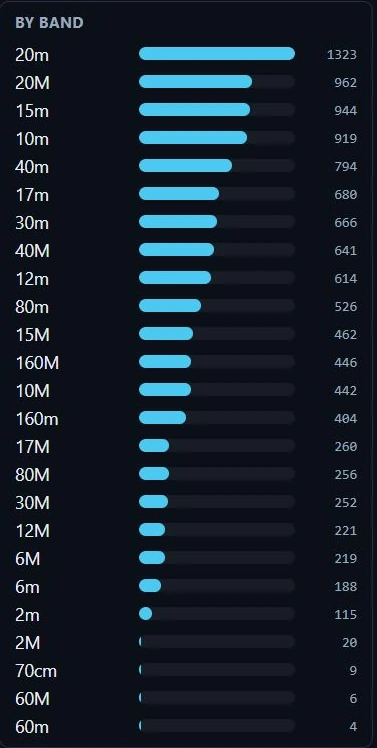
By band in Nexus 1.10.3. This log carries both cases for every band, so each band appears twice — 20m 1323 and 20M 962 are one band worked 2285 times.
Two cases means two bars, and it is worth knowing why. The entity cards
fold case (an imported UNITED STATES and a resolved United States are one
row); band and mode do not. A log assembled from more than one source almost
always carries both cases, so this is the normal state of an imported log
rather than a rare one. Add the pair before you read a band’s total, and
be careful with the ranking: two half-height bars can sit below a band that is
genuinely smaller. If you want one bar per band, the fix is in the records —
make the case consistent in the ADIF and re-import.
Top DXCC entities is the top 12 by QSO count, on the same resolved-entity key as the headline. It is descriptive, not award credit — an entity counts here the moment you work it, confirmed or not.
Most-worked states (WAS) is the top 12 states, and it counts a QSO only if
its DXCC entity is the United States, Alaska or Hawaii and its ADIF STATE
is one of the 50 WAS codes. The entity is the one the headline counts, the
same one the WAS award counts, so the QSO counts however the record spells its
country (LoTW and DXKeeper write UNITED STATES OF AMERICA, some loggers write
none). Only a contact placed in no entity is judged by the record’s country
instead. That gate is the point: without it an Australian
WA (Western Australia) and a Brazilian SC (Santa Catarina) would pile into
Washington and South Carolina. Casing is folded, so an external logger’s ct
lands in the CT bucket.
Activity by hour (UTC) is a 24-bar histogram, labelled every six hours,
each bar as tall as that hour is busy relative to your busiest. Hover a bar for
the exact figure (“14:00 UTC — 37 QSOs”). QSOs stamped at exactly 00:00:00
UTC are not in it — that is what a QRZ or LoTW import writes when it carries
the date but not the time, and counting it as midnight buries your real pattern
under an import spike. They are counted in a line under the chart instead:
“n QSOs not shown — imported with a date but no time of day.”
Confirmations breaks the headline percentage into four bars — Award-grade (LoTW or paper only, the ones ARRL will take), LoTW, eQSL, Paper card — each a count of QSOs carrying that channel, drawn against your total. It is the card that tells you whether a good-looking confirmation rate rests on anything an award will accept.
By continent, By CQ zone, DX vs domestic are the geographic cards. Each contact is placed where the Awards count it: the entity and CQ zone its record carries, else its callsign’s. Continent is derived from that CQ zone into the six WAC continents, and each row carries both the QSO count and the distinct entities behind it (”· 14 ent”) — 40 QSOs spanning 3 entities is a different log from 40 spanning 20. Zones are the top 15 you have worked, by QSO count. DX vs domestic is anchored on your own callsign’s entity: your entity is domestic, everything else is DX. When some callsigns can’t be placed the card says so plainly — “n of m QSOs couldn’t be placed by callsign” — and those QSOs appear in no geographic breakdown at all.
What the page can be instead of the dashboard. Before the log arrives it says “Loading your logbook…”. With an empty log it says “No QSOs logged yet — your stats will fill in here as you work stations.” If the read fails it says “Couldn’t read the logbook — try reopening this view.” — and that is literally the recovery: there is no retry button.
Refresh. The page reads the log once, when you open the section. It does not live-update while you sit on it; leave and come back and it re-reads, so a QSO you logged in a cockpit shows up on your next visit. The cards reflow into as many columns as your window fits and the page scrolls as one long column of cards.
Core workflows
Reconcile the page against your logbook
- Read the QSOs headline. It is the number of records in the logbook — the same set the Logbook section lists.
- If a card’s counts fall short of that, the card is telling you which records are missing a field: By band and By mode drop records with a blank band/mode, Most-worked states (WAS) drops anything that isn’t a US-family entity with a valid state code, and the geographic cards drop contacts placed in no entity (a callsign cty.dat can’t place with no DXCC number on the record, or a record’s DXCC 0, a ship at sea).
- Add case variants together before comparing. By band and By mode split
20mfrom20M, so a band’s real total is the sum of its rows. Nothing else on the page does this — the entity, state and continent cards all fold case. - Check which denominator a percentage uses. confirmed in the headline is any channel; Award-grade in the Confirmations card, and the Confirmed card on Awards, are LoTW and paper only. Both are over your whole log, so the difference between them is entirely eQSL and QRZ.
- Read the exclusion notes, because they are per card and they are not small: “n QSOs not shown — imported with a date but no time of day” under Activity by hour, and “n of m QSOs couldn’t be placed by callsign” under DX vs domestic. In the screenshot above the first of those is 10,667 of 11,373 contacts — the histogram is describing well under a tenth of the log.
- Fix the underlying records in the Logbook — the numbers here follow, because there is nothing stored on this page to go stale.
Find the hours you actually operate
- Open Activity by hour (UTC) and hover the tall bars for exact counts.
- Read the note under the chart first. If it says most of your log has no time of day, the histogram is describing your timed QSOs only — typically the ones Nexus logged, not the ones you imported.
- Use the shape to choose a session time, then check it against the band with Conditions — Stats tells you when you have been on, not when the band was open.
See what your confirmation rate rests on
- Note the confirmed headline — that counts every channel, including eQSL and a QRZ-logbook match.
- Compare it with the Award-grade bar in Confirmations, which counts only LoTW and paper. The gap between the two is the work an ARRL award will not accept.
- If the gap is wide, pull confirmations and push your log with the LoTW / eQSL sync, then reopen Stats.
Read your DX balance
- DX vs domestic splits on your own entity. If it reads as all DX, check that your station callsign is set in Settings ▸ Station — with no resolvable home entity there is nothing to be domestic against.
- By continent shows where the QSOs went and how many entities they span; a continent with many QSOs and few entities is a well-worn path, not coverage.
- Take the thin continents to the Needed board or DXpeditions — Stats describes the log, it does not point the radio.
Honest limits
- Nothing on the page is a control. No date range, no band/mode filter, no sort, no click-through to the QSOs behind a bar, no CSV or image export, and no ⧉ pop-out window. Every card counts the whole logbook; slicing by date or digging into individual contacts is the Logbook’s job.
- The figures are a snapshot from when you opened the section. They do not refresh on their own, and the failure message (“try reopening this view”) is the retry — there is no reload button.
- Field Day contacts are not counted. While Field Day is active a contact goes to the contest log only, which is journaled as its own ADIF file; those QSOs reach Stats only if you import that file back into the logbook. See Field Day & POTA/SOTA.
- No grid squares. There is no VUCC or grid-square card here at all — grids are counted in Awards, whose per-band grid counts run from 160 m up through the microwave bands.
- No POTA/SOTA, satellite, power or distance breakdown. Those fields are in your records and used elsewhere in the app; this dashboard does not slice by them.
- A QRZ-logbook confirmation counts in the headline but has no bar. The Confirmations card shows Award-grade, LoTW, eQSL and Paper card only, so on a QRZ-heavy log the four bars will not add up to the confirmed percentage. There is no way to read the QRZ figure off this page; the gap between the headline and the Award-grade bar is the closest you get, and it also contains eQSL.
- Band and mode are not normalised, and case is the usual reason a total
looks wrong.
20mand20Mare two rows for one band. This is a limitation of the page, not of your log — the records are fine, the card groups on the exact string. - Old records can undercount the four Confirmations bars. The per-source QSL flags can be all-false on records whose sync predates the per-channel split; those QSOs still count as confirmed in the headline while contributing to no channel bar.
- A QSO genuinely worked at exactly 00:00:00 UTC drops out of the hour histogram. The chart cannot tell it from a date-only import, and it is counted in the “not shown” line instead.
- The states card keys on the country text, not the resolved entity. A record whose country is spelled anything other than United States, Alaska or Hawaii — “USA”, say, from an imported log — is left out of the WAS breakdown even when its state code is perfectly good.
- Unplaceable callsigns sit out the geography. They are in the QSOs headline and the caption’s “couldn’t be placed” figure, and in no continent, zone or DX/domestic count. If the geographic call itself fails, those three cards are simply absent — the rest of the page still renders, and nothing announces the gap.
- These counts are not award credit. They include WAE/CQ-only entities and make no confirmation requirement, so the DXCC entity figure here will read higher than the DXCC tracker in Awards. That is the two pages doing different jobs, not a disagreement.
Related guides
This page is synced from docs/guide/stats.md in the Nexus repo. Corrections belong there.