Phone (SSB)
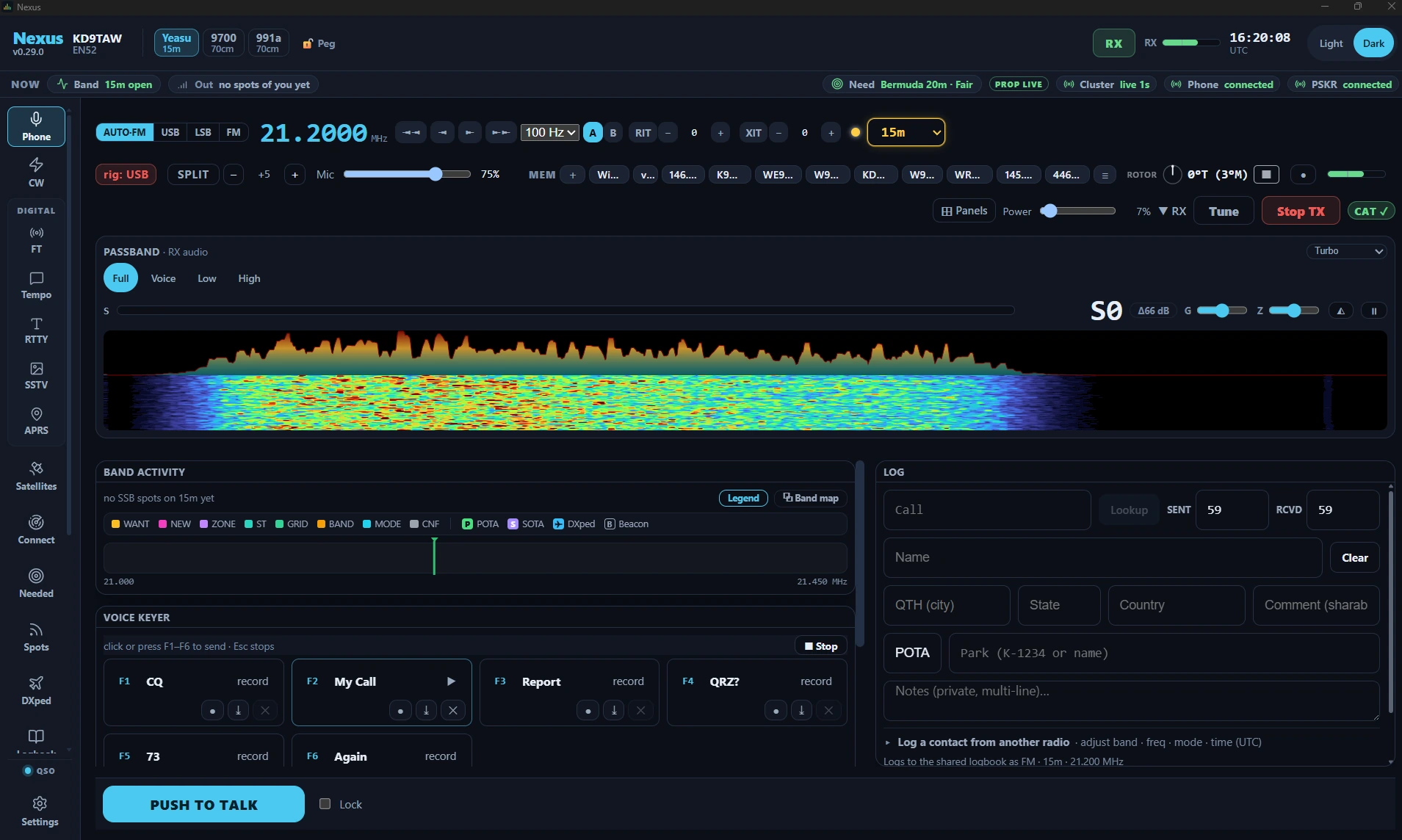
The Phone cockpit is a traditional rig-panel experience for voice operating — SSB on HF and FM for VHF/UHF and repeaters. It doesn’t try to reinvent voice — you talk on the rig’s own mic — but it gives you the shack-monitor conveniences a modern app should: live dial read-back, a fast colored bandscope, a voice keyer for the calls you make over and over, and crash-safe QSO recording, all with your logbook and license privileges wired in.
Phone ships enabled — the wizard turns everything on; there is no mode picker to miss it in. No goal profile enables it, though, so if you pick one in Settings ▸ App ▸ Features, switch Phone back on there — or take Everything (expert), which includes it.
The tour
Live dial read-back. The cockpit polls the rig about every 750 ms: spin the
VFO knob and the displayed frequency follows. On SSB the sideband is automatic —
LSB below 10 MHz, USB above — so the rig lands on the right sideband for the band.
The mode chips — AUTO / USB / LSB / FM — set what the cockpit commands, and
AUTO shows the sideband it settled on (AUTO·USB, AUTO·FM). If the rig’s own
mode knob disagrees, a rig: badge appears beside them naming what the radio
is actually on; logging and TX follow the commanded mode until you match it up.
On 60 m a US licence class may talk only upper sideband, so LSB, AM and FM are
greyed out there, and hovering one says why. If TX is locked on 60 m only
because the mode is not USB, 🔒 TX LOCKED says “60 m allows only USB phone”
instead of blaming the frequency.
The bandscope is a fast (~30 Hz) colored display split into a panadapter trace and a scrolling waterfall, with per-frame AGC so signals stay visible as conditions shift. Span chips above the scope — Auto / Full / Voice / 1.5k / 800 — zoom the view to the part of the passband you care about; Auto follows the filter width.
The passband and its edge. Where your radio reports its filter width, the scope shades the passband it is listening through, hung on the dial. Drag the far edge (the one away from the carrier) to set the width, in the same range and 100 Hz steps as the BW buttons; the radio follows within a second or two. In the Auto span the far edge sits on the scope’s border: grab it there and drag in to narrow the filter, or out past the border to widen it. A manual notch the radio reports on shows as a red line. The edge is not offered in FM, in a DATA mode, on the Remote page or while anything is transmitting. On a dual-receiver radio whose Sub frequency Nexus knows, a cyan SUB line marks it on the radio’s own scope when it is in view; it is only a mark, and a click on it tunes nothing. Tab to the scope and the keys work too: ← and → tune (Shift for bigger steps), Enter tunes onto the signal in the passband, [ and ] narrow and widen the filter, and ↑ and ↓ scroll back while paused.
Spots and your privileges on the scope. The SSB spots Band Activity lists for your band are tagged on the scope at their frequencies, coloured as Band Activity colours them and fading over half an hour; where too many crowd together the freshest are shown and the rest counted as “+N”. Click a tag to work that station, as a click in Band Activity does: Nexus tunes to it and fills in the log. A tag is only a label while you transmit, on the Remote page, and while CAT is down. The scope also tints the frequencies your licence class (Settings ▸ Station) may not transmit phone on. The tint only shows the transmit lock: 🔒 TX LOCKED still decides, and it judges your whole signal, so a dial just inside the tint’s edge can still be locked. An Open licence class has no tint.
RF power slider. Wired to CAT and follows the rig: turn the rig’s power knob and the slider tracks it (it won’t sit lying at 100%). Your drags win while you’re dragging.
⊞ Panels in the header shows and hides the panes under the scope. Where there is something you would want to know before you tick — nothing on screen behind the box, or a consequence to unticking it — the entry says so in a line under it:
- Rig Scope Controls command the radio’s own panadapter (span sets the hardware sweep width, ref sets weak-signal visibility), so they appear only while an Icom CI-V or FlexRadio scope is streaming. On the audio bandscope there is nothing to command, and the entry says so. The span chips over the scope are a different thing: they zoom what is already on screen.
- DSP Functions (NB / NR / Auto notch / Manual notch / COMP / VOX) and RX DSP Levels (NR level, AGC) only ever offer what your radio reports over CAT. A rig that reports none of them has nothing for those panes to hold, and the entries say so rather than hiding an empty pane behind a silent checkbox.
- TX Meters (SWR / ALC / PO / COMP) read on transmit, and the last over’s readings stay on screen after you unkey, dimmed, so you can look at what your drive actually did instead of trying to read a needle while you talk. Until your first over the panel says when it reads. On an FT-991A, FT-710 or FTDX10 the ALC bar is the radio’s own, and its colours follow the radio’s ALC zone, which ends at half scale: amber from 40 %, red from 48 %.
- Voice Keyer puts the F-key message pane away if you work with a mic and never use it. Unticking it stops a message that is playing and throws away a recording you are part-way through making; the entry says both before you tick it, and Undo last change — which can put the pane away again — carries the same line before you press it. Whichever way the pane closes, including simply leaving the Phone screen, Nexus tells you what it ended: the over it cut short, or the recording it discarded. Nothing else changes: PTT, Tune and Stop TX are not panels and have no entry, so no layout you save can put them out of reach.
- Spots and Needed are the Spots and Needed boards as panes of this screen, and they start unticked. Tick one and it takes empty space below the strips: on a wide window Spots goes under Band Activity and the keyer and Needed under Receiver and Transmitter; on a narrower one both go at the bottom of the control column, with a divider between them that you drag to share the height. On a smaller window, make room for them by hiding the keyer or Receiver and Transmitter in ⊞ Panels, or by dragging the scope smaller. Spots opens on the voice spots on the band your radio is on and moves with the radio when you change band. Its Filter chips widen it to other modes and bands, and unticking your own band’s chip stops it following. Needed opens on the phone needs, and its chips widen it the same way. Each pane keeps its own filters, apart from the Spots and Needed screens’. A click on a row works the station exactly as it does on those screens, and Reset layout unticks both again. Closing either ends nothing.
The line explains the screen; the tick is still yours. Every box in the menu can be ticked and unticked whenever you like, and what you choose applies the moment that panel has something to show — untick one now and it stays away when your rig starts feeding it. Once you have unticked an entry, its line goes with it: the pane is off your screen because you said so, and a note still blaming the rig would no longer be true. Tick it back and the line returns if it still applies. Each entry is a keyboard tab stop and reads its reason with the panel name; Esc closes the menu and puts focus back on the ⊞ button rather than at the top of the app; as everywhere on this screen, the same press also stops transmit. If the list outgrows your window it scrolls inside the menu, so Undo last change and Reset layout stay reachable.
The control column. Band Activity, the voice keyer and the rig-scope / DSP / RX-DSP strips share the leading column, and none of them can shrink. When the stack stands taller than the space it has — a small window, or a large UI zoom — that column scrolls, so the NR slider, the AGC chips, the DSP toggles and the keyer’s F-keys are always reachable rather than rendered past the edge. Spots and Needed, when ticked, come after the strips and take whatever height they leave, which is where a tall window used to have empty space. PTT, Stop TX and Tune are not in the pane region at all, so nothing you do in ⊞ Panels can hide them or put them in a pane.
The left side. ⊞ Panels ▸ Arrange starts with a Left side: a column from under the scope and the transmit strip down to the dock, beside the other panes, for Band Activity, Spots and Needed. ◀ on one of them in Column 1 puts it there, and ▶ takes it back to its column. The scope keeps the full width of the window above it. Drag the divider on the left side’s right edge to make it wider or narrower; Nexus remembers the width, and a double-click on the divider (or Backspace) puts the default back. The left side shows on a window about 1280 px wide or wider, counted after the UI scale. On a narrower window those panes stand in their usual columns, your choice is kept, and they go back to the left side when the window is wide enough again. The voice keyer, the log form and the radio’s strips cannot go there. PTT and the dock below it never move, and Tune and Stop TX stay in the strip right under the scope, at the same height: with the left side showing, the scope gets narrower and keeps its height. Reset layout empties the left side.
Drag a pane. A pane can also be picked up by its title bar and dropped onto a column, between two panes, or onto the left side when the window is wide enough for it; while you drag, a line shows where it will land, and an empty column or an empty left side shows a box where it would stand. The voice keyer moves only up and down in its column, as its arrows do. Esc, or letting go anywhere else, puts the pane back, and the same Esc stops transmit as always. A drop makes exactly the move the arrows in ⊞ Panels ▸ Arrange would (they stay, for the keyboard), and the rows there drag too. PTT, Stop TX, Tune and the dock cannot be dragged, and letting go over them drops nothing.
Boxes. Any pane of Conditions — the Clock, Space Wx, Getting Out, POTA / SOTA, the Spots and Needed boards and the rest — can also stand among this screen’s panes, in up to six boxes. In ⊞ Panels ▸ Arrange, each column, and the left side while it can show, ends with + Add a box: it puts a box at the foot of that column, showing the first pane that is not already on the screen. The picker in the box’s title lists every Conditions pane in the Conditions groups. A pane already on the screen is marked there, and choosing it moves it into this box; choosing Spots or Needed while this screen’s own Spots or Needed pane shows hides that pane, because the board is then in the box. ▲ ▼ ◀ ▶ in Arrange move a box like any other pane, and its ✕ hides it. Hiding or moving a box ends nothing: the voice keyer keeps its message and a half-typed log entry stays as it is. On a small window, where the panes stack, a box with a long list keeps to its own height and scrolls inside. Clicking a station in a box selects it in the boxes only, never the station you are working; a box’s Work and HUNT move the radio and open its screen, and nothing in a box transmits. With six boxes on the screen, + Add a box is greyed and says so. No box shows until you add one, and Reset layout hides them all again. Boxes are not shown on Nexus Remote.
Core workflows
Get on the air and make a call
- Set the band and frequency — type it, pick a band-plan channel, or just spin the rig’s knob and watch the read-back follow.
- Push to talk one of three ways:
- hold the on-screen PTT button,
- hold the Space bar (works unless you’re typing in a field),
- or let the configured rig method key it (CAT, serial RTS/DTR, or VOX) — set in Settings ▸ Radio ▸ Rig & CAT. For hands-free operating, toggle Lock.
- Talk on the rig’s microphone. Nexus handles the canned messages, recording, scope, and CAT/PTT — the voice path itself is the rig’s own mic.
- The cockpit unconditionally drops PTT when you navigate away, so there is no stuck-transmitter path.
Talk from Remote
From a browser on Remote, with the stream of this window on, you talk on your own microphone instead of the rig’s.
- Set the rig to take its transmit audio from USB before you start. The menu is usually called the SSB (or voice) audio source, and most radios come set to the front microphone. FM and AM have their own source menu on some radios. Until it is set, an over keys the rig but sends whatever the shack’s microphone picks up. If the rig reports its power output and shows none while your voice is arriving, the page tells you to check that menu.
- Turn on the stream page’s microphone button, which reads Mic off until you do. Your browser asks for the microphone then, and not before.
- Hold PTT: the page’s Hold PTT, the Space bar over the picture, or this cockpit’s PTT clicked through the picture. Each one arms an over, and the rig keys when your audio arrives. With the microphone off, nothing keys, and the page says so. Pressed through the picture, this cockpit’s PTT reads Armed — talk to transmit until your voice keys the rig, then ON AIR — release to stop. Whichever you hold, the ▲ TX sign by Stop TX stays dark until your voice keys the rig, and the page’s Hold PTT, held, shows the accent colour until then and the transmit colour from then on.
- If you sound quiet, raise Mic level, beside Mic on. Talk as you would on the air and raise it until your loudest words reach the end of its bar. The page holds every peak 3 dB under full scale, so your voice never clips on the way, and your browser remembers the setting. It starts at your microphone’s own level: the page keeps the browser’s automatic gain off, so a laptop’s built-in microphone can be much quieter than a headset. The rig’s own level for USB audio still applies: USB MOD Level on Icom radios, RPORT GAIN in the FTDX10’s SSB menu (its DATA menu has its own, for FT8), the USB audio input level on Kenwood radios.
The over ends when you let go, when your audio stops arriving for 200 ms, when the picture or the connection freezes, and at 10 minutes. Lock does not work from Remote: an over lasts only while you hold PTT. The station’s receive audio is muted in your browser while you are on the air. The page reminds you to give your call sign before each ten minutes of a run of overs is up, and again when the stream ends. Stop TX, beside the picture, stops everything at the station.
Work FM and repeaters
- Set Phone mode ▸ FM in Settings ▸ Phone. The cockpit’s mode badge switches to FM and the rig is driven to FM.
- For a repeater, set the Repeater shift (simplex / plus / minus — the offset is the band standard, e.g. 600 kHz on 2 m, 5 MHz on 70 cm) and the CTCSS (PL) tone in the same Settings tab.
- Tune to the repeater’s output frequency and operate — Nexus applies the shift and access tone through CAT.
Use the voice keyer
The voice keyer has seven slots, on F1–F6 and F8: CQ, My Call, Report, QRZ?, 73, Again, AGN. AGN on F8 is the slot Enter Sends Message plays in a contest when you need a repeat, from the same key as AGN on CW and RTTY.

The voice keyer in Nexus 1.10.3. F2 My Call holds a recording, so it shows a ▶; an empty slot reads record instead. ● records into the slot, the arrow imports a WAV, ✕ clears it, and the pane’s ■ Stop ends whatever is playing.
- Record in-app or import any WAV (Nexus resamples and downmixes automatically). Choose your recording mic in Settings ▸ Phone — on a digital setup the default input is the rig’s RX audio, so point “Voice mic (recording)” at your actual microphone. Both controls that start a recording — the ● button and an empty slot — carry that warning, so it reaches you where you are standing when it matters. Recording the rig’s RX audio into a slot is how a canned call goes on the air with the wrong voice in it.
- Press a slot to play it. Playback keys PTT for the duration; Esc aborts.
On a FlexRadio through SmartSDR CAT, turn on DAX for voice in SmartSDR’s P/CW panel first. In SSB the Flex transmits from its own mic unless DAX is on, so a message keys the radio with no RF. Nexus shows a note saying so the first time a message plays, until you dismiss it. See Phone (SSB) on a Flex.
If you never use it, untick Voice Keyer in ⊞ Panels and the pane goes away. Closing the pane is itself a stop: a message that is playing is aborted rather than left transmitting behind a pane you just closed. A recording running at that moment is thrown away — Nexus says so when it happens, and the menu entry says so first. Leaving the Phone screen does the same thing, for the same reason: there is no abort button off-screen.
Record a QSO
QSO recording streams the rig’s RX audio straight to a timestamped WAV on disk, with crash-safe headers and a 2-hour auto-stop, so a long ragchew or a dropped session never leaves you with a corrupt file.

Where the recordings go, in Nexus 1.10.3 — the path shown is this station’s, and Open recordings folder opens yours. The per-period setting next to it is a decoder-debugging tool, not a QSO recorder: “All” writes about 2 GB a day.
Field Day and logging
The log strip pre-fills 59 / SSB. Log a contact and — because the draft is seeded from what you were actually running — it says SSB, never an accidental “FT8.” The Log button sits inside the log pane at every window from 1024×768 up, so committing a contact never means scrolling to find the button that commits it. The strip takes its name from the pane head above it (LOG), which is also what a screen reader reads — the printed repeat and the strip’s own inner card are gone, and that is where the height came from. Nothing is in a smaller type. During Field Day, the strip becomes an FD entry with class and section, sharing dupe checking with the other cockpits, and each contact routes to the event log.
License-class enforcement hard-blocks PTT outside your privileges — see Settings ▸ Station.
Honest limits
- No live mic-through-app audio bridge at the shack. You use the rig’s mic for live voice; Nexus handles canned messages, recording, the scope, and CAT/PTT — not a software voice path to the transmitter. This applies to SSB and FM alike. The one exception is Remote, where your browser’s microphone is the voice, and the rig has to take its audio from USB for it.
Related guides
- CW
- RTTY — the teleprinter cockpit on the same rig: typed, not spoken
- SSTV — pictures in the phone segment, through this same transmitter
- APRS — the packet side of the same 2 m radio
- Memories — the bank behind this cockpit’s MEM strip
- Repeaters — building the repeater channels you work here
- Operate — FT8/FT4 digital
- Field Day & POTA/SOTA
- Settings reference
This page is synced from docs/guide/phone.md in the Nexus repo. Corrections belong there.